Archive for March, 2025

QuickBooks Online Features for Small Businesses

Quick Summary

  • QuickBooks Online is a cloud-based accounting software for small businesses
  • Automates invoicing, expense tracking, and tax calculations
  • Provides real-time financial insights and reports
  • Scales with your business as you grow
  • Accessible from anywhere with internet

Managing finances is one of the most important parts of running a small business. But it can also be the most time-consuming and confusing. Many small businesses struggle with tracking expenses, sending invoices, and getting ready for taxes. That’s where QuickBooks Online comes in. It is a cloud-based accounting software that helps small businesses keep their books accurate and up to date. In this blog, Global FPO explains why QuickBooks Online is a smart choice for small business owners. We’ll walk you through its best features and how it can make your daily accounting tasks much easier.

What is QuickBooks Online?

QuickBooks Online (QBO) is an accounting software developed by Intuit. It is used by millions of small businesses around the world. QBO allows you to manage your business finances from any device with internet access. It stores all your data securely in the cloud, so you don’t have to worry about losing it. Unlike desktop accounting tools, QBO does not need to be installed or updated manually. You can log in from your laptop, tablet, or smartphone and access real-time financial data.

At Global FPO, we help small businesses set up and run their QuickBooks Online accounts. Our team ensures that QuickBooks Online is properly tailored to each client’s needs, whether you’re a startup, a retail business, or a service-based firm.

Why Small Businesses Choose QuickBooks Online

1. Access Anytime, From Anywhere

QuickBooks Online runs on the cloud. This means you don’t need to be in the office to manage your accounts. You can check your income, track expenses, or send invoices from your home, your car, or even while traveling. All you need is an internet connection. This feature is perfect for business owners who wear many hats and are always on the go.

2. Saves Time with Automation

QBO takes care of many tasks automatically. Here are a few examples:

  • Transaction downloads: It connects to your bank and downloads transactions daily.
  • Invoice reminders: It sends automatic follow-ups to customers who haven’t paid.
  • Recurring bills: You can schedule repeating bills or payments.
  • Tax calculations: QBO calculates and records sales tax as you make sales.

By automating these tasks, you reduce errors and save time. You can then focus on running and growing your business.

3. Real-Time Collaboration

You don’t have to email spreadsheets back and forth anymore. QBO allows you to invite your bookkeeper, accountant, or employees into your account. Everyone can work at the same time, from different locations. Changes are updated in real time. You can also limit what each person can see or do, giving you better control over your data.

4. Simplified Tax Season

One of the most stressful parts of running a business is tax time. QuickBooks Online keeps your records clean throughout the year, so preparing for taxes is simple. You can generate reports that show your income, expenses, and deductions. If you work with an accountant, you can give them access to your QBO account. They can pull the data they need and file your returns without delays.

5. Stay on Top of Cash Flow

QuickBooks helps you track money coming in and going out. You can view unpaid invoices, upcoming bills, and recent transactions all in one place. Cash flow dashboards show you if you are making a profit or spending too much. It helps you decide when to make purchases, how much to save, or whether you need to collect more payments.

6. Safe and Secure Storage

Your financial data is encrypted and stored securely. Even if your device is lost or damaged, your records are safe in the cloud. Intuit, the company behind QBO, uses high-level security similar to banks. There are also automatic backups, so you don’t lose your work.

7. Grows With Your Business

Whether you’re just starting or scaling up, QuickBooks Online grows with you. You can start with a basic plan and upgrade when needed. New features and integrations can be added easily. This means you won’t outgrow your accounting system as your business expands.

Detailed Features That Make QuickBooks Online Powerful

1. Professional Invoicing

QBO lets you create and send professional-looking invoices. You can:

  • Add your logo
  • Choose invoice terms
  • Send recurring invoices
  • Allow clients to pay online via credit card or ACH

You can also see when customers view invoices and follow up automatically. This shortens the time it takes to get paid.

2. Expense Tracking Made Easy

Once you link your bank and credit cards, QBO pulls in all transactions automatically. You can:

  • Categorize expenses (rent, utilities, supplies, etc.)
  • Attach pictures of receipts
  • Split costs across different jobs or clients

This keeps your records organized and ensures you don’t miss any tax deductions.

3. Accurate Financial Reports

QuickBooks generates dozens of built-in reports, including:

These reports help you make better decisions. You can customize them to see only the data you care about and export them to Excel or PDF.

4. Inventory Tracking

If you sell products, QBO helps manage your stock. It:

  • Updates inventory as items are sold
  • Alerts you when stock is low
  • Tracks the cost of goods sold (COGS)
  • Helps calculate profits for each item

This reduces the risk of overselling and keeps your inventory lean.

5. Payroll (Add-On Feature)

QuickBooks Payroll is an optional feature that integrates with your QBO account. It lets you:

  • Pay employees by direct deposit
  • Calculate payroll taxes automatically
  • File state and federal payroll tax forms
  • Track time, PTO, and benefits

This is a major time-saver and helps you avoid costly payroll mistakes.

6. Mileage Tracking

If you travel for work, QBO’s mobile app can track your mileage using GPS. You just open the app, turn on tracking, and drive. The app logs your miles and calculates how much you can deduct at tax time.

7. Mobile App Access

The QuickBooks Online mobile app gives you control on the go. You can:

  • Create invoices and send them instantly
  • Record expenses and attach receipts
  • Track mileage
  • Check dashboards and reports

It’s like having a mini accounting office in your pocket.

Need Help Setting Up QuickBooks Online?

Let Global FPO manage your setup and bookkeeping.

Talk to an Expert →

QuickBooks Online Pricing Plans

Here’s a quick look at what each plan offers:

Plan Monthly Cost* Key Features
Simple Start $30 Invoicing, bank syncing, basic reports
Essentials $60 Bills, time tracking, up to 3 users
Plus $90 Inventory, project tracking, up to 5 users
Advanced $200 Custom permissions, analytics, automation, up to 25 users

*Prices may vary based on promotions or region.

Each plan builds on the previous one, so you can start small and upgrade when needed.

Table: QuickBooks Online for Small Business Tasks

Task QBO Feature That Helps
Sending Invoices Custom templates, online payments, auto-reminders
Tracking Expenses Bank sync, digital receipts, categories
Managing Inventory Auto-adjustments, alerts, real-time stock count
Filing Taxes Auto sales tax tracking, ready-made reports
Paying Employees QuickBooks Payroll integration
Viewing Business Health Real-time dashboards and reports
Staying Compliant Secure data, audit trail, accurate records

Global FPO’s QuickBooks Online Expertise

Global FPO specializes in accounting support for small businesses. We have deep experience working with QuickBooks Online. Here’s how we help:

  • Setup and Customization: We configure your QBO account to match your industry, operations, and goals.
  • Day-to-Day Bookkeeping: We manage transactions, reconcile bank accounts, and keep your books tidy.
  • Payroll Support: We help you pay staff, manage taxes, and stay compliant.
  • Financial Reporting: We turn QBO data into clear insights that drive growth.
  • Ongoing Support: Whether you’re stuck with a feature or planning to expand, we’re just a call away.

We work with startups, retail businesses, eCommerce stores, law firms, and service providers. Our team ensures that your QBO account is running smoothly, accurately, and efficiently.

Make the Smart Move with QuickBooks Online

Switching to QuickBooks Online is not just a software upgrade, it’s a strategic decision that can save your business time, money, and stress. With powerful tools for invoicing, expense tracking, reporting, and payroll, QBO gives you more control and insight into your operations. Its real-time access, automation, and security features are tailored to help small businesses work smarter, not harder.

But choosing the right plan, setting it up correctly, and using all its features to the fullest can take time and expertise. That’s where Global FPO steps in. As accounting professionals who specialize in QuickBooks Online, we help small businesses like yours get the most value from this platform.
Don’t let accounting slow you down. Let Global FPO simplify the numbers, so you can focus on the bigger picture, that is, growing your business.

FAQs

1. What is QuickBooks Online?
Ans. QuickBooks Online is accounting software that helps small businesses manage money. You can use it from your phone or computer.

2. Do I need to install QuickBooks Online?
Ans. No, you don’t need to install it. It works on the internet, so you can log in anytime from anywhere.

3. Can I use QuickBooks Online to send invoices?
Ans. Yes. You can make and send invoices quickly. You can also get paid online through the invoice.

4. Is my data safe on QuickBooks Online?
Ans. Yes. Your data is stored in the cloud and protected with strong security, like what banks use.

5. Can Global FPO help me with QuickBooks Online?
Ans. Yes. Global FPO can help you set it up, manage your books, and give support whenever you need it.
T4, T4A, and T5 Slips Explained: Your Updated Guide for 2026 Filing

Article Summary:

  • In Canada, tax slips like T4, T4A, and T5 report different types of income and help the CRA track earnings and deductions for accurate tax filing.
  • A T4 slip reports employment income and deductions such as CPP, EI, and income tax withheld by employers.
  • A T4A slip reports non-salary income such as pensions, commissions, scholarships, research grants, or other payments.
  • A T5 slip reports investment income, including interest, dividends, and certain foreign or royalty earnings.
  • Individuals may receive multiple slips depending on their sources of income during the year.
  • These slips must be used when filing tax returns to ensure income is reported correctly.
  • For the 2025 tax year, the filing deadline is April 30, 2026, while self-employed individuals can file until June 15, 2026.
  • Global FPO provides expert tax support to help individuals and businesses manage tax slips and file accurately.

Tax season can be confusing, but understanding the different tax slips you receive can make filing your taxes much easier. If you live and work in Canada, you may receive a T4, T4A, or T5 slip, depending on the type of income you earned during the year. Each slip serves a different purpose and helps the Canada Revenue Agency (CRA) track income and deductions. In this guide, we will explain what these slips are, who gets them, and how to use them when filing your taxes for 2026.

What Are Tax Slips?

Tax slips are official documents that report your income and deductions for a specific tax year. Employers, financial institutions, and other organizations provide these slips to individuals and the CRA to ensure that income is reported accurately. The information on these slips helps you complete your tax return correctly and ensures that you pay the right amount of tax.

The three most common tax slips in Canada are:

T4 Slip – Statement of Remuneration Paid
T4A Slip – Statement of Pension, Retirement, Annuity, and Other Income
T5 Slip – Statement of Investment Income

Each of these slips reports different types of income, so let’s take a closer look at what they mean and how they affect your tax filing.

T4 Slip: Statement of Remuneration Paid

What Is a T4 Slip?

The T4 slip is a tax form issued by employers to employees. It reports the income you earned from your job and any deductions taken from your paycheck. Employers must give T4 slips to employees by the end of February each year.

Who Receives a T4 Slip?

If you worked for an employer and earned a salary or wages, you should receive a T4 slip. This includes:

  • Full-time employees

  • Part-time employees

  • Seasonal workers

What Information Does a T4 Slip Include?

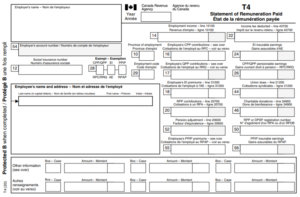
A T4 slip contains several important details:

  • Employment income: The total amount you earned from your job.
  • Income tax deducted: The amount of tax your employer deducted from your paychecks.
  • Canada Pension Plan (CPP) contributions: The amount you contributed to CPP.
  • Employment Insurance (EI) premiums: The amount deducted for EI.
  • Other deductions and benefits: Union dues, pension contributions, or taxable benefits like health insurance

How to Use a T4 Slip for Filing Taxes

When you file your taxes, you will use the information on your T4 slip to report your income and deductions. If you had multiple jobs during the year, you may receive more than one T4 slip. Make sure to include all T4 slips when filing your taxes to avoid mistakes.

Read Blog- Chart of Accounts 101 for Canadian Business Owners

T4A Slip: Statement of Pension, Retirement, Annuity, and Other Income

What Is a T4A Slip?

form T4 Canada Tax

The T4A slip reports various types of income that are not from regular employment. This includes pension payments, self-employment income, scholarships, and other sources.

Who Receives a T4A Slip?

You may receive a T4A slip if you earned money from:

  • A pension or retirement plan
  • Self-employment commissions
  • Scholarships or bursaries
  • Certain insurance payments
  • Research grants

What Information Does a T4A Slip Include?

A T4A slip contains different types of income and may include:

  • Pension or superannuation: Retirement income from a pension plan.
  • Self-employed commissions: If you earned commissions as an independent contractor.
  • Scholarships and bursaries: Taxable financial aid received for education.
  • Other income: Research grants, RESP withdrawals, or fees paid for services.

How to Use a T4A Slip for Filing Taxes

If you receive a T4A slip, you must report the income on your tax return. Some types of income on a T4A slip may be taxable, while others may be tax-free. For example, scholarships may not be taxable if they are used for tuition and other educational expenses. Make sure to check with the CRA or a tax professional if you are unsure about your T4A income.

File your Taxes Before Deadline with Global FPO

A Top-rated Canadian Tax Service Provider You Can Trust!

T5 Slip: Statement of Investment Income

What Is a T5 Slip?

The T5 slip reports investment income earned during the year. This includes interest, dividends, and some other types of investment earnings.

Who Receives a T5 Slip?

You may receive a T5 slip if you earned investment income from:

  • Interest on savings accounts, term deposits, or GICs
  • Dividends from Canadian corporations
  • Certain royalty payments

What Information Does a T5 Slip Include?

A T5 slip includes details such as:

  • Interest income: Interest earned from bank accounts or other investments.
  • Dividend income: Payments received from investments in Canadian corporations.
  • Foreign income: If you earned interest or dividends from foreign investments, it may be included.

How to Use a T5 Slip for Filing Taxes

Investment income reported on a T5 slip must be included in your tax return. Some investment income, like Canadian dividends, may qualify for special tax credits. If you have multiple investments, you may receive several T5 slips.

Key Filing Deadlines for 2026

or the 2025 tax year, the deadline to file your taxes is April 30, 2026.

If you are self-employed, you have until June 15, 2026 to file your return, but any taxes owed must still be paid by April 30, 2026.

Employers, financial institutions, and other organizations must send T4, T4A, and T5 slips by February 28, 2026.

What Happens If You Don’t Receive a Tax Slip?

If you do not receive a tax slip by early March, you should:

Check online: Many tax slips are available through your CRA My Account.
Contact the issuer: Reach out to your employer, pension provider, or financial institution.
Use your pay stubs or financial statements: Pay stubs or financial statements may help estimate your income.

Failing to report income from a missing tax slip could result in penalties, so it’s important to follow up if you don’t receive one.

Read This- How to Calculate Net Income?

How to File Your Taxes in 2026

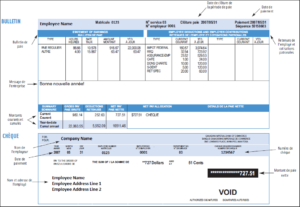
payslip for Canada Tax

You can file your taxes in three main ways:

  1. Online using tax software: Most Canadians file taxes using CRA-approved tax software, such as TurboTax or Wealthsimple Tax.
  2. By paper: You can fill out a paper tax return and mail it to the CRA.
  3. Through a tax professional: An accountant or tax preparer can help ensure your taxes are filed correctly.

The CRA also offers NETFILE, a secure online system that allows you to submit your tax return directly.

Get Expert Help with Global FPO

Understanding your T4, T4A, and T5 slips is essential for accurate tax filing. These slips report different types of income and help ensure that you pay the correct amount of tax. Keeping track of all tax slips and filing on time can help you avoid penalties and reduce tax season stress.

If you need professional assistance, Global FPO offers expert tax services to help individuals and businesses navigate the filing process with ease. Whether you need help with missing slips, deductions, or complex tax situations, our team can simplify your tax filing experience.

Stay organized, file on time, and consider expert support for a smooth 2026 tax season.

FAQs

1. What should I do if I don’t receive my T4, T4A, or T5 slip?
Check your CRA My Account, contact the issuer, or use your financial records to estimate your income.

2. Can I receive more than one T4 slip?
Yes. If you worked for multiple employers during the year, you will receive a T4 slip from each employer.

3. Is all income on a T4A slip taxable?
No. Some income, such as certain scholarships or bursaries, may be tax-exempt depending on how it is used.

4. What types of income are reported on a T5 slip?
A T5 slip reports investment income such as interest, dividends from Canadian corporations, and certain royalty payments.

5. How can Global FPO help with tax filing?
Global FPO provides professional tax support, helping individuals and businesses understand tax slips, maximize deductions, and file accurately on time.


Start Your Tax Filing & Returns with Global FPO!

What is the Schedule C Form and Who has to File It?

Article Summary:

  • Schedule C Form is used by sole proprietors and self employed individuals to report business income and expenses along with their personal tax return.
  • Anyone earning income as a freelancer, independent contractor, gig worker, or single member LLC must file Schedule C in 2026.
  • The form captures total business income, allowable deductions, and calculates net profit or loss for the tax year.
  • Common deductible expenses include operating costs, vehicle and travel expenses, home office costs, marketing, and professional fees.
  • Net profit reported on Schedule C directly impacts income tax, self employment tax, and quarterly estimated tax payments.
  • Accurate record keeping and proper documentation are essential, as the IRS closely reviews Schedule C filings for inconsistencies.
  • Mistakes such as mixing personal and business expenses or overstating deductions can lead to penalties or audits.
  • Working with an experienced accounting partner like Global FPO helps ensure compliant Schedule C filing, optimized deductions, and better tax planning for self employed businesses.

If you’re self-employed, running a side business, or earning income outside a regular paycheck, chances are the Schedule C Form plays a big role in your taxes. Yet many business owners still aren’t fully clear on what it is, who must file it, and how it affects their tax bill.

As we move into the 2026 tax filing season, understanding Schedule C is more important than ever. The IRS continues to focus on accurate reporting of business income and expenses, and Schedule C is where that story gets told.

This guide breaks it all down in plain language. You’ll learn what Schedule C is, who needs to file it, what income and expenses go on the form, common mistakes to avoid, and how to file it correctly. We’ll also answer the most common questions people ask online so you can move forward with confidence.

What Is the Schedule C Form?

Schedule C, Profit or Loss From Business, is an IRS tax form used to report income and expenses from a business you operate or a profession you practice as a sole proprietor.

It’s not a standalone return. Schedule C is filed along with your Form 1040 and shows whether your business made a profit or a loss during the tax year.

In simple terms:

  • It reports how much your business earned

  • It lists what your business spent

  • It calculates your net profit or loss, which flows into your personal tax return

If you earned business income and didn’t receive a W 2 for it, Schedule C is likely required.

Why Schedule C Matters in 2026

For the 2026 filing year, Schedule C remains the primary form the IRS uses to:

  • Track self-employed income

  • Validate business deductions

  • Calculate self-employment tax obligations

  • Flag inconsistencies or red flags during audits

With increased IRS scrutiny on gig workers, freelancers, and digital businesses, accurate Schedule C reporting is no longer optional. Errors can trigger penalties, delayed refunds, or audits.

Who Has to File the Schedule C Form?

You must file a Schedule C Form if both of the following apply:

  1. You operated a business or practiced a profession as a sole proprietor

  2. You earned income from that activity during the tax year

Let’s look at the most common groups required to file Schedule C in 2026.

Sole Proprietors

If you run a business by yourself and haven’t formed a corporation or partnership, you’re considered a sole proprietor by default.

Examples include:

  • Small retail or service businesses

  • Consultants and advisors

  • Online sellers

  • Home-based businesses

If the business income is reported under your name or DBA, Schedule C is required.

Freelancers and Independent Contractors

If you receive Form 1099 NEC or 1099 K, that income usually belongs on Schedule C.

Common examples:

  • Writers, designers, marketers

  • IT consultants and developers

  • Virtual assistants

  • Coaches and trainers

Even if freelancing is a side hustle, you still need to file Schedule C if you earned income.

Gig Economy Workers

Driving, delivering, or offering services through apps doesn’t change your tax obligations.

Schedule C is required for:

  • Rideshare drivers

  • Food delivery drivers

  • Task-based service providers

  • Online marketplace sellers

If you’re paid as an independent contractor, the IRS views you as running a business.

Single Member LLCs

A single member LLC that hasn’t elected corporate taxation is treated as a disregarded entity by the IRS.

That means:

  • The LLC does not file a separate business tax return

  • Income and expenses are reported on Schedule C

  • The Schedule C is attached to your personal Form 1040

Self-Employed Professionals

Licensed professionals who work independently also use Schedule C, including:

  • Accountants

  • Consultants

  • Therapists

  • Real estate professionals

Ready to file your taxes with Experts?

Who Does NOT Need to File Schedule C?

You generally do not file Schedule C if:

  • You are an employee receiving only W-2 income

  • You are a partner in a partnership (Form 1065 is used instead)

  • Your business is taxed as an S corporation or C corporation

  • You only earned passive income, like interest or dividends

However, many people have both W-2 income and self-employed income. In that case, Schedule C is still required for the business portion.

What Income Is Reported on Schedule C?

Schedule C includes all income earned from your business, even if you didn’t receive a tax form for it.

This includes:

  • Payments reported on 1099 NEC or 1099 K

  • Cash payments

  • Checks

  • Digital payments

  • Barter income

  • Tips related to your business

The IRS expects you to report gross receipts, not just profit.

What Expenses Can You Deduct on Schedule C?

This is where Schedule C becomes powerful. You can deduct ordinary and necessary business expenses to reduce your taxable income.

Common Schedule C deductions include:

Operating Expenses

  • Office supplies

  • Software subscriptions

  • Professional tools

  • Website and hosting costs

Vehicle and Travel Expenses

  • Business mileage or actual vehicle expenses

  • Parking and tolls

  • Business travel airfare and lodging

Home Office Deduction

  • Portion of rent or mortgage

  • Utilities

  • Internet

  • Maintenance

Professional Services

Marketing and Advertising

  • Online ads

  • Branding costs

  • Social media promotion

Insurance and Licenses

  • Business insurance

  • Professional licenses

  • Permits

Every expense must be properly documented. Receipts, invoices, and records matter more than ever in 2026.

How Schedule C Affects Your Taxes

The net profit from Schedule C flows into your personal tax return and impacts:

If your net profit is $400 or more, you’ll also owe self-employment tax, which covers Social Security and Medicare.

This is calculated using Schedule SE, which is directly tied to your Schedule C results.

Common Schedule C Mistakes to Avoid

Many self-employed taxpayers overpay taxes or face audits due to avoidable errors.

Watch out for these common mistakes:

  • Mixing personal and business expenses

  • Overstating deductions

  • Forgetting to report cash income

  • Incorrect business classification

  • Missing depreciation rules

  • Poor record keeping

The IRS cross-checks Schedule C against 1099 data, bank records, and industry benchmarks. Accuracy matters.

Schedule C Filing Tips for 2026

To file Schedule C correctly in 2026:


Simplify Your Schedule C Filing Today with Global FPO

An IRS Authorized Outsourcing Tax Services Provider You Can Trust!

How Global FPO Helps with Schedule C Filing

Schedule C looks simple, but the details can be costly if handled incorrectly. At Global FPO, we work with self employed professionals, freelancers, and business owners worldwide to ensure accurate and compliant tax filings.

Our team helps with:

  • Schedule C preparation and review

  • Expense categorization and optimization

  • Self-employment tax planning

  • IRS compliance and audit support

  • Year-round bookkeeping and advisory

We don’t just file forms. We help you understand your numbers and reduce tax exposure legally.

📄 Download IRS Schedule C Form (Profit or Loss from Business)

Looking for the official IRS Schedule C form? Download the latest version directly from the IRS website and report your business income and expenses with accuracy and confidence.

  • ✔️ Official IRS Form (Latest Version)
  • ✔️ Required for Sole Proprietors and Single-Member LLCs
  • ✔️ Used with Form 1040 to report business income or loss

Make sure you maintain proper records of income and deductible expenses before filing to maximize tax savings and stay compliant.

Download Schedule C Form

Frequently Asked Questions

1. What is the Schedule C Form used for?

The Schedule C Form is used to report income and expenses from a sole proprietorship or self-employed business.

2. Do I need to file Schedule C if I made very little money?

Yes. If you earned business income, you must file Schedule C, even if the amount is small.

3. Is Schedule C required for freelancers?

Yes. Freelancers and independent contractors report their income and expenses using Schedule C.

4. Can I file Schedule C without a business license?

Yes. A formal business license is not required to file Schedule C as long as you earned business income.

5. Does Schedule C increase my chances of an audit?

Not automatically. Accurate reporting and proper documentation significantly reduce audit risk.

6. Can I deduct losses on Schedule C?

Yes. Business losses may offset other income, subject to IRS rules and limitations.

7. Is Schedule C filed separately from Form 1040?

No. Schedule C is filed as part of your Form 1040 tax return.

8. Should I use a tax professional for Schedule C filing?

For most self employed individuals, professional help ensures accuracy, maximized deductions, and compliance.

Key Tax Deductions and Benefits for the Self-Employed

Being self-employed has many advantages, like flexible work hours and being your own boss. But when it comes to taxes, things can get tricky. Unlike employees who have taxes deducted from their paychecks, self-employed individuals must handle their own taxes. The good news is that there are many tax deductions and benefits available to help reduce the amount you owe. In this blog, we will explore key tax deductions and benefits for self-employed individuals, making it easy to understand and apply.

Understanding Self-Employment Taxes

Self-employment taxes include income tax and self-employment tax. Self-employment tax covers Social Security and Medicare taxes. If you work for a company, your employer pays part of these taxes. But when you are self-employed, you must pay both the employer and employee parts. However, you can deduct half of this tax from your income when filing your tax return.

Important Tax Deductions for the Self-Employed

1. Home Office Deduction

If you use a part of your home exclusively for business, you may qualify for the home office deduction. This means you can deduct expenses like rent, mortgage interest, property taxes, and utilities based on the portion of your home used for business. The IRS offers two ways to calculate this deduction:

  • Simplified Method: Deduct $5 per square foot of your home used for business, up to 300 square feet.
  • Actual Expense Method: Calculate the percentage of your home used for business and apply that percentage to your total home expenses.

2. Office Supplies and Equipment

Any supplies or equipment you purchase for your business are deductible. This includes:

  • Computers and printers
  • Office furniture
  • Pens, paper, and notebooks
  • Business-related software

If an item is used for both personal and business purposes, you can only deduct the portion used for business.

3. Internet and Phone Expenses

If you use the internet and phone for work, you can deduct the portion used for business. Keep detailed records of how much you use these services for work versus personal use to calculate the deduction accurately.

4. Health Insurance Premiums

Self-employed individuals can deduct health insurance premiums for themselves, their spouses, and their dependents. This helps lower taxable income and reduces the overall tax burden.

5. Retirement Contributions

Saving for retirement is important, and self-employed individuals have special retirement plans that offer tax advantages. Some common options include:

  • Solo 401(k): Allows high contribution limits and tax-deferred growth.
  • SEP IRA: Lets you contribute up to 25% of your net earnings.
  • Traditional or Roth IRA: Offers tax benefits, depending on whether you choose pre-tax or after-tax contributions.

6. Travel Expenses

If you travel for business, you can deduct expenses such as:

  • Airfare and transportation
  • Lodging
  • Meals (up to 50% deductible)
  • Car rentals and taxis

Make sure to keep receipts and records of the purpose of each trip.

7. Vehicle Expenses

If you use your car for business purposes, you can deduct mileage or actual expenses like gas, maintenance, and insurance. The IRS offers two methods:

  • Standard Mileage Rate: Deduct a set amount per mile driven for business.
  • Actual Expense Method: Deduct a percentage of total car expenses based on business use.

8. Professional Services and Education

Expenses related to professional development and services are deductible, including:

  • Fees for accountants, lawyers, and consultants
  • Business-related courses and certifications
  • Books and online resources that help improve your skills

9. Advertising and Marketing

Promoting your business can be expensive, but many costs are tax-deductible, such as:

  • Website design and hosting
  • Social media ads
  • Business cards and flyers
  • Sponsorships and promotions

10. Business Insurance

If you have business insurance, such as liability or property insurance, you can deduct the premiums. This helps protect your business while reducing your tax liability.

11. Employee Salaries and Contractor Payments

If you hire employees or independent contractors, you can deduct their salaries and wages. This includes:

Keeping proper records of payments is essential to claim these deductions correctly.

12. Software and Subscriptions

Many self-employed professionals rely on various software and online subscriptions to run their businesses. Whether it is accounting software, design tools, or cloud storage, these expenses are deductible if used for business purposes. Some examples include:

  • QuickBooks or FreshBooks for accounting
  • Adobe Creative Suite for design
  • Microsoft Office or Google Workspace for Productivity
  • Industry-specific software required for business operations

13. Membership Fees and Networking Costs

Memberships to professional organizations, networking groups, and business associations can also be deducted. These memberships help expand your professional network and keep you informed about industry trends. Conference and workshop fees that help you grow your business may also be deductible

Other Tax Benefits for the Self-Employed

1. Qualified Business Income Deduction (QBI)

The QBI deduction allows eligible self-employed individuals to deduct up to 20% of their business income. This deduction applies to sole proprietors, partnerships, and S-corporations.

2. Depreciation Deduction

If you purchase expensive equipment for your business, such as computers, machinery, or vehicles, you may be able to deduct the cost over time through depreciation. Section 179 allows you to deduct the full cost in the year of purchase instead of spreading it over several years.

3. Startup Costs Deduction

If you recently started your business, you may be able to deduct up to $5,000 in startup costs. This includes legal fees, market research, and business registration fees.

4. Self-Employed Tax Credit for Sick Leave and Family Leave

Self-employed individuals affected by certain conditions, such as illness or family responsibilities, may qualify for tax credits similar to paid leave benefits given to employees under specific laws. These credits can reduce your tax liability dollar-for-dollar.

Tips for Maximizing Tax Deductions

  1. Keep Good Records: Maintain detailed records of all business expenses, including receipts and invoices. Consider using accounting software to track your finances.
  2. Separate Personal and Business Finances: Open a business bank account to make it easier to track expenses and avoid confusion.
  3. Work with a Tax Professional: A tax expert can help you find deductions you may have missed and ensure compliance with tax laws.
  4. Pay Estimated Taxes: Self-employed individuals must pay estimated taxes quarterly to avoid penalties.
  5. Stay Informed: Tax laws change regularly, so keep up with any updates that may affect your business and deductions.

Maximize Your Tax Savings with Expert Help

Navigating tax deductions and benefits as a self-employed individual can be overwhelming, but you don’t have to do it alone. Global FPO specializes in helping self-employed professionals and small business owners optimize their tax savings while ensuring compliance with tax laws. Our team of experts can guide you through tax planning, bookkeeping, and deductions to maximize your profits and minimize your liabilities.

Take advantage of every tax benefit available to you and let Global FPO help you keep more of your hard-earned money. Contact us today to ensure you’re making the most of your self-employment tax benefits!

Frequently Asked Questions (FAQs)

1. What is the biggest tax deduction for self-employed individuals?
One of the largest deductions is the Qualified Business Income (QBI) Deduction, which allows self-employed individuals to deduct up to 20% of their business income. Other major deductions include home office expenses, health insurance premiums, and retirement contributions.

2. Can I deduct my home office expenses even if I work from a rented apartment?
Yes, as long as you use a specific area of your home exclusively for business, you can claim a home office deduction. This applies to both rented and owned properties.

3. How can I track my business expenses efficiently?
Using accounting software like QuickBooks, FreshBooks, or Wave can help track business expenses efficiently. Keeping digital receipts and maintaining a separate business bank account also simplifies tax filing.

4. Do I need to pay taxes quarterly if I’m self-employed?
Yes, self-employed individuals must pay estimated taxes every quarter to avoid penalties. These payments cover income tax and self-employment tax (Social Security and Medicare).

5. How can Global FPO help with my self-employment taxes?
Global FPO specializes in tax planning and compliance for self-employed individuals. They offer expert guidance on maximizing deductions, filing taxes correctly, and ensuring compliance with ever-changing tax laws. Partnering with professionals like Global FPO can save time and help avoid costly mistakes.

How to Prepare Financial Statements for Small Businesses

Starting and running a small business can be exciting and rewarding. However, keeping track of your finances is crucial to ensure your business stays on the right track. One of the best ways to do this is by preparing financial statements. Financial statements help you understand your company’s financial health and make smart business decisions. In this blog, we will explain how small business owners can prepare financial statements step by step. We will keep it simple, clear, and easy to understand.

What Are Financial Statements?

Financial statements are documents that show how much money your business is making, spending, and keeping. They help you see if your business is doing well or if there are financial problems that need attention. There are three main types of financial statements:

  1. Balance Sheet – Shows what your business owns (assets), owes (liabilities), and the owner’s investment (equity) at a specific time.
  2. Income Statement – Shows the revenue (income) and expenses over a period of time to determine profit or loss.
  3. Cash Flow Statement – Shows the movement of cash in and out of your business.

Each of these financial statements provides useful information that helps business owners, investors, and lenders understand a company’s financial situation.

Why Are Financial Statements Important?

Financial statements are important because they help in:

  • Understanding business performance
  • Making informed decisions
  • Tracking expenses and profits
  • Managing cash flow
  • Attracting investors and getting loans
  • Preparing for tax payments

By keeping accurate financial statements, small business owners can avoid financial troubles and grow their businesses successfully.

Step 1: Gather Financial Records

Before you start preparing financial statements, you need to gather all the necessary financial records. These include:

  • Sales invoices
  • Purchase receipts
  • Bank statements
  • Payroll records
  • Loan statements
  • Tax records

Having well-organized records makes it easier to prepare accurate financial statements. Proper bookkeeping ensures that all financial information is easily accessible when needed. Many businesses use accounting software to track these records efficiently. If you do not have accounting software, maintaining a well-organized ledger or spreadsheet can help keep track of all transactions.

It is also essential to separate personal and business finances. Keeping a separate business bank account and using business credit cards can simplify the tracking of income and expenses, making it easier to prepare financial statements.

Step 2: Prepare the Balance Sheet

A balance sheet provides a snapshot of your business’s financial condition at a specific moment. It consists of three main sections:

1. Assets (What Your Business Owns)

Assets include anything of value that your business owns. They are classified into two types:

  • Current Assets: These are short-term assets that can be converted into cash within a year, such as cash in hand, accounts receivable, and inventory.
  • Non-Current Assets: These are long-term assets that provide value over time, such as property, equipment, and machinery.

Assets are essential because they represent the resources your business can use to generate revenue. Tracking assets accurately helps determine the overall value of your business.

2. Liabilities (What Your Business Owes)

Liabilities represent debts or obligations your business has. They are also classified into two types:

  • Current Liabilities: These are short-term debts due within a year, such as accounts payable, short-term loans, and tax obligations.
  • Long-Term Liabilities: These are debts that will be paid over a longer period, such as long-term loans and mortgages.

Businesses must carefully manage liabilities to avoid financial distress. Too much debt can make it difficult to pay bills on time and impact creditworthiness.

3. Owner’s Equity (Your Investment in the Business)

Owner’s equity represents the investment made by the business owner, plus retained earnings (profits reinvested in the business). This section shows the net worth of your business after all debts are paid.

The formula for the Balance Sheet:

Assets = Liabilities + Owner’s Equity

If the total assets are equal to the sum of liabilities and owner’s equity, your balance sheet is correct. If not, double-check calculations and ensure all transactions are recorded properly.

Step 3: Prepare the Income Statement

The income statement shows how much money your business earned and spent over a period of time. It helps you determine if your business made a profit or a loss. It consists of:

1. Revenue (Money Earned)

Revenue includes all the money your business earns from selling products or services. This can include:

  • Sales revenue
  • Interest earned
  • Service fees

Tracking revenue correctly ensures that businesses can understand how well their products or services are performing.

2. Expenses (Money Spent)

Expenses include all costs associated with running the business. The main categories include:

  • Cost of Goods Sold (COGS): The cost of producing or purchasing goods for sale.
  • Operating Expenses: Rent, utilities, salaries, advertising, insurance, and office supplies.
  • Depreciation: The reduction in value of assets over time.

3. Net Profit or Loss

To determine the net profit or loss:

  • Net Profit = Revenue – Expenses (if revenue is higher)
  • Net Loss = Revenue – Expenses (if expenses are higher)

Example: If your business made $50,000 in sales and had $30,000 in expenses, your net profit is $20,000.

A high profit margin indicates a successful business, while consistent losses may signal the need to cut costs or increase revenue.

Step 4: Prepare the Cash Flow Statement

The cash flow statement tracks the movement of cash in and out of your business. It is divided into three sections:

1. Operating Activities

This section includes cash from selling products and services minus daily expenses. It helps determine whether your core business operations generate enough cash to sustain the business.

2. Investing Activities

This section includes money spent on purchasing or selling assets such as property, equipment, or investments. A business investing heavily in equipment or property may have reduced short-term cash flow but potential long-term benefits.

3. Financing Activities

This section records any borrowing or repayment of loans, as well as money received from or paid to investors. Proper financing decisions help businesses maintain stability and grow over time.
A positive cash flow means your business is earning more cash than it spends, while a negative cash flow means you may need to find ways to manage expenses better.

Step 5: Review and Analyze Your Financial Statements

Once you have prepared your financial statements, take time to review them carefully. Here are some key points to consider:

Compare past statements – Look at previous months or years to see financial trends.
Check for errors – Ensure numbers add up correctly.
Identify strengths and weaknesses – Find areas where you can cut costs or increase profits.
Analyze financial ratios – Important ratios such as the debt-to-equity ratio, profit margin, and return on investment (ROI) can give insights into business performance.

Regularly reviewing financial statements helps business owners make informed decisions and spot potential issues before they become serious problems.

The Road to Financial Success: Mastering Your Business Finances

Preparing financial statements may seem difficult at first, but with practice, it becomes easier. However, small business owners often have limited time and resources to manage financial statements effectively. This is where Global FPO comes in.

Global FPO is a trusted financial outsourcing partner that provides expert accounting, bookkeeping, and financial statement preparation services tailored for small businesses. Their team of professionals ensures that your financial records are accurate, up-to-date, and compliant with industry standards. By outsourcing financial tasks to Global FPO, business owners can focus on growth and operations while having peace of mind that their finances are in expert hands.

Whether you need assistance with bookkeeping, tax preparation, or comprehensive financial reporting, Global FPO can streamline your financial processes and provide valuable insights to help you make informed decisions. Investing in professional financial management is key to a thriving business, and Global FPO is here to support you every step of the way. As a small business owner, keeping financial records and preparing statements can help you make informed decisions, track growth, and avoid financial problems.

FAQs

1. Why are financial statements important for small businesses?
Financial statements help small businesses track their income, expenses, assets, and liabilities. They provide a clear picture of a company’s financial health, aid in decision-making, and are essential for securing loans, attracting investors, and meeting tax obligations.

2. How often should I prepare financial statements?
Most businesses prepare financial statements monthly, quarterly, and annually. Regular reporting helps business owners monitor performance, identify potential financial issues, and plan for the future effectively.

3. What is the difference between an income statement and a cash flow statement?
An income statement shows a company’s profitability by detailing revenue and expenses over a period of time. A cash flow statement, on the other hand, tracks the actual movement of cash in and out of the business, ensuring there is enough liquidity to meet financial obligations.

4. Can I prepare financial statements on my own, or should I hire a professional?
Small business owners can prepare financial statements using accounting software or spreadsheets. However, hiring a professional accountant or outsourcing to a firm like Global FPO ensures accuracy, compliance with regulations, and financial insights that can improve business performance.

5. How can Global FPO help small businesses with financial management?
Global FPO offers expert accounting, bookkeeping, and financial reporting services tailored for small businesses. Their team ensures that financial statements are accurate, up-to-date, and compliant with industry standards, allowing business owners to focus on growth and operations.

How Do Tax Credits Work? Everything You Need to Know

Taxes can be complicated, but tax credits are one of the best ways to save money. Whether you’re a worker, a student, or a parent, understanding tax credits can help lower the amount you owe to the government. Tax credits are different from tax deductions, and they can significantly impact your financial situation by reducing your tax liability directly.

When tax season arrives, many people look for ways to minimize the amount they owe or maximize their refund. Tax credits play a crucial role in achieving this. Unlike deductions that only lower your taxable income, tax credits reduce the amount of tax you owe dollar-for-dollar. This means that tax credits can have a much bigger impact on your final tax bill than deductions. Some tax credits even go beyond reducing your tax bill to zero and provide a refund, putting money directly into your pocket.

What Are Tax Credits?

A tax credit is an amount of money that reduces the taxes you owe. Unlike tax deductions, which lower your taxable income, tax credits directly reduce your tax bill. That means if you owe $1,000 in taxes and qualify for a $500 tax credit, you will only have to pay $500. Some tax credits are refundable, which means they can even give you money back if the credit is more than what you owe.
Tax credits are designed to provide financial relief to individuals and families, especially those in lower income brackets. Governments use tax credits to encourage certain activities, such as earning income, supporting children, furthering education, or making eco-friendly choices. Knowing which tax credits you qualify for can help you take full advantage of potential savings.

Types of Tax Credits

There are two main types of tax credits: refundable and nonrefundable. Knowing the difference can help you understand how much you can save.

Refundable Tax Credits

A refundable tax credit can reduce your tax bill to zero and give you a refund if the credit is larger than the taxes you owe. This is great because even if you don’t owe any taxes, you can still get money back. One example of a refundable tax credit is the Earned Income Tax Credit (EITC), which helps low- and moderate-income workers by giving them extra money.
Refundable credits are especially beneficial to low-income individuals and families because they can result in a larger tax refund. Even if you don’t owe any federal income tax, you can still receive the excess amount as a refund, which can provide valuable financial assistance.

Nonrefundable Tax Credits

A nonrefundable tax credit can only reduce your tax bill to zero. If the credit is more than what you owe, you won’t get the extra amount as a refund. For example, if you owe $400 in taxes but qualify for a $600 nonrefundable credit, the extra $200 won’t be refunded. The Child Tax Credit (CTC) is an example of a nonrefundable tax credit.
Although nonrefundable credits cannot generate a refund, they are still valuable because they reduce the amount of tax you owe. Some nonrefundable credits, like the Child Tax Credit, may have a partially refundable portion, allowing taxpayers to receive some benefits even if they owe little to no tax.

Common Tax Credits You Should Know

There are several tax credits available to help individuals and families. Let’s go over some of the most common ones.

Earned Income Tax Credit (EITC)

The Earned Income Tax Credit is for low- to moderate-income workers. If you earn a low wage, this credit can help reduce your taxes and even give you a refund. The amount you get depends on your income, filing status, and the number of children you have.
The EITC is particularly useful because it is designed to encourage work while providing financial relief to those who need it most. If you qualify, the amount you receive can be significant, especially if you have children. However, you must file a tax return to claim the credit, even if you do not owe any taxes.

Child Tax Credit (CTC)

If you have children under 17, you may qualify for the Child Tax Credit. This credit helps parents by lowering their tax bill for each child they claim. The amount can change depending on your income and tax filing status.
Recent tax laws have increased the CTC amount in some cases, and part of it may be refundable. This means that if your credit is larger than the taxes you owe, you could receive part of the remaining credit as a refund. This credit is especially helpful for families with multiple children, as the savings can add up quickly.

Child and Dependent Care Credit

This credit helps parents who pay for childcare while they work. If you pay someone to take care of your child or a dependent while you are at work, you can get a tax credit for a portion of those expenses.
Eligible expenses include daycare, babysitters, or even summer camps, as long as the care is necessary for you to work or look for work. The credit is calculated as a percentage of the qualifying expenses, up to a certain limit.

American Opportunity Tax Credit (AOTC)

The American Opportunity Tax Credit helps students pay for higher education. It covers tuition, books, and other school-related expenses. The best part is that part of this credit is refundable, which means you could get money back even if you don’t owe taxes.
This credit applies to students in their first four years of college and can cover up to $2,500 in eligible expenses per student. Up to 40% of this credit is refundable, meaning students and parents can receive up to $1,000 back even if they owe no taxes.

Lifetime Learning Credit (LLC)

The Lifetime Learning Credit is another education tax credit, but it’s for anyone taking college courses, even part-time students. It can be used for tuition and related expenses, but it is nonrefundable, so it can only reduce your tax bill, and not give you money back.
The LLC is more flexible than the AOTC because it does not have a limit on the number of years you can claim it. It can also be used for courses that improve job skills, making it a valuable credit for lifelong learners.

Energy-Efficient Home Credit

If you make energy-efficient improvements to your home, like installing solar panels or energy-efficient windows, you may qualify for a tax credit. This credit encourages people to use renewable energy and save on electricity bills.
Investing in solar panels, wind energy, or other green home improvements can be expensive, but tax credits can help offset the cost. Some of these credits cover a percentage of installation costs, and they can be used in combination with other incentives to maximize savings.

How to Claim Tax Credits

To claim tax credits, you need to follow these steps:

  • Check Eligibility: Each credit has its own rules. Make sure you meet the requirements before claiming it.
  • Keep Records: Save receipts, pay stubs, and other proof to show you qualify.
  • Complete the Right Tax Forms: Some credits require extra forms. Make sure you fill out everything correctly.
  • File Your Taxes on Time: To get your credit, you need to file your tax return before the deadline.

Tax Credits vs. Tax Deductions

Many people confuse tax credits with tax deductions. Here’s the difference:

  • Tax Credits: Reduce the amount of taxes you owe directly. If you qualify for a $500 tax credit, your tax bill goes down by $500.
  • Tax Deductions: Lower your taxable income. For example, if you earn $50,000 and have a $1,000 deduction, your taxable income becomes $49,000. This means you pay less in taxes, but it’s not as powerful as a tax credit.

Maximize Your Tax Savings with Global FPO

Tax credits can significantly reduce your tax burden, but understanding and claiming them correctly is essential to maximizing your savings. Whether you are a worker, a parent, a student, or a homeowner, there are numerous tax credits available to help you save money.
To ensure you don’t miss out on valuable tax credits, consider working with Global FPO, a trusted provider of professional tax and accounting services. Global FPO specializes in helping individuals and businesses navigate the complexities of tax credits, ensuring you claim every credit you are eligible for. Their team of experts can guide you through tax planning, filing, and optimization, making tax season stress-free and financially rewarding.

FAQs

1. What is the difference between a tax credit and a tax deduction?
A tax credit directly reduces the amount of taxes you owe, while a tax deduction lowers your taxable income, which may reduce your tax bill indirectly.

2. What are refundable tax credits?
Refundable tax credits can reduce your tax bill to zero and even give you a refund if the credit exceeds the taxes you owe.

3. How can I qualify for the Earned Income Tax Credit (EITC)?
To qualify for the EITC, you must have earned income, meet income limits, and file a tax return, even if you don’t owe taxes.

4. Can I claim multiple tax credits in the same year?
Yes! As long as you meet the eligibility requirements for each credit, you can claim multiple tax credits on the same tax return.

5. How can Global FPO help me with tax credits?
Global FPO provides expert tax filing and advisory services to help you identify and claim all eligible tax credits, ensuring maximum savings on your taxes.

What Is the Difference Between LLC, S Corp, and C Corp?

Starting a business is an exciting journey, but it also comes with many important decisions. One of the first and most important choices a business owner must make is deciding on the legal structure of their business. Three of the most common business structures in the United States are the Limited Liability Company (LLC), the S Corporation (S Corp), and the C Corporation (C Corp). Each of these structures has its own advantages, disadvantages, and unique features. Understanding the differences between them can help you make the best choice for your business.

What Is an LLC?

An LLC, or Limited Liability Company, is a business structure that combines aspects of both corporations and partnerships. It provides liability protection to its owners (called members) while allowing flexibility in management and taxation.

Advantages of an LLC:

  1. Limited Liability Protection – One of the biggest advantages of an LLC is that it protects the owners personal assets. This means that if the business faces legal trouble or debt, the owners personal belongings like homes and cars are generally safe.
  2. Flexible Taxation – LLCs do not have to pay corporate taxes. Instead, profits and losses “pass-through” to the owners, who report them on their personal tax returns. This avoids the double taxation that corporations face.
  3. Simple Management – Unlike corporations, LLCs do not require a board of directors, annual meetings, or extensive paperwork.
  4. Fewer Restrictions on Ownership – There is no limit on the number of owners in an LLC, and members can be individuals, corporations, or even foreign entities.
  5. Less Regulatory Burden – LLCs have fewer government regulations compared to corporations, making them an attractive choice for small business owners.
  6. Lower Startup Costs – Compared to corporations, LLCs usually have lower initial setup costs and fewer ongoing fees.
  7. Flexibility in Profit Distribution – LLC members can decide how to distribute profits among themselves, rather than following strict corporate rules.

Disadvantages of an LLC:

  1. Self-Employment Taxes – Owners of an LLC may have to pay self-employment taxes, which can be higher than corporate taxes.
  2. Limited Growth Potential – Unlike corporations, LLCs cannot issue stock, which makes it harder to attract investors.
  3. State-Specific Rules – LLC laws vary from state to state, which can make it complicated to operate in multiple states.
  4. Dissolution Upon Member Exit – In some states, an LLC may dissolve if one of the members leaves, unless provisions are in place to prevent this.
  5. Difficulty Expanding Nationwide – LLCs may face challenges when expanding to other states due to varying state regulations and fees.

What Is a C Corporation?

A C Corporation, often called a C Corp, is a separate legal entity from its owners (called shareholders). This means that the corporation itself is responsible for debts, lawsuits, and other obligations, not the individual owners.

Advantages of a C Corp:

  1. Limited Liability Protection – Just like an LLC, the personal assets of the shareholders are protected.
  2. Easier to Raise Money – C Corps can issue stock, making it easier to attract investors and raise capital.
  3. No Ownership Restrictions – A C Corp can have an unlimited number of shareholders, including foreign investors.
  4. Separate Legal Entity – The corporation continues to exist even if the owners change, making it more stable in the long run.
  5. Potential for Employee Benefits – C Corps can offer tax-deductible fringe benefits to employees, such as health insurance and retirement plans.
  6. Preferred by Venture Capitalists – Investors often prefer C Corps because they allow for multiple classes of stock and greater flexibility in ownership.
  7. More Business Credibility – C Corps are often seen as more established and professional, which can help attract clients, investors, and employees.

Disadvantages of a C Corp:

  1. Double Taxation – A major downside is that C Corps are taxed twice. First, the corporation pays taxes on its profits. Then, shareholders also pay taxes on any dividends they receive.
  2. More Paperwork and Regulations – C Corps have stricter requirements, including annual reports, corporate meetings, and detailed record-keeping.
  3. Complex Management Structure – A C Corp must have a board of directors and officers, which makes decision-making more formal and structured.
  4. Higher Costs – Because of increased regulations and paperwork, C Corps often have higher administrative costs.
  5. Less Flexibility in Profit Distribution – Unlike LLCs, C Corps must distribute profits based on the number of shares each shareholder owns.
  6. More Government Scrutiny – C Corps face stricter regulations, including SEC compliance if they become publicly traded.

Read Blog- How to Adjust Entries in Accounting

What Is an S Corporation?

An S Corporation, or S Corp, is a special type of corporation that avoids double taxation by allowing income to pass through to its shareholders.

Advantages of an S Corp:

1.    Pass-Through Taxation – Like an LLC, an S Corp does not pay corporate taxes. Instead, income is reported on shareholders personal tax returns, avoiding double taxation.
2.    Limited Liability Protection – Just like an LLC and a C Corp, an S Corp protects the owners personal assets.
3.    Salary and Dividend Payments – Shareholders who work for the company can take a salary and also receive dividends, which may be taxed at a lower rate.
4.    Attracts Investors – Even though S Corps cannot issue multiple classes of stock, they can still attract investors more easily than an LLC.
5.    Tax Savings on Payroll – S Corp owners may reduce their self-employment tax burden by taking a reasonable salary and then taking additional profits as distributions.
6.    Easier Ownership Transfer – Compared to LLCs, S Corps make it easier to transfer ownership without dissolving the business.

Disadvantages of an S Corp:

  1. Strict Eligibility Requirements – S Corps can have no more than 100 shareholders, and all shareholders must be U.S. citizens or residents.
  2. More Rules and Formalities – Like a C Corp, an S Corp must follow corporate formalities such as holding board meetings and maintaining records.
  3. Limited Stock Options – S Corps can only issue one class of stock, which limits flexibility in raising funds.
  4. Higher Scrutiny from IRS – The IRS closely watches S Corps to ensure that shareholder-employees are taking a reasonable salary before distributing profits.
  5. Less Flexibility in Profit Sharing – Unlike LLCs, profit distributions in S Corps must be proportional to ownership percentages.

Which Business Structure Is Right for You?

The best structure for your business depends on several factors, including your goals, tax situation, and long-term plans.

  • Choose an LLC if: You want flexibility, simple management, and liability protection without dealing with corporate formalities.
  • Choose an S Corp if: You want to avoid double taxation but still maintain a corporate structure with a board and officers.
  • Choose a C Corp if: You plan to grow your business significantly, raise money from investors, and do not mind double taxation in exchange for greater benefits.

Making the Right Choice for Your Business

Selecting the best business structure depends on your company’s goals, tax preferences, and growth plans. LLCs are ideal for small business owners looking for flexibility and limited liability. S Corps offer tax advantages while maintaining a corporate structure. C Corps are best suited for businesses planning to scale and attract significant investment.
Choosing the right business structure is a crucial decision, and professional guidance can make all the difference. Global FPO specializes in providing expert financial and business consulting services to help entrepreneurs and business owners navigate their legal and tax obligations. Whether you are setting up an LLC, S Corp, or C Corp, Global FPO can assist you in making an informed decision that aligns with your long-term business goals.
Before making a final decision, consider consulting with Global FPO or a professional accountant to ensure the best structure for your business success.

FAQs

1.    What is the main difference between an LLC, S Corp, and C Corp?
The primary difference is in taxation and ownership. LLCs offer flexibility and pass-through taxation, S Corps avoid double taxation but have ownership restrictions, and C Corps can attract investors but face double taxation.

2.    Which business structure is best for small businesses?
An LLC is often the best choice for small businesses due to its flexibility, simple management, and liability protection without the formalities of a corporation.

3.    Can an LLC be converted into an S Corp or C Corp later?
Yes, an LLC can elect to be taxed as an S Corp or C Corp if the owners decide it is beneficial for taxation or growth purposes.

4.    Why do investors prefer C Corporations?
Investors prefer C Corps because they can issue multiple classes of stock, have no ownership restrictions, and offer better long-term scalability.

5.    How can Global FPO help in choosing the right business structure?
Global FPO provides expert financial and business consulting to help entrepreneurs understand legal, tax, and financial implications, ensuring they choose the right structure for their business goals.

What is Form 1065: U.S. Return of Partnership Income

Article Summary:

  • IRS Form 1065 is the required tax return for partnerships to report income, expenses, and allocations to the IRS.
  • Partnerships don’t pay federal income tax. Profits and losses pass through to partners via Schedule K-1.
  • General partnerships, LPs, LLPs, and most multi-member LLCs must file Form 1065, even with zero activity.
  • The filing deadline is March 15, with a six-month extension available using Form 7004.
  • Common errors include wrong profit splits, mismatched K-1s, and incomplete partner details.
  • Global FPO helps partnerships file Form 1065 accurately, stay compliant, and avoid costly IRS issues.

If you run a partnership or are planning to form one, IRS Form 1065 is not optional. It is one of the most important tax filings for partnerships in the United States, yet it is often misunderstood. Many business owners assume that partnerships do not need to file a tax return because they do not pay income tax at the entity level. That assumption leads to costly penalties and avoidable compliance issues.

This guide breaks down what IRS Form 1065 is, who must file it, how it works, and how to file it correctly. We will also cover common mistakes, deadlines, penalties, and practical tips to stay compliant. By the end, you will have a clear picture of how Form 1065 fits into partnership taxation and how to handle it with confidence.

What Is IRS Form 1065?

IRS Form 1065, officially titled U.S. Return of Partnership Income, is the annual tax return used by partnerships to report their financial activity to the Internal Revenue Service.

Unlike corporations, partnerships do not pay federal income tax at the business level. Instead, profits and losses “pass through” to the partners. Form 1065 acts as the reporting mechanism that tells the IRS:

  • How much income the partnership earned

  • What expenses were incurred

  • How profits, losses, credits, and deductions are allocated among partners

Each partner then reports their share of the partnership’s income or loss on their individual or business tax return.

Who Must File IRS Form 1065?

You must file IRS Form 1065 if your business is classified as a partnership for federal tax purposes. This includes:

  • General partnerships

  • Limited partnerships (LPs)

  • Limited liability partnerships (LLPs)

  • Multi-member LLCs taxed as partnerships

Even if your partnership had no income or expenses during the year, you are still generally required to file Form 1065.

Exceptions

You may not need to file Form 1065 if:

  • The entity is a single-member LLC (taxed as a sole proprietorship by default)

  • The business has elected to be taxed as a corporation (using Form 8832 or Form 2553)

If there is any doubt about your filing obligation, it is better to confirm early rather than risk penalties later.

Why IRS Form 1065 Is So Important

Form 1065 is not just a formality. It plays a critical role in partnership taxation and IRS compliance.

Here is why it matters:

  • It establishes transparency between the partnership and the IRS

  • It ensures each partner reports the correct share of income

  • It supports deductions and credits claimed by partners

  • It reduces audit risk by aligning partnership and partner-level reporting

Errors or late filings often trigger IRS notices, penalties, or partner-level complications.

Key Components of IRS Form 1065

Form 1065 is more detailed than many business owners expect. It consists of multiple sections and schedules.

1. Basic Partnership Information

This section includes:

  • Legal business name and address

  • Employer Identification Number (EIN)

  • Date the business started

  • Principal business activity and code

Accuracy here is essential. Mismatches with IRS records can delay processing.

2. Income Section

The income section reports:

  • Gross receipts or sales

  • Cost of goods sold (COGS)

  • Ordinary business income

This section forms the foundation of the partnership’s financial reporting.

3. Deductions Section

Common deductions include:

  • Salaries and wages

  • Rent and utilities

  • Depreciation

  • Professional fees

  • Advertising and marketing expenses

Only ordinary and necessary business expenses should be included.

4. Schedule K – Partners’ Distributive Share Items

Schedule K summarizes how total income, deductions, credits, and other tax items are allocated among partners.

This is not where individual partner details go. Instead, it shows totals at the partnership level.

5. Schedule K-1 (Form 1065)

Each partner receives a Schedule K-1, which details their individual share of:

  • Income or loss

  • Capital gains

  • Deductions and credits

Partners use Schedule K-1 to complete their personal or business tax returns.

6. Balance Sheets and Capital Accounts

Partnerships with significant assets are often required to report:

  • Beginning and ending balance sheets

  • Changes in partners’ capital accounts

These sections help the IRS assess the financial health and structure of the partnership.

IRS Form 1065 Filing Deadline

The standard deadline to file IRS Form 1065 is:

March 15 following the end of the tax year (for calendar-year partnerships).

If your partnership operates on a fiscal year, the due date is the 15th day of the third month after the fiscal year ends.

Filing an Extension

You can request a six-month extension using Form 7004, moving the deadline to September 15.
Keep in mind, an extension gives you more time to file the return, not more time to provide K-1s to partners without consequences.

Penalties for Late or Incorrect Filing

The IRS takes partnership reporting seriously.

As of current IRS rules, the penalty for late filing of Form 1065 is per partner, per month, up to a maximum period. This can add up quickly for partnerships with multiple partners.

Common triggers for penalties include:

  • Filing after the deadline

  • Missing or incorrect Schedule K-1s

  • Incomplete information on the return

Avoiding penalties is often less about complexity and more about organization and timing.

Common Mistakes to Avoid With IRS Form 1065

Many issues we see are preventable. Some of the most common mistakes include:

  • Incorrect profit-sharing percentages

  • Mismatched totals between Form 1065 and Schedule K-1s

  • Failing to report guaranteed payments correctly

  • Incomplete partner information

  • Missing disclosures or schedules

These errors can delay refunds for partners and increase audit exposure.

How to File IRS Form 1065

There are two main ways to file:

1. E-file With Tax Software

Most partnerships choose to e-file using IRS-approved tax software. This method:

  • Reduces errors

  • Speeds up processing

  • Provides confirmation of receipt

2. File With a Tax Professional

For partnerships with multiple partners, foreign partners, or complex allocations, professional support is often the safer route.

A qualified tax professional ensures:

  • Proper allocation of income and losses

  • Compliance with IRS partnership rules

  • Accurate and timely filing

IRS Form 1065 and Foreign or Multi-State Partnerships

If your partnership:

  • Has foreign partners

  • Earns income in multiple states

  • Owns complex assets

Form 1065 becomes more technical. Additional disclosures and compliance requirements may apply, including withholding obligations and state-level filings.

This is where experience matters.

Best Practices for Staying Compliant

To manage Form 1065 smoothly each year:

  • Keep accurate books throughout the year

  • Reconcile capital accounts regularly

  • Confirm partner information before filing

  • Prepare Schedule K-1s early

  • Work with professionals who understand partnership taxation

Good preparation reduces stress and minimizes last-minute surprises.

How Global FPO Can Help

Filing IRS Form 1065 correctly is not just about filling in numbers. It requires a clear understanding of partnership agreements, tax rules, and reporting obligations.

Global FPO supports businesses with:

  • Partnership tax return preparation

  • IRS Form 1065 filing and review

  • Schedule K-1 preparation

  • Bookkeeping and accounting outsourcing

  • Ongoing tax compliance and advisory

Our team works with U.S. partnerships across industries, helping them stay compliant, reduce risk, and focus on growth instead of paperwork.

If you want Form 1065 done right the first time, Global FPO is here to help. Reach out to our experts and make partnership tax compliance simple and stress-free.

Frequently Asked Questions

1. What is IRS Form 1065 used for?

IRS Form 1065 is used to report income, deductions, and other financial details of a partnership to the IRS.

2. Does a partnership pay tax when filing Form 1065?

No. The partnership itself does not pay federal income tax. Income passes through to the partners.

3. Who receives Schedule K-1 from Form 1065?

Each partner receives a Schedule K-1 showing their share of partnership income, losses, and credits.

4. What happens if Form 1065 is filed late?

The IRS may assess penalties for each month the return is late, calculated per partner.

5. Can a multi-member LLC file Form 1065?

Yes. Multi-member LLCs are typically taxed as partnerships and must file Form 1065 unless they elect corporate taxation.

6. Is Form 1065 required if there is no income?

In most cases, yes. Partnerships generally must file even if there was no income or activity.

7. Can IRS Form 1065 be amended?

Yes. Errors can be corrected by filing an amended Form 1065 and issuing corrected Schedule K-1s.

8. Do partners file Form 1065 individually?

No. The partnership files Form 1065. Partners file their own returns using the information from Schedule K-1.

TurboTax vs H&R Block: Tax Software Comparison | Global FPO

Article Summary:

  • TurboTax vs. H&R Block compares two leading tax software platforms, each designed to simplify tax filing but suited to different user needs and preferences.
  • TurboTax stands out for ease of use and automation, offering a guided, step-by-step experience ideal for individuals comfortable filing taxes independently.
  • H&R Block offers stronger human support, allowing users to access live tax professionals virtually or in person, which is helpful for complex tax situations.
  • Pricing differs significantly, with H&R Block generally being more affordable, while TurboTax charges more for advanced features and expert assistance.
  • Both platforms provide strong accuracy checks and data security, ensuring reliable tax filings and protection of sensitive financial information.
  • Choice depends on taxpayer type, such as salaried individuals, freelancers, investors, or small business owners, with each platform catering better to specific needs.
  • For businesses with growing or complex tax requirements, professional outsourcing like Global FPO offers greater accuracy, compliance, and long-term tax efficiency beyond software solutions.

Choosing the right tax filing software is no longer just about getting your return done. It’s about accuracy, confidence, support, and knowing you’re not leaving money on the table. For individuals and businesses alike, the debate often comes down to one question: TurboTax vs. H&R Block – which software is best for you?

Both are industry leaders, trusted by millions, and packed with features. But they serve slightly different needs. In this in-depth comparison, we’ll break down pricing, features, ease of use, support, accuracy, and ideal use cases so you can make a clear, informed decision.

Whether you’re a salaried employee, freelancer, small business owner, or someone with complex tax situations, this guide will help you choose wisely.

Understanding the Basics: TurboTax and H&R Block

Before diving into features and pricing, it’s important to understand what each platform stands for.

TurboTax at a Glance

TurboTax is known for its step-by-step guided experience. It asks simple questions and fills out your tax forms in the background. The focus is on automation, accuracy, and ease of use, especially for people filing on their own.

H&R Block at a Glance

H&R Block combines software with human support. Along with online filing, users can access real tax professionals, either virtually or in person. This hybrid approach appeals to filers who want reassurance or hands-on guidance.

TurboTax vs. H&R Block: Ease of Use

TurboTax User Experience

TurboTax excels in simplicity. The interface feels intuitive, even for first-time filers. It uses plain language and adapts questions based on your answers, which reduces confusion.

Key highlights:

  • Smart interview-style questions

  • Automatic import of W-2s and 1099s

  • Seamless integration with payroll and accounting tools

  • Clean, modern dashboard

If you value a smooth, self-guided experience, TurboTax has an edge.

H&R Block User Experience

H&R Block’s interface is also user-friendly, though slightly more form-focused. Where it stands out is flexibility. You can switch from self-filing to professional help at any stage.

Key highlights:

  • Clear navigation

  • Easy access to live tax professionals

  • Strong error-checking tools

  • Option to visit a physical office

H&R Block is ideal if you want support without committing to a CPA upfront.

Pricing Comparison: TurboTax vs. H&R Block

Pricing is often the deciding factor when comparing TurboTax vs. H&R Block.

TurboTax Pricing Overview

TurboTax tends to be more expensive, especially for complex returns.

Typical pricing tiers include:

  • Free Edition for simple returns

  • Deluxe for deductions and credits

  • Premier for investments and rental income

  • Self-Employed for freelancers and business owners

Additional fees may apply for:

  • State returns

  • Live CPA assistance

H&R Block Pricing Overview

H&R Block is generally more affordable at similar tiers.

Typical pricing tiers include:

  • Free Online for basic returns

  • Deluxe for homeowners and deductions

  • Premium for investors and self-employed individuals

H&R Block often includes:

  • More features at lower price points

  • Affordable access to tax professionals

If budget is a priority, H&R Block usually offers better value.

Accuracy and Reliability

TurboTax Accuracy

TurboTax is well-known for its strong accuracy checks. It runs thousands of calculations behind the scenes and flags potential errors before filing.

Strengths include:

  • Real-time error detection

  • Audit risk alerts

  • Accuracy guarantee

H&R Block Accuracy

H&R Block also offers robust accuracy tools, backed by decades of tax expertise.

Strengths include:

  • Human review options

  • Audit assistance

  • Accuracy guarantee

Both platforms are highly reliable. The key difference is that H&R Block gives you easier access to human review, which can be reassuring for complex cases.

Support and Expert Help

TurboTax Support Options

TurboTax focuses on digital-first support with optional upgrades.

Support includes:

  • Extensive help articles

  • AI-driven suggestions

  • Paid access to live CPAs

Best for users confident in self-filing.

H&R Block Support Options

H&R Block is built around human support.

Support includes:

  • Live chat with tax experts

  • Virtual tax filing with professionals

  • In-person office visits

Best for users who want guidance or reassurance.

Best for Different Types of Taxpayers

Salaried Individuals with Simple Returns

  • Best choice: TurboTax or H&R Block Free

  • Decision factor: TurboTax for ease, H&R Block for cost

Freelancers and Gig Workers

  • Best choice: TurboTax Self-Employed or H&R Block Premium

  • Decision factor: TurboTax for automation, H&R Block for affordability

Small Business Owners

  • Best choice: H&R Block or professional outsourcing

  • Decision factor: Human support and cost efficiency

Investors and Rental Property Owners

  • Best choice: TurboTax Premier or H&R Block Premium

  • Decision factor: TurboTax for investment imports, H&R Block for expert access

TurboTax vs. H&R Block: Pros and Cons

TurboTax Pros

  • Extremely user-friendly

  • Strong automation and integrations

  • Excellent for first-time filers

TurboTax Cons

  • Higher pricing

  • Many features locked behind paid tiers

H&R Block Pros

  • Lower overall cost

  • Easy access to tax professionals

  • Flexible support options

H&R Block Cons

  • Interface slightly less polished

  • Fewer automation features

Security and Data Protection

Both TurboTax and H&R Block invest heavily in data security.

Shared security features include:

  • Encryption of sensitive data

  • Multi-factor authentication

  • Secure cloud storage

From a security standpoint, both platforms meet high industry standards.

Which Is Better for Long-Term Tax Planning?

If your tax situation is evolving, long-term planning matters.

  • TurboTax works well if your income remains predictable.

  • H&R Block is better if you anticipate changes like business growth, investments, or international income.

However, software alone has limits. That’s where professional tax consulting becomes valuable.

Final Verdict: TurboTax vs. H&R Block

The choice between TurboTax vs. H&R Block depends on what you value most.

Choose TurboTax if:

  • You want a smooth, guided experience

  • You’re comfortable filing on your own

  • Automation matters more than cost

Choose H&R Block if:

  • You want affordable pricing

  • You value access to tax professionals

  • Your tax situation is more complex

Looking Beyond Software? Global FPO Can Help

While tax software works well for many individuals, it often falls short for growing businesses, startups, and firms with complex compliance needs.

Global FPO provides end-to-end Accounting, Bookkeeping Outsourcing, and Tax Consulting services tailored to your business. From monthly bookkeeping and payroll to year-end tax filings and strategic tax planning, our experts ensure accuracy, compliance, and peace of mind.

If you’re tired of navigating tax software limitations and want a reliable partner who understands your numbers, Global FPO is here to support you. Let us handle the complexity, so you can focus on growth.

FAQs

1. Is TurboTax better than H&R Block?

TurboTax is better for users who want a fully guided, self-service experience. H&R Block is better for those who want access to human tax experts.

2. Which is cheaper, TurboTax or H&R Block?

H&R Block is generally more affordable, especially for complex tax returns and state filings.

3. Can I switch from TurboTax to H&R Block?

Yes, you can switch platforms, though you may need to re-enter some information depending on the data import options.

4. Is TurboTax safe to use?

Yes, TurboTax uses advanced encryption and security protocols to protect user data.

5. Does H&R Block offer live tax professionals?

Yes, H&R Block provides live chat, virtual filing, and in-person support options.

6. Which is better for self-employed individuals?

TurboTax offers strong automation for freelancers, while H&R Block is often more cost-effective with expert help.

7. Can both handle state and federal tax returns?

Yes, both platforms support federal and state tax filings, though state filing may cost extra.

8. Are these tools suitable for complex business taxes?

They can handle moderate complexity, but for advanced business or multi-entity taxes, professional outsourcing is recommended.

Accounting for Startups: Everything You Need to Know in 2025

Starting a business is an exciting journey filled with opportunities, but it also comes with numerous financial responsibilities. Many startups fail not because of a lack of innovation but due to poor financial management. Accounting plays a fundamental role in helping startups track income, control expenses, comply with tax regulations, and make informed decisions that drive long-term success.

For many startup founders, accounting can seem overwhelming, especially when juggling multiple responsibilities. However, understanding the basics of accounting and setting up a strong financial foundation can save time, reduce stress, and help businesses scale efficiently. In 2025, with increasing automation, AI-powered tools, and evolving tax regulations, startup accounting is more dynamic than ever. This guide will help you navigate everything you need to know about managing finances, choosing the right accounting system, ensuring compliance, and leveraging technology to optimize your accounting processes.

The Importance of Accounting for Startups

Accounting is more than just balancing books, it is the backbone of any successful business. Without proper financial management, startups risk running out of cash, failing to pay taxes on time, or making poor business decisions that hinder growth. Here are some of the key reasons why accounting is essential for startups:

  • Financial Clarity: Proper accounting helps businesses understand their financial health, track income, and monitor expenses effectively.
  • Cash Flow Management: Start-ups often face cash shortages, and accounting helps in managing cash flow to ensure sufficient funds for operations.
  • Investor and Lender Trust: Investors and banks require accurate financial reports before funding a startup. Good accounting practices build credibility.
  • Tax Compliance: Understanding tax obligations prevents penalties and legal troubles, ensuring smooth operations.
  • Better Decision-Making: With accurate financial records, startups can make informed decisions regarding hiring, expansion, and investments.

Many startups neglect accounting in their early stages, focusing instead on product development and marketing. However, failing to establish a solid financial system can create long-term problems, making it difficult to scale effectively.

Setting Up an Accounting System for Your Startup

To ensure smooth financial management, startups must establish a structured accounting system. Here’s how to do it:

1. Choosing the Right Accounting Method

Startups have two primary accounting methods to choose from:

  • Cash Basis Accounting: This method records transactions when cash is received or spent. It is simple and ideal for small startups with minimal transactions.
  • Accrual Basis Accounting: This method records revenue and expenses when they are earned or incurred, regardless of when cash is exchanged. It provides a more accurate financial picture and is recommended for startups looking to scale.

While cash-based accounting is easier to manage, accrual accounting gives a clearer view of financial health, which is beneficial for investors and long-term planning.

2. Setting Up a Chart of Accounts

A chart of accounts categorizes all financial transactions in your startup, helping you track revenue, expenses, assets, liabilities, and equity. Some common categories include:

  • Assets: Cash, accounts receivable, inventory
  • Liabilities: Loans, accounts payable, credit card debt
  • Revenue: Sales, investment income
  • Expenses: Rent, payroll, marketing, software subscriptions
  • Equity: Owner’s investment, retained earnings

Having a structured chart of accounts ensures organized financial records, making tax preparation and reporting easier.

Read Blog- State Disability Insurance (SDI) Wage Cap

3. Selecting Accounting Software

Manual bookkeeping is time-consuming and prone to errors. Investing in accounting software streamlines financial management and automates tasks such as invoicing, expense tracking, and payroll processing. Popular accounting software for startups includes:

QuickBooks: Ideal for small businesses with comprehensive accounting features.
Xero: Cloud-based, user-friendly software suitable for startups.
FreshBooks: Best for freelancers and service-based startups.
Zoho Books: Budget-friendly and integrates with other business tools.

Choosing the right software depends on the complexity of your business and the level of automation required.

Managing Cash Flow Effectively

Cash flow is the lifeline of a startup. Even profitable businesses can fail if they run out of cash to cover expenses. Managing cash flow effectively ensures that a startup can pay its bills, invest in growth, and stay afloat during financial downturns.

1. Monitor Cash Flow Regularly

Startups should track cash inflows and outflows on a weekly or monthly basis. Creating a cash flow statement helps identify potential shortfalls and plan accordingly.

2. Reduce Unnecessary Expenses

Cutting costs without compromising business growth is crucial. Start-ups should review expenses regularly and eliminate unnecessary subscriptions, renegotiate vendor contracts, and minimize overhead costs.

3. Encourage Prompt Customer Payments

Late payments from clients can disrupt cash flow. Implementing clear payment terms, sending invoices promptly, and offering early payment discounts can encourage customers to pay on time.

4. Secure Funding When Needed

Many startups rely on external funding to sustain operations. Whether through venture capital, business loans, or crowdfunding, securing adequate funding ensures financial stability.

Understanding Taxes for Startups

Taxes can be complicated for new businesses, but staying compliant is essential to avoid fines and legal issues. Startups should be aware of their tax obligations, which may include:

1. Business Structure and Tax Implications

The legal structure of a startup determines its tax obligations:

  • Sole Proprietorship: Business income is reported on the owner’s personal tax return.
  • LLC (Limited Liability Company): Taxes depend on how the LLC is structured (single-member or multi-member).
  • C-Corporation: Subject to corporate income tax, but allows for greater growth potential.
  • S-Corporation: Avoids double taxation by passing income to shareholders.

Choosing the right structure affects tax rates, liability, and compliance requirements.

2. Deductible Business Expenses

Startups can reduce taxable income by claiming deductions for business expenses such as:

  • Office rent
  • Employee salaries and benefits
  • Marketing and advertising
  • Business travel and meals
  • Software subscriptions
  • Professional services (legal, accounting)

Proper record-keeping is crucial to substantiate these deductions during tax filings.

3. Sales Tax Compliance

Startups selling products or services may be required to collect and remit sales tax. Tax rates and regulations vary by state and country, so it’s essential to stay informed about local laws.

4. Filing Taxes on Time

Missing tax deadlines can lead to penalties. Startups should mark key tax deadlines on their calendar and consider hiring a tax professional to ensure accurate filings.

Leveraging Technology for Startup Accounting

In 2025, technology will play a major role in making accounting easier and more efficient. Startups can benefit from:

AI-powered Bookkeeping: Automated categorization of transactions reduces manual work.
Cloud-based accounting Software: Allows real-time collaboration with accountants and financial advisors.
Expense Management Tools: Apps like Expensify and Dext simplify tracking business expenses.
Automated Invoicing and Payments: Tools like Stripe and PayPal streamline billing and payment processing.

Investing in the right technology can save startups time and ensure accuracy in financial reporting.

Read This- How to File Federal Income Taxes

When to Hire an Accountant

While some startups manage finances on their own initially, hiring a professional accountant becomes essential as the business grows. Consider hiring an accountant if:

  • The business experiences rapid growth and increased financial complexity.
  • Tax filing becomes overwhelming.
  • Investors require audited financial statements.
  • The startup expands into new markets with different tax regulations.

An accountant provides valuable insights, ensures compliance, and helps optimize financial strategies.

Conclusion

Accounting is a critical aspect of running a successful startup. From setting up an accounting system and managing cash flow to understanding tax obligations and leveraging technology, staying on top of financial management can make or break a business.
In 2025, startups must embrace automation, maintain accurate records, and plan their finances strategically to remain competitive. Whether handling accounting internally or hiring professionals, having a solid financial foundation is essential for long-term success.

Global FPO, a leading outsourcing provider specializing in financial services, offers startups the support they need to manage accounting processes efficiently. With expert accountants and state-of-the-art technology, Global FPO helps startups streamline their financial management, ensuring accuracy and compliance. By partnering with Global FPO, startups can focus on what they do best, innovating and growing their business while leaving the complexities of accounting to the professionals.
By prioritizing proper accounting practices and leveraging trusted partners like Global FPO, startups can not only survive but also thrive in an increasingly complex business landscape.