Archive for April, 2026

What Is a T4 Slip in Canada? A Complete Guide

Quick Summary

  • T4 slip reports employee income and deductions in Canada
  • Used for personal tax filing and employer compliance
  • Includes salary, tax, CPP, and EI contributions
  • Deadline for issuing T4 slips is end of February
  • Accurate payroll data is essential to avoid errors

If you handle Canadian payroll or taxation, you have likely searched “What is a T4?” at some point. It is one of the most important documents in the Canadian tax system, yet many teams only understand it at a surface level.

A T4 represents the full record of an employee’s earnings and deductions over a year. Every payroll entry made during the year contributes to this document.

Understanding what is a T4 slip helps you manage payroll reporting with clarity. It allows you to identify where errors begin and how to prevent them before filing.

This guide explains how T4 slips work, what they include, and how to manage T4 Canada reporting in a structured way.

What is a T4?

A T4 is a tax slip issued by employers in Canada that summarizes an employee’s total income and deductions for a calendar year.

It includes salary, wages, bonuses, and taxable benefits. It also includes deductions such as income tax, Canada Pension Plan contributions, and Employment Insurance contributions.

Employees use this document to file their income tax returns. Employers submit the same data to the government for compliance. A T4 Canada document reflects all payroll activity across the year. It is not created independently at year-end.

Key details included in a T4

  • Total employment income
  • Income tax deducted
  • CPP contributions
  • EI contributions

If payroll data is inconsistent during the year, the final T4 slips will reflect those inconsistencies.

How is a T4 slip different from a T4 return?

A T4 slip is the individual document issued to each employee, showing their personal income and deductions.

A T4 return is the complete package submitted by the employer. It includes all individual T4 slips along with a summary.

Each T4 slip Canada format follows a fixed structure. Every field is mapped to a specific category of income or deduction.

Here is a breakdown of key fields:

Field Description
Box 14 Total employment income
Box 22 Income tax deducted
Box 16 CPP contributions
Box 18 EI contributions
Box 12 Employee SIN

This structure ensures consistency across all T4 Canada reporting.

Common differences between T4 slip and T4 return

Aspect T4 Slip T4 Return
Scope Individual employee All employees
Purpose Employee tax filing Employer reporting
Submission Given to employee Sent to CRA

Errors in mapping payroll data to these fields are one of the most common causes of reporting issues.

Also Read: Top Deductions and Credits for Small Business Owners

What information is included in T4 slips?

Each of the T4 slips contains financial data that directly impacts tax calculations. These numbers determine how much tax an employee owes or receives as a refund.

The information is divided into income, deductions, and identification fields.

Here is a simplified view:

Category Included Details
Income Salary, wages, bonuses
Deductions Income tax, CPP, EI
Identification SIN, employer details
Additional Benefits, allowances

Accuracy is essential because errors affect both employees and employers.

Why accuracy matters in T4 slips

  • Incorrect income leads to wrong tax calculations
  • Errors can trigger reassessments by tax authorities
  • Employees may face delays in refunds
  • Employers may face compliance penalties

Most errors occur when payroll totals do not match reported values in T4 slips.

Who is required to issue T4 slips and what is the deadline?

Employers in Canada are required to issue T4 slips for employees who receive taxable income. This includes salaries, wages, bonuses, and commissions.

Employers must also issue T4 slips if deductions such as income tax, CPP, or EI are made. The deadline for issuing T4 slips is the end of February for the previous calendar year.

Employer responsibilities for T4 Canada

  • Issue T4 slips for all eligible employees
  • Ensure accuracy of payroll data
  • Submit T4 return to the CRA
  • Meet the February deadline

Failure to meet deadlines results in penalties. Incorrect filings may lead to compliance issues. Maintaining clean payroll data throughout the year makes it easier to meet these requirements.

Related Article: T4A, and T5 Slips Explained

What are the most common mistakes in T4 Canada reporting?

Many teams understand what is a T4 slip, but errors still occur due to process gaps.

These mistakes often originate from inconsistent payroll tracking rather than a lack of knowledge.

Common mistakes in T4 slips

  • Payroll totals not matching reported values
  • Incorrect deductions for tax, CPP, or EI
  • Missing employee slips
  • Late filing
  • Data stored across multiple systems

These issues usually surface during year-end reporting, when time for correction is limited.

Here is the impact of these mistakes:

Issue Impact
Incorrect data Wrong tax filings
Late submission Penalties
Missing slips Compliance gaps
Data mismatch Increased reconciliation effort

A centralized workflow helps reduce these risks by keeping payroll and reporting aligned.

Facing Issues with T4 Reporting?

Avoid errors, penalties, and delays with expert payroll support.

Talk to Global FPO Experts →

How can businesses manage T4 slips efficiently and reduce errors?

Managing T4 slips efficiently requires a structured approach to payroll and reporting. The goal is to ensure that all data is accurate before the reporting stage begins.

Best practices for managing T4 slips

  • Track payroll data in real time
  • Reconcile deductions monthly
  • Maintain consistent employee records
  • Use a centralized accounting system

Here is a comparison of different approaches:

Approach Outcome
Manual tracking Higher error rates
Disconnected systems Data inconsistencies
Centralized system Accurate reporting
Real-time tracking Minimal corrections

What is the best way to handle T4 slips for consistent and error-free reporting?

The best way to handle T4 slips is to build a system that maintains accuracy throughout the year. You should not rely on fixing errors at the end.

In a distributed setup, clarity matters. You need clear ownership, standardized processes, and consistent data flow.

According to our Global FPO model, the focus is on control and visibility. Teams should not work in isolation but operate within a structured system that keeps payroll data consistent before it reaches T4 Canada reporting.

If you want consistent, error-free T4 reporting, the answer is simple: build accuracy into your process from day one.

Need Help with Payroll and T4 Compliance?

Global FPO helps businesses manage payroll, reporting, and tax compliance with accuracy and efficiency.

Get Free Consultation

FAQs

Que: 1. What is a T4 in Canada and why is it required for employee tax filing?

Ans. A T4 reports annual income and deductions, making it essential for accurate personal income tax filing in Canada.

Que: 2. What is a T4 slip and how does it differ from a T4 return?

Ans. A T4 slip shows individual employee income, while a T4 return includes all slips submitted by employers.

Que: 3. What information is included in T4 slips issued by employers in Canada?

Ans. T4 slips include income, tax deductions, CPP, EI contributions, and employee identification details like SIN.

Que: 4. When are T4 slips issued and what are the penalties for late filing?

Ans. T4 slips are issued by the end of February, and late filing may result in penalties and compliance risks.

Que: 5. Who is eligible to receive a T4 Canada slip from an employer?

Ans. Employees earning taxable income or having deductions must receive a T4 Canada slip from employers.

Que: 6. How can businesses ensure accuracy in T4 slips before submitting them to authorities?

Ans. Businesses should reconcile payroll data regularly and maintain consistent records to ensure accurate T4 slips reporting.

Que: 7. What are the most common mistakes made while preparing T4 Canada reports?

Ans. Common errors include incorrect deductions, missing employees, mismatched payroll data, and delayed submission of T4 slips.

Que: 8. Why is accuracy in T4 slips important for both employees and employers in Canada?

Ans. Accurate T4 slips ensure correct tax filing, prevent reassessments, and maintain compliance with Canadian tax regulations.

Que: 9. How do Global FPO teams manage T4 Canada reporting across multiple clients efficiently?

Ans. Global FPO teams use centralized systems and standardized workflows to ensure consistent and accurate T4 Canada reporting.

Que: 10. What challenges do Global FPO teams face while handling T4 slips for international clients?

Ans. They face data inconsistencies, fragmented systems, and coordination gaps that impact accuracy in T4 slips reporting.

How to Register or Sign In to CRA My Account (Step-by-Step Guide)

If you want full control over your tax information, CRA My Account is the place to start. It is the official online portal that lets you manage everything from returns to benefits in one place.

To access it, you need to register for a CRA account and understand how the CRA login process works. This guide walks you through how to register for a CRA account, how to complete your CRA registration for My Account, and how to log in without errors.

What Is CRA My Account?

CRA My Account is a secure online platform provided by the Canada Revenue Agency. It gives individuals direct access to their tax and benefit information.

Once you register for a CRA account, you no longer need to rely on paper notices or long wait times on support calls. Everything is available online, in real time.

Here is what you can do after you complete your CRA My Account setup:

  • View tax returns and notices of assessment
  • Track refund status and payment history
  • Update personal details and direct deposit information
  • Monitor benefit payments like GST/HST credits

What this really means is simple. When you use CRA My Account, you stay in control of your financial data without delays or guesswork.

What Information Do You Need Before You Register for CRA My Account?

Before you begin to register for a CRA account, you need to have specific information ready. The system requires exact details, and any mismatch can stop your progress.

You will need:

  • Your Social Insurance Number (SIN)
  • Your date of birth
  • Details from a recently filed tax return
  • A valid email address and phone number

The tax return details are critical. They act as a verification checkpoint during the CRA registration for My Account.

Here is where many people get stuck. If you have not filed a recent tax return, you will not be able to complete the CRA account registration process. Filing your taxes is a prerequisite.

Taking a few minutes to gather these details will save you from restarting the process midway.

Also Read:  What Is the T2 Tax Form?

How to Register for CRA My Account: Step-by-Step Guide

Let us break down how to register for a CRA account into clear steps so you can complete it without confusion.

Step 1: Access the Official CRA Sign-In Page

Start by searching for Canada Revenue Agency login and open the official CRA website. From there, select the option to register.

Always make sure you are on the official site. Avoid third-party links to protect your data.

Step 2: Select Your Preferred Sign-In Method

During the CRA My Account registration process, you will choose how you want to log in going forward.

You will see three main options:

  • Sign-In Partner using your bank credentials
  • CRA user ID and password
  • Provincial digital ID (available in select regions)

All three options lead to the same CRA My Account dashboard. The difference lies only in how you authenticate your identity.

Step 3: Enter Personal and Tax Information Accurately

You will now enter your SIN, date of birth, and tax return details.

Accuracy matters here. Even a small mismatch can block your attempt to register for a CRA account. Use your latest tax return as a reference and double-check each entry before moving forward.

Step 4: Create Your Login Credentials

If you choose CRA credentials, you will need to:

  • Create a unique username
  • Set a strong password
  • Choose and answer security questions

These credentials will be used for every future CRA login, so choose something secure but memorable.

Step 5: Set Up Multi-Factor Authentication for Security

The CRA requires multi-factor authentication for all users. This step protects your account from unauthorized access.

You can choose:

  • Phone-based verification
  • Authenticator apps
  • Grid-based security codes

Every time you complete a CRA login, you will need to pass this additional verification step.

Step 6: Complete Identity Verification to Unlock Full Access

At this stage, your account is created, but access may still be limited.

You can verify your identity in two ways:

  • Instant verification using government-issued ID
  • Waiting for a security code sent by mail

The mailed code can take several days to arrive. Once entered, your CRA My Account will be fully activated.

Step 7: Confirm Registration and Access Your Dashboard

Once verification is complete, your registration process is finished.

You can now log in anytime and access your full account features without restrictions.

Need Help with CRA My Account Setup?

Avoid registration errors and delays. Let Global FPO guide you through a smooth and secure CRA account setup.

Get Free Consultation

How Do You Complete CRA Login Without Errors?

Once your account is active, the CRA login process becomes straightforward.

Here is how to sign in correctly:

  1. Go to the official CRA login page
  2. Select your sign-in method
  3. Enter your credentials or banking details
  4. Complete multi-factor authenticationx

After these steps, you will land on your CRA My Account login dashboard.

Most login issues happen because of incorrect credentials or failed authentication steps. Staying consistent with your chosen login method helps avoid confusion.

What Common Challenges Can Occur During CRA My Account Registration?

Even when you follow the steps, issues can still come up. Knowing what to expect helps you avoid delays.

  1. Incorrect Tax Information Stops Registration
    The system checks your tax details against official records. If the numbers do not match exactly, your attempt to register for a CRA account will fail. Always refer to your filed return instead of guessing.
  2. Not Filing Taxes Prevents Account Creation
    You cannot register for a CRA account without a recent tax filing. This is one of the most common roadblocks. If needed, file your return first and then restart the process.
  3. Delays in Receiving the Security Code
    Mail verification can take time. A missing code can be replaced by requesting a new one or switching to instant verification when available.
  4. Forgotten Credentials Affect CRA Login
    Login issues are usually resolved through the password recovery option. In cases of complete access loss, re-registration or contacting CRA support becomes necessary.

Which CRA Login Method Should You Choose?

During the CRA My Account registration process, choosing the right login method can make your experience smoother.

Here is how to decide:

Login Option When It Works Best
Sign-In Partner When you prefer quick access using banking credentials
CRA User ID When you want full control over login details
Provincial ID When you already use a government digital identity

All options give access to the same CRA My Account. Your choice depends on convenience and comfort with security methods.

Why Is It Important to Set Up Your CRA My Account Early?

You should register for a CRA account before you actually need it. Waiting until tax deadlines creates unnecessary pressure and delays.

Once you complete the CRA account registration process, every CRA login becomes quick and consistent. You get direct access to refunds, notices, and updates without relying on manual follow-ups.

If you want to avoid setup errors or delays, support from a firm like Global FPO can help streamline the process.

Setting up your CRA My Account early ensures you are ready when it matters and gives you full control through the official Canada Revenue Agency login page.

Need Help with CRA Setup?

Get expert assistance for smooth registration and login without errors.

FAQs

Que: 1. How do I register for CRA account for the first time?

Ans. To register for a CRA account, visit the official site, enter your SIN, tax details, and set up login credentials. You will also need to complete identity verification to access full features.

Que: 2. What details are required to register for a CRA account?

Ans. You need your SIN, date of birth, and information from a recently filed tax return. These details are used to verify your identity during registration.

Que: 3. Can I complete CRA My Account registration without filing taxes?

Ans. No, you cannot complete CRA My Account registration without a recent tax filing. The system uses your tax return for verification.

Que: 4. What is the fastest way to complete CRA login?

Ans. The fastest way to complete CRA login is by using a Sign-In Partner, such as your bank credentials, along with multi-factor authentication.

Que: 5. Why is my CRA login not working?

Ans. Your CRA login may fail due to incorrect credentials, failed multi-factor authentication, or account lock issues. Resetting your password usually resolves the problem.

Que: 6. How long does it take to activate CRA My Account?

Ans. If you use instant verification, CRA My Account can be activated immediately. Mail verification may take up to 10 days.

Que: 7. What should I do if I do not receive my CRA security code?

Ans. If your code does not arrive, request a new one or switch to instant verification if available to complete access setup for your account.

Que: 8. Can I access CRA My Account from outside Canada?

Ans. Yes, you can access CRA My Account from outside Canada, but you must complete the same CRA login steps, including multi-factor authentication.

Que: 9. Can Global FPO help with CRA account registration?

Ans. Yes, Global FPO can assist with the process of CRA registration for My Account by ensuring your details are accurate and guiding you through each step. This helps reduce errors and speeds up account activation.

Que: 10. When should you consider using Global FPO for CRA setup?

Ans. You can consider Global FPO if you face issues with CRA login, verification delays, or incorrect tax details. Professional support can make the registration process smoother and more reliable.

What is Return on Equity: Definition, Formula & Examples

If you want to understand how efficiently a business uses investor money, return on equity (ROE) is one of the most practical metrics to focus on. It shows how much profit a company generates from the capital shareholders have invested.

Unlike revenue or growth numbers, ROE goes deeper. It tells you whether the business is actually creating value from the money it already has.

If you are evaluating a company, managing finances, or making investment decisions, understanding return on equity gives you a clear edge.

What Is Return on Equity?

Return on equity measures how effectively a company uses shareholder funds to generate profit. It answers a direct question: how much return are you getting on the money invested in the business?

For example, if your ROE (return on equity) is 18%, it means the business generates $0.18 in profit for every $1 of equity.

This metric matters because it connects profitability with ownership capital.

Here’s what it helps you understand:

  • How efficiently your business uses invested capital
  • Whether management decisions are driving real returns
  • How your performance compares to competitors

A consistently strong ROE usually signals a well-managed and financially efficient business. But a single number is not enough. Trends and context matter just as much.

What is The Return on Equity Formula?

To understand the metric properly, you need to know the return on equity formula. This formula connects profit with the capital invested by shareholders.

Once you understand what goes into it, interpreting the results becomes much easier.

ROE =

Net Income
Shareholders’ Equity

This is the standard formula to calculate return on equity.

How to Calculate Return on Equity Step by Step?

If you are trying to understand how to calculate return on equity, the process is simple once you know where to look. You just need two numbers from your financial statements. The key is accuracy. Even small errors in inputs can lead to misleading results.

Follow these steps to calculate it correctly:

Step 1: Identify net income

Find this in your income statement. It is your final profit after all expenses.

Step 2: Calculate shareholders’ equity

Use your balance sheet. Subtract total liabilities from total assets.

Step 3: Apply the formula

Use the formula to calculate return on equity:

ROE = Net Income ÷ Shareholders’ Equity

Step 4: Convert into percentage

Multiply the result by 100.

Example calculation

Net Income = $800,000
Shareholders’ Equity = $4,000,000

ROE = 800,000 ÷ 4,000,000 = 0.20 → 20%

This means the company generates $0.20 in profit for every $1 of equity.

Understanding how to calculate return on equity helps you quickly evaluate financial performance without relying on complex analysis.

How the ROE Formula Works in Practice with Example

Understanding theory is useful, but real clarity comes from examples. Looking at actual numbers helps you see how return on equity works in different scenarios.

Company A reports:

Net Income: $1,200,000
Shareholders’ Equity: $6,000,000

Using the return on equity formula:

ROE = 1,200,000 ÷ 6,000,000 = 0.20 → 20%

Now compare this with Company B:

Net Income: $1,000,000
Shareholders’ Equity: $8,000,000

ROE = 1,000,000 ÷ 8,000,000 = 0.125 → 12.5%

Even though Company B earns a high absolute profit, Company A is more efficient at generating returns from its equity.

This is why ROE return on equity is more insightful than looking at profit alone.

What Is a Good Return on Equity Ratio for Different Businesses?

There is no single number that defines a “good” ROE. It depends heavily on the type of business and industry conditions. However, general benchmarks can help you evaluate performance more clearly.

Here are some commonly accepted ranges:

  • 15% to 20% is typically considered strong
  • 10% to 15% is moderate
  • Below 10% may indicate inefficiency

However, industry context matters.

  • Tech companies often show higher return on equity
  • Manufacturing businesses may have moderate levels
  • Capital-heavy industries may show lower ratios

A consistently improving ROE is often more valuable than a single high number.

If your return on equity is rising over time, it indicates better capital utilization and smarter financial decisions.

What Affects Return on Equity and How to Improve It?

Return on equity does not change randomly. It is driven by specific financial and operational factors within your business. Understanding these factors helps you take control of your performance instead of just measuring it.

Several key elements influence ROE:

1. Profit margins

When your profit margins improve, net income increases. This directly strengthens your overall returns without requiring additional capital.

2. Asset efficiency

The better you use your assets, the more output you generate from the same investment. This improves financial performance without increasing costs.

3. Financial leverage

Using debt can amplify returns, but it also increases risk. The key is maintaining a balance that supports growth without creating financial pressure.

4. Cost control

Reducing unnecessary expenses improves profitability. Even small cost optimizations can have a noticeable impact on overall returns.

Improving performance requires a structured approach. You need to focus on both profitability and efficiency at the same time.

Limitations of Return on Equity You Should Not Ignore

While ROE is useful, it has limitations you should be aware of. Relying on it blindly can lead to incorrect conclusions. Understanding these drawbacks helps you use the metric more effectively.

It can be influenced by debt
High borrowing reduces shareholder equity, which can artificially inflate return on equity and make performance look stronger than it actually is.

It does not reflect cash flow
A company may report strong ROE but still struggle with liquidity, meaning it lacks actual cash to support operations or growth.

One-time gains can distort results
Temporary or non-recurring profits can boost ROE return on equity, giving a false impression of sustainable performance.

It varies across industries
Different industries have different capital structures, so comparing ROE across sectors often leads to inaccurate conclusions.

This is why return on equity should always be analyzed alongside other financial metrics for a complete picture.

Return on Equity vs ROA vs ROI: What Is the Difference?

To fully understand return on equity, it helps to compare it with other financial metrics. Each one measures performance from a different angle.

Metric Full Form Focus Best Used For
ROE Return on Equity Profit generated from shareholder equity Evaluating investor returns and capital efficiency
ROA Return on Assets Profit generated from total assets Measuring how efficiently assets are used
ROI Return on Investment Return generated on overall investment Assessing profitability of investments and projects

Return on equity focuses only on equity capital, making it more relevant for investors and business owners.

Other metrics provide broader insights, but ROE remains one of the most direct measures of profitability.

Should You Rely Only on Return on Equity for Financial and Investment Decisions?

Short answer: no. It is tempting to rely heavily on ROE because it is simple and powerful. However, no single metric can give you the full picture. Financial decisions require multiple perspectives.

Here is a better way to approach it:

  • Use ROE to measure profitability
  • Combine it with cash flow and debt metrics
  • Track performance over multiple periods

What this really means: return on equity is most powerful when used as part of a bigger financial picture.

How to Use Return on Equity For Financial Performance Evaluation

If you want to evaluate financial performance with clarity, return on equity is one of the most reliable metrics available. It directly connects profit with invested capital and shows whether your business is actually creating value.

But the real insight comes from consistency and context. Tracking your ROE over time and comparing it within your industry gives you a much clearer picture than a single number ever could.

At the same time, accurate financial data is what makes this metric useful in the first place. If your numbers are not clean or up to date, even the best analysis can lead to wrong decisions.

That is where having structured financial processes and the right support system matters. Many firms work with partners like Global FPO to maintain accurate reporting and gain better visibility into metrics like return on equity without adding internal complexity.

FAQs

Que: 1. What is return on equity in simple terms?

Ans. Return on equity measures how much profit a company generates from shareholder investments. It shows whether the business uses its capital efficiently to generate consistent returns.

Que:2 . What is the return on equity formula?

Ans. The return on equity formula divides net income by shareholders’ equity. It connects profitability with invested capital and helps evaluate how efficiently a business generates returns.

Que: 3. How to calculate return on equity quickly?

Ans. To calculate return on equity, divide net income by shareholders’ equity and multiply by 100. This gives a percentage that reflects how efficiently capital is used.

Que: 4. What is a good ROE for a business?

Ans. A good ROE usually falls between 15% and 20%, depending on industry standards. You should compare it with similar businesses and track performance consistently over time.

Que: 5. Why is ROE important for investors?

Ans. Return on equity helps investors understand how efficiently a company uses invested funds. It offers a clear measure of profitability and supports better investment decisions.

Que: 6. Can return on equity be negative?

Ans. Yes, return on equity can be negative when a company reports losses or has negative equity. This usually indicates weak financial performance or inefficient capital usage.

Que: 7. How can a business improve its ROE?

Ans. A business can improve ROE by increasing profitability, reducing costs, and improving efficiency. Better asset utilization and financial management also contribute to stronger returns.

Que: 8. What are the limitations of ROE?

Ans. ROE can be misleading because it is affected by debt and one-time gains. It also ignores cash flow, so it should be used with other financial metrics.

Que: 9. How can Global FPO help improve return on equity?

Ans. Global FPO helps improve financial accuracy and reduce costs. This enables better tracking of return on equity and supports more informed and consistent financial decision-making.

Que: 10. Why should CPA firms track return on equity with Global FPO?

Ans. CPA firms can use Global FPO to improve reporting accuracy and insights. This makes tracking ROE more reliable and helps support better financial planning and analysis.

5 Best Cloud Accounting Software: Features, Benefits & Comparison

If you are evaluating Cloud Accounting Software, you are likely trying to simplify financial management without adding complexity. The right tool gives you real-time visibility, automation, and better control over your numbers.

Most businesses today are shifting to cloud-based accounting software because it replaces manual processes with automated workflows. You get faster reporting, fewer errors, and access to your data anytime.

What this really means is simple. You spend less time managing books and more time making decisions. Let us break down what to look for and which tools actually deliver.

What Is Cloud Accounting Software and Why Are Businesses Switching?

Cloud Accounting Software is hosted online instead of being installed on a desktop. You log in through a browser, and your data is stored securely on remote servers. This shift is not just about convenience. It changes how you manage finances daily.

Here is what you gain with cloud-based accounting software:

  • Access your books from anywhere
  • Automatic updates without manual installs
  • Real-time syncing with bank accounts
  • Secure backups without extra effort

Traditional systems rely on local storage and manual updates. That creates delays and risks. With accounting software cloud based, your data updates in real time.

For growing businesses, this becomes critical. You can track cash flow, monitor expenses, and generate reports instantly. That level of visibility helps you make faster and better decisions.

What Are the Must-Have Features in Cloud Based Accounting Software?

Not all tools deliver the same value. The best cloud based accounting software focuses on automation, accuracy, and usability. Here are the features that actually matter:

Automated Invoicing and Payments

You can create invoices in minutes and automate follow-ups. Many tools also allow online payments, reducing delays.

Real-Time Expense Tracking

Expenses are captured through bank feeds or receipt uploads. This reduces manual entry and improves accuracy.

Bank Reconciliation

Transactions are matched automatically with bank data. This removes hours of manual work every month.

Financial Reporting

You get instant reports like profit and loss, balance sheet, and cash flow. These insights help you understand your financial health quickly.

Multi-User Access

Teams and accountants can work together without sharing files. This improves collaboration and reduces confusion.

Integrations

Most tools connect with payroll, CRM, and payment platforms. This creates a connected financial ecosystem.

The goal is simple. Reduce manual effort and give you clear financial visibility.

Which Are the Best Cloud Accounting Software Options in 2026?

There are many tools available, but only a few consistently stand out. Here are five widely used options, including solutions suitable for different business needs.

1. Zoho Books

Zoho Books is a strong choice for small and growing businesses.

  • Free plan available for eligible businesses
  • Easy invoicing and expense tracking
  • Good automation for recurring tasks

It works well if you want affordability without losing essential features. The interface is simple, and the learning curve is minimal.

2. QuickBooks Online

QuickBooks Online remains one of the most popular cloud accounting software for small business users.

  • Advanced reporting capabilities
  • Strong tax and compliance features
  • Widely used by accountants

It is ideal if you need a comprehensive solution. However, pricing increases as you add features.

3. Xero

Xero is known for flexibility and integrations.

  • Unlimited users across plans
  • Clean and intuitive dashboard
  • Strong app ecosystem

It works well for teams that need collaboration and customization. The platform is especially useful for businesses using multiple tools.

4. FreshBooks

FreshBooks is a user-friendly cloud based accounting software built for service-based businesses and freelancers.

  • Simple invoicing and expense tracking
  • Time tracking and project-based billing
  • Clean interface with easy navigation
  • Strong customer support

It works well if you want simplicity without sacrificing core functionality. The platform is designed to reduce manual effort while keeping your financial data organized and accessible.

5. Sage Intacct

Sage Intacct is built for more complex business needs.

  • Advanced financial management features
  • Multi-entity support
  • Detailed reporting and dashboards

It is best suited for mid-sized companies or businesses with more complex accounting requirements.

Not sure which cloud accounting software is right for your business?

Get Expert Recommendation

How Do Pricing Models Compare Across Cloud Accounting Software?

Most cloud accounting software follows three common pricing models: free or low-cost plans, tiered subscriptions, and custom enterprise pricing.

Here is a simplified comparison:

Software Starting Price Best For
Zoho Books Free plan; paid plans from $15/month Small businesses
QuickBooks Online Starts at $38/month Growing businesses
Xero Starts at $15/month Teams and startups
FreshBooks Starts at $17–$19/month Small to mid-sized businesses
Sage Intacct Custom pricing (~$9,000+/year) Larger businesses

Lower pricing does not always mean better value. You need to consider features, scalability, and ease of use.

For example, a tool that automates invoicing, expense tracking, and reporting can save hours every week. This can justify a higher monthly cost. On the other hand, smaller businesses with simple needs may not benefit from advanced features and can start with lower-cost plans.

Also Read: Sage vs Quickbooks

How to Choose the Right Cloud Accounting Software for Small Businesses?

Choosing the right tool is less about features and more about fit. The best software is not the one with the most features, but the one your team will actually use every day. Here is how you can approach it:

Understand Your Business Needs

Start with your current challenges. Are you struggling with invoicing, reporting, or compliance? Choose software that directly solves these problems instead of offering features you may never use.

Evaluate Ease of Use

If the software is hard to use, your team will not adopt it. Simple, intuitive tools often deliver more value than complex platforms with advanced features.

Check Scalability

Your business will grow, and your accounting needs will become more complex. Make sure the software can handle higher transaction volumes, additional users, and advanced reporting as you scale.

Look at Integrations

Ensure it connects with your existing tools such as payroll, CRM, and banking systems. Good integrations reduce manual work and improve accuracy.

Compare Costs Carefully

Do not focus only on the base price. Consider add-ons, per-user costs, and upgrade requirements as your business grows.

The right cloud accounting software for small businesses should solve your current problems, support your growth, and remain easy for your team to use.

Also Read: QuickBooks vs Wave

What Are the Benefits of Using a Cloud-Based Accounting Software?

The benefits go beyond convenience. They directly impact how your business operates. Here is what you gain when you find the right software for your business:

Better Financial Visibility

You can see your financial position in real time. This helps you make informed decisions quickly.

Reduced Manual Work

Automation handles repetitive tasks like data entry and reconciliation.

Improved Accuracy

Fewer manual entries mean fewer errors.

Faster Decision-Making

With real-time data, you do not have to wait for reports.

Enhanced Collaboration

Your accountant and team can access the same data anytime.

These advantages make accounting software cloud based a practical investment, not just a technical upgrade.

What Challenges Should You Consider Before Switching to Cloud-Based Accounting Software?

Switching to cloud-based accounting software requires planning. While the benefits are clear, you should prepare for a few challenges.

1. Data Migration: Moving data from old systems can take time and effort.

2. Learning Curve: Your team may need time to adjust to a new system.

3. Subscription Costs: Unlike one-time software, cloud tools require ongoing payments.

4. Internet Dependency: You need a stable internet connection to access your data.

These challenges are manageable with the right planning and support.

Which Is the Best Cloud Accounting Software for Your Business?

There is no single tool that works for everyone. The best cloud accounting software depends on your business size, complexity, and how you manage your finances.

For early-stage needs, a simple and affordable option like Zoho Books can handle the basics. As your requirements expand, tools like QuickBooks or Xero offer stronger reporting and deeper integrations.

FreshBooks stands out for its simplicity and ease of use. It helps streamline invoicing, expense tracking, and day-to-day accounting without adding complexity. For more complex structures, Sage Intacct provides the depth and control required.

To avoid trial and error, Global FPO can guide you through selection, setup, and ongoing management. That way, your cloud accounting software for small business works like a system, not just another tool.

Need Help Managing Your Accounting Software?

Let Global FPO handle your bookkeeping, reporting, and software management while you focus on growing your business.

Talk to Our Experts →

FAQs

Que: 1. What is Cloud Accounting Software?

Ans: Cloud accounting software is an online system that helps you manage, track, and access financial data in real time from anywhere.

Que: 2. Is cloud accounting software for small business suitable for startups?

Ans: Yes, it is ideal for startups as it offers affordable plans, automation, and easy financial tracking without complex setup.

Que: 3. How does cloud based accounting software improve efficiency?

Ans: It automates invoicing, expense tracking, and reporting, reducing manual work, saving time, and improving overall accuracy.

Que: 4. Can cloud-based accounting software integrate with other tools?

Ans: Yes, most tools integrate with payroll, CRM, and payment systems to create a connected and streamlined financial workflow.

Que: 5. Is accounting software cloud based secure for financial data?

Ans: Yes, most platforms use encryption, secure servers, and regular backups to protect sensitive financial data.

Que: 6. How long does it take to switch to Cloud Accounting Software?

Ans: Switching typically takes a few days to weeks, depending on your data volume, system complexity, and migration requirements.

Que: 7. Does Global FPO help with choosing the right software?

Ans: Yes, Global FPO helps evaluate your business needs and recommends the most suitable cloud accounting solution.

Que: 8. Can Global FPO manage my cloud based accounting software?

Ans: Yes, Global FPO manages bookkeeping, reporting, reconciliations, and ongoing financial processes for smooth operations.

Que: 9. What is the biggest advantage of cloud accounting software for small businesses?

Ans: The biggest advantage is real-time visibility, allowing you to track finances instantly and make faster, informed business decisions.

Que: 10. Do I need technical knowledge to use cloud-based accounting software?

Ans: No, most tools are user-friendly and designed for non-technical users, with simple dashboards and guided workflows.

Bookkeeping vs Accounting: What’s the Real Difference?

If you have ever compared bookkeeping vs accounting, you are not alone. These terms are often used interchangeably, but they serve very different roles in your financial system.

Both are essential, but they operate at different levels. One focuses on recording financial activity. The other turns that data into insight.

Understanding the bookkeeping vs accounting difference is not just about definitions. It shapes how you manage cash flow, ensure compliance, and plan growth.

Let us break it down in a way that actually makes sense.

What Is Bookkeeping?

Bookkeeping is the process of recording and organizing financial transactions. It is the first layer of your financial system.

It answers a simple question: what happened?

Every sale, expense, payment, or invoice gets recorded. This ensures your financial data stays complete and up to a date.

A bookkeeper typically handles:

  • Recording daily transactions
  • Managing invoices and billing
  • Tracking accounts payable and receivable
  • Reconciling bank and credit card statements
  • Maintaining general ledgers
  • Processing payroll entries

This work requires consistency and attention to detail. Even small errors can affect your financial records later.

Top US financial resources consistently describe bookkeeping as the foundation of all financial reporting. Without it, nothing else works reliably.

Think of bookkeeping as your financial record-keeper. It captures everything, but it does not interpret anything.

Need expert help managing your bookkeeping and accounting?

Hire a Bookkeeper Near You →

What Is Accounting?

Accounting builds on bookkeeping. It takes the recorded data and turns it into meaningful financial insight.

If bookkeeping answers what happened, accounting answers what it means.

An accountant typically handles:

  • Preparing financial statements
  • Analyzing revenue, costs, and profitability
  • Tax planning and compliance
  • Budgeting and forecasting
  • Financial advisory and strategy

Accounting is more analytical. It requires understanding trends, identifying risks, and supporting decision-making.

Leading US-based resources like the IRS Small Business Guide highlight that accounting helps businesses evaluate performance and plan future actions using financial data.

This is where your numbers start influencing decisions.

Bookkeeping vs Accounting: Key Differences Explained

The confusion around accounting vs bookkeeping comes from overlap. Both deal with financial data, but their roles are clearly distinct.

Here is a direct comparison to clarify the bookkeeping vs accounting difference:

Area Bookkeeping Accounting
Core Function Accurate recording of financial transactions Interpreting and analyzing financial data
Nature of Work Process-driven and detail-oriented tasks Strategic, analytical, and advisory-focused
Frequency Daily or ongoing operations Monthly, quarterly, and yearly reporting
Output Organized financial records and ledgers Financial reports, insights, and forecasts
Objective Ensure accuracy and compliance Support decision-making and business growth

Another way to simplify it:

  • Bookkeeping is about data entry
  • Accounting is about data analysis

Bookkeeping creates the numbers. Accounting explains them.

This distinction is consistent across most top-ranking US blogs and financial platforms.

How Bookkeeping and Accounting Work Together

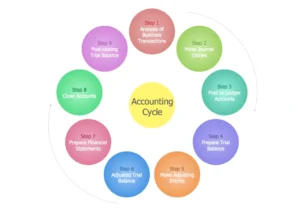
Accounting Cycle Process

Accounting Cycle Process

Treating bookkeeping vs accounting as a choice is a mistake. They are designed to work together.

Here is how the relationship plays out:

  • Bookkeeping records every financial transaction
  • Accounting reviews and analyzes those records
  • Insights from accounting guide business decisions

If bookkeeping is weak:

  • Your financial data becomes unreliable
  • Reports lose accuracy
  • Compliance risks increase

If accounting is missing:

  • You lack clarity on performance
  • Financial decisions become guesswork
  • Growth planning becomes difficult

This is why businesses are moving toward integrated bookkeeping and accounting services instead of handling them separately.

When both functions align, you get accuracy plus insight. That combination drives better financial outcomes.

When Do You Need Bookkeeping vs Accounting?

The timing depends on your business stage and complexity.

You need bookkeeping when:

  • You are tracking daily financial transactions
  • You want organized and updated financial records
  • You need visibility into cash flow

You need accounting when:

  • You want to understand profitability
  • You are planning budgets or forecasts
  • You need tax planning and compliance support
  • You are making strategic financial decisions

Most businesses start with bookkeeping. As operations grow, accounting becomes essential.

The smarter approach is not choosing between bookkeeping vs accounting, but scaling both as your needs evolve.

Also Read: How Much Does a Bookkeeper Cost

Why the Difference Matters for Your Business

Understanding the bookkeeping vs accounting difference has practical impact.

It affects:

  • Accuracy of financial records
  • Quality of financial decisions
  • Compliance with tax regulations
  • Ability to plan and scale

Poor bookkeeping leads to flawed data. Flawed data leads to poor decisions.

On the other hand, strong accounting without proper bookkeeping is built on unreliable inputs.

This is why more CPA firms and businesses rely on combined bookkeeping and accounting services to maintain consistency across both functions.

How Outsourcing Helps CPA Firms Manage Both Functions

For CPA firms, managing both bookkeeping and accounting internally can stretch resources. Routine tasks take up time that could be spent on higher-value advisory work.

Outsourcing changes that balance.

With the right partner, you can:

  • Offload repetitive bookkeeping tasks
  • Ensure accurate and timely financial records
  • Focus internal teams on advisory and client relationships
  • Scale operations without increasing overhead

This is where Global FPO adds value. By supporting CPA firms with structured bookkeeping and accounting services, it helps streamline workflows while maintaining accuracy and compliance.

Instead of choosing between efficiency and quality, firms get both.

Focus on Integration, Not Comparison

The discussion around bookkeeping vs accounting often frames them as separate functions.

In reality, they are parts of the same system.

Bookkeeping ensures your financial data is accurate and complete. Accounting ensures that data is useful and actionable.

You do not need one instead of the other. You need both working together.

For CPA firms looking to improve efficiency and deliver better client outcomes, integrated bookkeeping and accounting services are no longer optional.

They are the foundation of a strong financial operation, and a smarter way to scale.

Ready to Simplify Your Financial Management?

Let Global FPO handle your bookkeeping and accounting while you focus on growth.

Talk to Our Experts

FAQs

Que: 1. What is the key difference between bookkeeping and accounting?

Ans: Bookkeeping focuses on recording daily financial transactions, while accounting interprets that data to provide insights, reports, and strategic financial guidance.

Que: 2. Why do businesses need both bookkeeping and accounting?

Ans: Both are essential because bookkeeping ensures accurate financial records, while accounting uses that data to guide decisions, planning, and long-term business growth.

Que: 3. Can bookkeeping exist without accounting?

Ans: Yes, bookkeeping can exist alone, but without accounting, businesses lack analysis, insights, and the ability to make informed financial decisions.

Que: 4. Is accounting more important than bookkeeping?

Ans: No, both are equally important. Bookkeeping builds the foundation, and accounting uses that foundation to deliver insights and strategic direction.

Que 5. When should a business invest in accounting services?

Ans: A business should invest when it needs financial analysis, tax planning, forecasting, and strategic insights to support growth and decision-making.

Que 6. What are bookkeeping and accounting services?

Ans: These services include transaction recording, reconciliations, financial reporting, tax preparation, analysis, and advisory support to maintain accurate and useful financial data.

Que 7. How does outsourcing help with bookkeeping and accounting?

Ans: Outsourcing improves accuracy, reduces operational workload, ensures compliance, and allows businesses to focus more on core activities and growth.

Que 8. Do CPA firms benefit from outsourcing these functions?

Ans: Yes, outsourcing helps CPA firms scale operations, reduce costs, and focus more on high-value advisory services and client relationships.

Que 9. Does Global FPO provide bookkeeping support?

Ans: Yes, Global FPO offers flexible and scalable bookkeeping solutions designed to handle daily financial tasks efficiently for CPA firms and businesses.

Que 10. Can Global FPO manage both bookkeeping and accounting services?

Ans: Yes, Global FPO provides end-to-end support, covering bookkeeping, accounting, reporting, and compliance to ensure accuracy and support business growth.

How to Fill Out Form 4506-T: Step-by-Step Instructions

Article Summary:

  • Form 4506-T is used to request tax return transcripts from the IRS for income verification, loans, or record access.
  • This step-by-step guide explains how to fill out Form 4506-T accurately using line-by-line instructions.
  • Choosing the correct transcript type and entering exact details is critical to avoid IRS rejection or delays.
  • Common mistakes include incorrect personal details, wrong transcript selection, missing tax years, and unsigned forms.
  • The form typically takes 5–10 business days to process, depending on accuracy and IRS record matching.
  • Following a structured approach ensures faster processing, reduces errors, and improves compliance with IRS requirements.

If you need access to your tax records, form 4506 T is the form you will use. It helps you request tax return transcripts directly from the IRS.

While the form looks simply, every step ties to specific lines. A small error can delay or reject your request. That is why a structured, line-by-line approach to the 4506 T form matters.

Let’s break it down properly and then go deeper into practical insights most guides skip.

What Is Form 4506-T

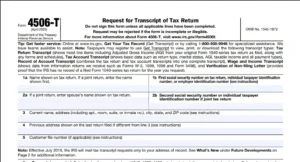
Form 4506-T

Form 4506-T

The IRS form 4506- family includes multiple forms but form 4506-T is used to request transcripts, not full tax returns.

You may need the 4506-T form when:

  • Applying for a mortgage or loan
  • Verifying income
  • Requesting past tax records
  • Working with a CPA

The IRS validates your form 4506 T using exact matches. If your entries do not align with their records, your request will not be processed.

Step 1: Enter Your Basic Taxpayer Details (Lines 1–4)

Start with your identity details on the tax form 4506 T.

Fill in:

  • Line 1a – Full name (exactly as filed)
  • Line 1b – SSN or EIN
  • Line 2a – Spouse’s name (if joint return)
  • Line 2b – Spouse’s SSN
  • Line 3 – Current address
  • Line 4 – Previous address (if changed)

Accuracy is critical. Even small mismatches can cause rejection of your 4506 T form.

Step 2: Add Third-Party Details or File Number (Line 5)

Move to authorization and tracking in the form 4506-T.

  • Line 5a – Third-party name
  • Line 5b – Third-party address

You can also include a customer file number.

Use this if:

  • A lender is requesting transcripts
  • A CPA is handling your filing

Skip if not required.

Step 3: Select Transcript Type and Form Number (Line 6)

This is a crucial step in the tax form 4506 T.

  • Line 6 – Enter the tax form number (1040, 1065, etc.)
  • Select the transcript type

Options include:

  • Return Transcript
  • Account Transcript
  • Record of Account
  • Wage and Income Transcript

Choosing the wrong option is a common mistake in a 4506-T form.

Step 4: Request Record of Account (Line 7)

Line 7 – Request a Record of Account

This combines return and account transcripts.

Only select if required.

Step 5: Request Wage and Income Details (Line 8)

  • Line 8 – Request wage and income transcripts

Includes:

  • W-2s
  • 1099s

Useful for income verification through the 4506 T form.

Step 6: Enter the Tax Years (Line 9)

  • Line 9 – Enter tax year ending date (e.g., 12/31/2023)

You can request multiple years, but they must be clearly listed.

Errors here can lead to incomplete data from your IRS form 4506- request.

Step 7: Sign and Validate the Form (Signature Section)

Your form 4506-T is incomplete without this.

You must:

  • Sign
  • Date
  • Provide contact number

For joint returns, one signature is enough.

Step 8: Submit the Form

Submit your tax form 4506 T via:

  • Mail
  • Fax

Ensure you send it to the correct IRS address.

Download Form 4506-T (IRS Official PDF)

You can download the official Form 4506-T directly from the IRS website. Make sure you use the latest version to avoid processing delays or rejection.

Download Form 4506-T PDF

How to Choose the Right Transcript Type

This is where most confusion happens with the 4506-T form.

Here’s a simple breakdown:

Transcript Type Best Used For
Return Transcript Loan or mortgage applications
Account Transcript Payment history and adjustments
Record of Account Detailed financial review
Wage & Income Income reconstruction

If a lender requested your form 4506 T, always confirm which type they need.

What Are Practical Tips to Avoid Rejection

Here is what actually helps when filling form 4506-T.

Match IRS Records Exactly

Use the same name and address format as your last return.

Do Not Guess Transcript Type

Always confirm before selecting Line 6.

Avoid Manual Corrections

If you make a mistake, start a fresh 4506 T form.

Keep It Minimal

Only fill required sections.

Review Before Submission

Focus on Steps 1, 3, and 6.

When Should You NOT Use Form 4506-T

This is important and often missed.

Do not use form 4506-T if:

  • You need a full copy of your tax return
  • You are requesting amended returns
  • You need certified copies

In these cases, a different form from the IRS form 4506- series is required.

Also Read: What Is Form 2555

Processing Time and Delays

The 4506-T form typically takes:

  • 5 to 10 business days

Delays happen if:

  • Information does not match IRS records
  • Required lines are incomplete
  • Wrong transcript type is selected

Rejected requests must be resubmitted.

Use Cases

Here Is how the tax form 4506 T is used in practice:

  • Mortgage lenders verify income before approval
  • Banks check financial consistency
  • CPAs retrieve past records for filing
  • Individuals access old tax data

Understanding your use case helps you fill the 4506 T form correctly.

What Are The Common Mistakes to Avoid

Even though form 4506-T is simple, small errors can lead to rejection. The IRS checks every detail, so accuracy matters.

  • Incorrect details in Line 1a/1b
    Your name and SSN must match IRS records exactly. Even minor differences can cause rejection of your 4506 T form.
  • Wrong selection in Line 6
    Choosing the wrong transcript type can delay your request. Always confirm what is required before filling this section of the tax form 4506 T.
  • Missing or incorrect year in Line 9
    If the tax year is missing or incorrect, the IRS may not process your request properly. Double-check this before submitting your 4506-T form.
  • Missing signature
    An unsigned form is automatically rejected. This is one of the most common mistakes.

Most issues happen due to rushed submissions. A quick review can prevent delays in your form 4506 T.

Ensure Accurate Submission of Your Form 4506-T

Filling out form 4506-T is straightforward when you follow a step-by-step approach. Each section is simple, but accuracy is key.

Before submitting your 4506 T form, review all critical areas: personal details, transcript type, and tax year. Never skip the signature.

If a lender or CPA requested the tax form 4506 T, confirm their requirements first. This avoids rework and delays.

For professionals managing submissions at scale, such as in a Global FPO setting, accuracy becomes even more important. A careful review ensures each 4506-T form is processed smoothly, saving time and reducing errors across multiple requests.

Get Help with Form 4506-T

FAQs

Que: 1. What is Form 4506-T used for?

Ans. It is used to request tax return transcripts from the IRS, typically for income verification, loan applications, or record retrieval.

Que: 2. How do I choose the correct transcript type on the 4506-T form?

Ans. Confirm with the requesting party—lenders or CPAs—whether they need a return transcript, account transcript, or wage and income transcript.

Que: 3. Can I submit Form 4506-T without a signature?

Ans. No, an unsigned form is automatically rejected by the IRS. Always ensure Step 7 is completed.

Que: 4. How long does it take to process a 4506-T form?

Ans. Typically 5–10 business days, but processing may take longer if information does not match IRS records.

Que: 5. What happens if the tax year is entered incorrectly on Line 9?

Ans. The IRS may send incomplete data or reject the request. Always verify the year(s) before submission.

Que: 6. How do Global FPO teams handle multiple 4506-T forms efficiently?

Ans. They standardize processes, double-check line-by-line accuracy, and maintain proper documentation to avoid delays across high-volume submissions.

Que: 7. Can Global FPO operations help ensure accuracy for 4506-T forms?

Ans. Yes. By centralizing review and validation, Global FPO teams reduce errors and streamline requests for multiple clients or employees.

Que: 8. Are there best practices from Global FPO environments that individuals can adopt?

Ans. Absolutely. Simple practices like verifying details, confirming transcript types, and reviewing each line mirror the checks FPO teams use to maintain high accuracy.

Que: 9. Can a Global FPO approach reduce the risk of IRS rejection?

Ans. Yes. Using systematic validation and cross-referencing, Global FPO processes minimize common mistakes like mismatched names, SSNs, or tax years.

Que: 10. Is there a difference between using a 4506-T form personally versus in a Global FPO setup?

Ans. The form itself is the same, but Global FPO setups handle high volumes with strict accuracy protocols, making the process faster and more reliable for multiple submissions.

What Is a W-2 Form? Everything Employees Need to Know

Understanding What Is a W-2 Form is essential if you earn income as an employee in the United States. This document forms the foundation of your tax return, showing exactly how much, you earned and how much tax was already paid on your behalf.

A W-2 form is not just a year-end summary. It is an official record shared with you, the Social Security Administration (SSA), and the IRS. These agencies use it to verify your income, tax payments, and compliance. Any mismatch between your W-2 and your tax return can lead to delays, notices, or penalties.

What are W-2 forms?

W-2 forms are official tax documents that employers must complete annually for each employee earning $600 or more. These forms report total wages, taxes withheld, and other compensation.

Employers are required to issue a form W-2 by January 31 each year, covering earnings from January 1 to December 31 of the previous year.

The purpose is straightforward. It ensures that:

  • Employees have the correct information to file their taxes
  • The IRS can verify reported income and tax payments

Without a W-2 form, accurate tax filing becomes difficult and error-prone.

Who needs these forms?

W-2 filing applies only to employees, not all types of workers. You will receive a W-2 form if:

  • You earned $600 or more during the year
  • Your employer withheld income, Social Security, or Medicare taxes
  • You are classified as an employee

This includes full-time, part-time, and even family members working in a business.

Independent contractors do not receive a W-2. Instead, they receive Form 1099-NEC. The $600 threshold includes both cash and non-cash payments, which means certain benefits may also be included.

Why are they important?

A W-2 form plays a central role in tax compliance and financial reporting.

For employees, it:

  • Provides all required details for filing tax returns
  • Acts as proof of income for loans or verification
  • Confirms total taxes already paid

For employers, it:

  • Ensures accurate reporting to the IRS
  • Maintains official payroll records
  • Reduces the risk of compliance issues

The IRS uses W-2 data to cross-check tax filings. Any inconsistency can trigger scrutiny or corrections.

Also Read: What Is Form 941 Schedule B

What information goes on W-2 forms?

Each form W-2 contains detailed financial and identification data that must align with payroll records.

It includes:

  • Employee details: name, address, Social Security number
  • Employer details: EIN, business name, address
  • Total wages, tips, and compensation
  • Federal, Social Security, and Medicare taxes withheld
  • State and local tax details where applicable

The form is divided into numbered boxes to organize this information.

For example:

  • Box 1 shows total taxable wages
  • Box 2 shows federal tax withheld
  • Boxes 3–6 cover Social Security and Medicare

Box 12 includes W 2 form codes, which identify specific benefits such as retirement contributions or health savings accounts. These codes explain why certain wage figures differ across boxes.

Download Form W-2 (Official IRS PDF)

You can review and download the official Form W-2 directly from the IRS. This document shows the exact format used to report employee wages, taxes withheld, and compensation details.

Download Form W-2 PDF

Employer W-2 Responsibilities

Employers are responsible for preparing accurate, complete, and timely W-2s. This responsibility extends beyond simply generating the form.

They must:

  • Report taxable wages and compensation accurately
  • Report all taxes withheld, including federal, state, local, Social Security, and Medicare
  • Provide copies to employees by January 31
  • File copies with the SSA within the same deadline
  • Maintain payroll and tax records
  • Correct errors promptly using Form W-2C
  • Use correct employee classification
  • Follow IRS electronic filing requirements

Employers may also need to submit copies to state tax agencies depending on local requirements.

Copies of W-2 Forms

A W-2 form includes multiple copies, each intended for a specific recipient.

  • Copy A – Sent to the SSA
  • Copy B – Filed by the employee with their federal tax return
  • Copy C – Employee’s personal record
  • Copy D – Employer’s record
  • Copy 1 – State or local tax filing
  • Copy 2 – Employee’s state/local filing copy

Employers must distribute all relevant copies to employees together and retain their own for recordkeeping.

What are the deadlines for filing?

W-2 deadlines are fixed and apply to both electronic and paper filing.

  • January 31: Provide W-2 copies to employees
  • January 31: File Copy A with the SSA
  • January 31: Submit Form W-3 (for paper filings)

These deadlines ensure that employees have enough time to file their tax returns and that the IRS receives accurate records on time.

What happens if you don’t file on time?

Late or incorrect W-2 filings can result in substantial penalties.

The IRS penalty structure is:

  • 1–30 days late: $50 per form
  • 31 days to August 1: $110 per form
  • After August 1: $330 per form

Additional penalties include:

  • Incorrect information: Same penalty rates
  • Intentional disregard: $630 per form with no maximum

Because penalties apply per form, costs can escalate quickly for businesses.

💰

Simplify Your Taxes with Global FPO

Get Maximize Return and Online Tax Solution for Your Business


How to Read a W-2: What Each Box Means

A W-2 contains numbered boxes for wages, taxes withheld, benefits, retirement contributions, and local/state information. Understanding each box helps employers verify accuracy and resolve employee questions.

Form W-2 Box Description
a–f Employee and employer identification details, including SSN, EIN, and addresses.
1 Wages, tips, and other compensation including salary, bonuses, and taxable earnings.
2 Total federal income tax withheld.
3 Wages subject to Social Security tax (may differ due to pre-tax contributions).
4 Social Security tax withheld.
5 Wages subject to Medicare tax.
6 Medicare tax withheld.
7 Tips reported by the employee (included in Box 1).
8 Allocated tips (not included in Box 1).
9 Reserved for IRS use (should be blank).
10 Employer-provided dependent care benefits.
11 Distributions from non-qualified deferred compensation plans.
12 Additional compensation details with specific codes (e.g., retirement, HSA contributions).
13 Checkboxes for statutory employee, retirement plan participation, or sick pay.
14 Other tax-related details such as union dues or insurance.
15 State and employer’s state tax ID.
16 Total wages subject to state income tax.
17 State income tax withheld.
18 Total wages subject to local income tax.
19 Local income tax withheld.
20 Name of the locality imposing the tax.

Differences across boxes often result from pre-tax deductions such as retirement contributions.

How to Fill Out a W-2 Form Step by Step

Employers follow a structured process to complete each form W-2.

Step 1: Gather employee information

Step 2: Enter employer details and EIN

Step 3: Add control number (if applicable)

Step 4: Report total wages in Box 1

Step 5: Enter federal tax withheld in Box 2

Step 6: Report Social Security wages and tax (Boxes 3 & 4)

Step 7: Report Medicare wages and tax (Boxes 5 & 6)

Step 8: Include tips where applicable

Step 9: Add allocated tips if required

Step 10: Complete Box 12 codes

Step 11: Enter state and local tax details

Step 12: Review all data for accuracy

Each step must align with payroll records to avoid discrepancies.

How to File a W-2 Form

Once completed, employers must file W-2 forms with the SSA and distribute employee copies.

The process includes:

  • Preparing W-2 forms for all employees
  • Completing Form W-3 if filing by mail
  • Submitting forms electronically via SSA’s Business Services Online (BSO)
  • Sending employee copies by January 31
  • Filing state copies if required
  • Retaining employer copies for at least four years

Electronic filing is mandatory for employers filing 10 or more forms. It reduces errors and provides confirmation of submission.

Get Help with W-2 Preparation

Electronic versus paper filing: Which option is right for you?

Employers can choose between electronic and paper filing, though the decision is often dictated by volume.

Electronic filing:

    • Required for 10 or more forms
    • Faster and more secure
  • Reduces errors
  • Provides instant confirmation

Paper filing:

  • Involves mailing physical forms
  • Slower and more error-prone
  • Suitable only for very small businesses

Most organizations prefer electronic filing due to efficiency and compliance requirements.

Using the right tool for the job

Payroll software simplifies W-2 preparation by automating data tracking throughout the year.

It enables:

  • Real-time tracking of wages and deductions
  • Accurate tax calculations
  • Automatic form generation
  • Direct electronic filing

This reduces preparation time from days to hours and minimizes manual errors.

Finding the right software

Choosing payroll software requires evaluating long-term needs. Key considerations include:

  • Scalability for growing teams
  • Integration with accounting systems
  • Cloud accessibility
  • Reliable user feedback

Essential features:

  • Automatic W-2 generation
  • Real-time tax updates
  • Employee self-service access

Make W-2 filing part of your payroll routine

W-2 filing becomes more manageable when integrated into regular payroll processes.

A typical workflow includes:

  • December: Review and finalize payroll data
  • January: Generate W-2 forms
  • January 31: Distribute and file all forms

This structured approach improves accuracy and reduces last-minute pressure.

How to find a W-2 form

If you need to know how to find a W-2 form, start with your employer’s payroll or HR system. Most companies provide digital access.

You can also:

  • Check your email for electronic copies
  • Contact your employer’s payroll team

This also applies if you are searching for how to get W 2 form after leaving a job.

What happens if there are errors?

Errors must be corrected promptly to avoid filing issues.

Employers issue Form W-2C to correct mistakes. Updated copies are sent to both employees and the SSA.

Common errors include incorrect wages, tax amounts, or Social Security numbers.

Can employers request an extension?

Employers can request a 30-day extension using Form 8809, but only under specific circumstances such as emergencies.

Approval is not guaranteed, and extensions are limited, so timely filing remains critical.

Stay Accurate, Stay Compliant, Stay Ahead

A clear understanding of What Is a W-2 Form does more than help you file taxes. It gives you visibility into your earnings, confidence in your reporting, and the ability to catch issues before they turn into bigger problems.

For employees, the focus is simple: verify the details, understand the numbers, and use the W-2 form correctly when filing your return. For employers, the stakes are higher. Accuracy, deadlines, and compliance all sit on this one document, and even small mistakes can lead to penalties or rework.

If managing payroll, filings, and compliance feels like too much to handle internally, Global FPO offers the structure and expertise to keep everything accurate and on time. With the right support in place, W-2 filing shifts from a risk-heavy obligation to a controlled, reliable process.

Schedule a Free Consultation

FAQs on W-2 Form Filing

1. What Is a W-2 Form?

A W-2 form reports your annual wages and taxes withheld.

2. How to find W-2 form online?

Through your employer’s payroll or HR portal.

3. How to find my W-2 form after switching jobs?

Contact your previous employer or access their system.

4. How to get W-2 form if lost?

Request a duplicate or download it online.

5. What are W-2 form codes?

Codes that explain benefits and compensation details.

6. When are W-2 forms issued?

By January 31 each year.

7. Can employers file W-2 forms electronically?

Yes, and it is required for 10 or more forms.

8. What if my W-2 has errors?

Request a corrected Form W-2C.

9. Do all employees receive a W-2?

Yes, if they earn $600 or more with tax withholding.

10. Can employers request an extension?

Yes, using Form 8809 under specific conditions.