Archive for December, 2025

What are the Features and Benefits of Wave Accounting Software?

Features and Benefits of Wave Accounting Software

Managing finances is one of the least glamorous parts of running a small business, yet it is the backbone of everything else. From tracking income to staying compliant at tax time, the right accounting system can either simplify your operations or quietly create chaos.

Wave Accounting Software has become a popular choice among freelancers and small business owners looking for a low – cost way to manage their books. Its promise is simple: essential accounting tools with no monthly subscription fee.

But “Is Wave Accounting actually good for small businesses in 2026?” And where does it fit compared to paid platforms and professional bookkeeping support?

This guide breaks down the features, benefits, limitations, and ideal use cases of Wave Accounting Software, helping you decide whether it fits your business today – and tomorrow.

Article Summary:

  • Wave Accounting Software is a free, cloud-based accounting platform designed for freelancers and small businesses.
  • It offers invoicing, expense tracking, bank connections, and financial reporting without monthly subscription fees.
  • Wave is best suited for service – based businesses with simple financial needs and low transaction volume.
  • Optional paid services include payroll and online payment processing.
  • Wave lacks advanced features such as inventory management and deep third-party integrations.
  • Many businesses use Wave as a starter solution before transitioning to more robust accounting systems.
  • Global FPO supports businesses using Wave by providing professional bookkeeping, reporting, and accounting oversight.

What is Wave Accounting Software?

Wave Accounting Software is an online bookkeeping and accounting platform created primarily for freelancers, solopreneurs, and small businesses. Unlike most accounting tools, Wave offers its core features completely free.

The software focuses on essential accounting tasks rather than advanced financial management. Users can track income and expenses, send invoices, connect bank accounts, and generate basic financial reports from a single dashboard.

Wave operates entirely in the cloud, allowing business owners to access their financial data from anywhere without installing software.
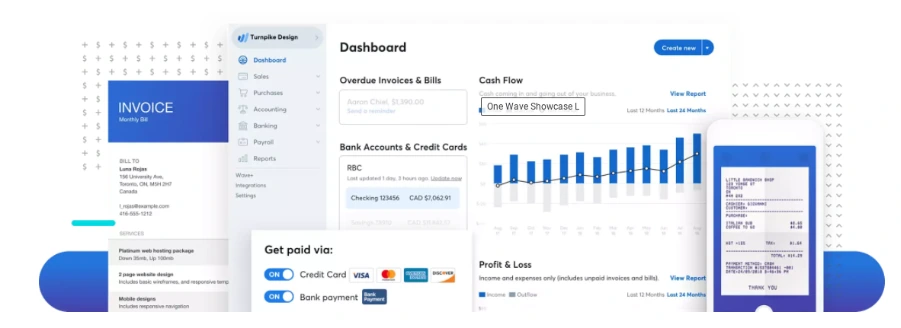
Wave Accounting Software Features and Benefits

What Are the Key Features of Wave Accounting Software?

Wave is intentionally simple. Its feature set covers the fundamentals that small businesses need to stay organized and compliant.

Feature What It Does Best For
Invoicing Create, customize, and send professional invoices with payment links Freelancers and service-based businesses
Expense Tracking Automatically import and categorize expenses from connected accounts Small teams with recurring expenses
Bank Reconciliation Match bank transactions with recorded entries to ensure accuracy Businesses needing clean monthly books
Financial Reports Generate profit & loss, balance sheet, and cash flow reports Owners reviewing financial health
Receipt Capture Upload and attach receipts to expense transactions Businesses needing audit-ready records
Payroll (Paid Add-on) Process payroll and tax filings in supported regions Small businesses with employees

Invoicing and Payments:

Wave allows users to create and send professional invoices quickly. You can customize invoices with your branding, automate recurring invoices, and accept online payments through integrated payment processing.

This is especially useful for freelancers and service-based businesses that invoice clients regularly.

Global FPO often helps clients transition from spreadsheets into Wave in a single day. For small teams, this instant start is a huge advantage.

Expense Tracking

Users can manually record expenses or connect bank and credit card accounts to import transactions automatically. Expenses can be categorized, helping maintain clean and organized financial records.

Accurate expense tracking ensures reliable reporting and easier tax preparation.

Bank Reconciliation

Wave supports bank reconciliation by matching imported transactions with recorded entries. This helps identify missing or duplicate transactions and keeps books accurate.

Financial Reporting

Tracking expenses becomes a lot easier when everything sits in one place. You can upload receipts using your phone, match them against imported transactions, and tag them for tax purposes.

This helps with:

  • Audit – proof documentation
  • Faster tax season preparation
  • Better understanding of spending habits
  • Easier identification of unnecessary costs
For small teams or solo business owners, this feature keeps financial clutter under control.

Insights with Comprehensive Reporting Tools

Wave’s reports offer a complete picture of your business without needing an accountant to interpret basic numbers. You can monitor profitability, check what you owe, and review long-term trends.

This matters when:

  • Applying for loans
  • Planning Budgets
  • Pitching to Investors
  • Checking whether the business is profitable
  • Setting quarterly or annual goals
Many people researching What is Wave Pro discover that advanced reporting and payroll functions which are included in premium tiers, but the free reports are strong enough for most of the users.

Integration with Wave Apps for Enhanced Functionality

Wave integrates smoothly with its internal apps, and each add-on serves a clear purpose. Receipt scanning keeps documentation organized. Wave Payroll (available in select regions) helps automate compliance. Payment tools simplify collections.

For searches like wave project management, users typically want a tool that connects tasks with finances. Wave does not do that directly. However, its integrations with internal apps create a simple, unified financial workflow that avoids unnecessary complexity.

Tax Preparation Made Easy

Tax season becomes far less stressful when all your financial data is stored cleanly. Wave exports comprehensive reports in seconds. You can share them with your accountant or let Global FPO manage them on your behalf.

This helps with:

  • Expense deduction accuracy
  • Quarterly tax estimates
  • Income verification
  • GST or VAT preparation where applicable

For many small teams, Wave serves as the foundation on which proper tax compliance is built.


Global FPO makes taxation easy!!


Pricing Options for Different Business Needs

One of the biggest reasons people search is wave accounting free is the popularity of Wave’s free tier. It covers:

  • Invoicing
  • Payments
  • Expense tracking
  • Basic reporting
  • Bank imports

Businesses can purchase add-ons such as payroll or online payment processing if they want additional convenience. This flexible pricing structure makes the wave finance ecosystem accessible to businesses of all sizes.

Trusted Security Standards

Financial data needs to be protected, and Wave takes this seriously. It uses encryption, secure logins, and cloud-based storage with backups. You can also manage staff access by assigning permissions based on roles. For small organizations without IT teams, this provides peace of mind.

Ideal Users for Wave Software

Wave fits businesses that want essential accounting without complex tools. This includes:

  • Freelancers
  • Solo consultants
  • Micro businesses
  • Online service providers
  • Creative professionals
  • Independent contractors
  • Home-based entrepreneurs
Businesses with heavy inventory or multi-branch operations might need more advanced systems. Everyone else will find Wave more than enough.

Some Limitations to Note

Wave has purposefully kept its toolset simple. That means:

  •  No deep inventory tracking
  • Limited third-party integrations
  • Payroll restricted by geography
  • No full wave project management capabilities
  • No advanced asset tracking

Despite these limits, Wave solves the core bookkeeping needs for the vast majority of freelancers and small firms.

Focus on Growth with Wave Accounting Software

The less time you spend tracking receipts and reconciling expenses, the more time you have to grow your business. Accurate numbers help you make smarter decisions, pitch confidently, and stay organized.

With the wave accounting package in place, owners can focus on improving products, building relationships, and exploring new markets. Our team helps with:

If you want the confidence that your wave bookkeeping system is correct, we are here to guide you.


Book a free consultation with our Experts today.


FAQs

Question 1: What is included in the Wave Accounting package?

The wave accounting package includes invoicing, payments, expense tracking, receipts, reporting tools, and bank connections. It is structured for freelancers and small teams that want simple bookkeeping without complexity.

Question 2:How do I create a Wave account?

You can open a wave account in minutes. Sign up, verify your email, add your business details, and start tracking income or expenses. The setup flow is designed to be beginner-friendly.

Question 3:Does Wave offer payroll?

Yes, but payroll is available only in select regions. Users often upgrade when they search for what Wave Pro is because premium features include payroll and advanced support.

Want help in Payroll services? Contact GFPO today!

Question 4:Does Wave provide audit trails?

It offers transaction history but not a complete audit trail. If you need deep user-activity logs, you may require additional tools. But we at Global FPO do provide Audit trails for our clients, as we have a team of audit professionals. For a free consultation, you can contact us, and we will be happy to help you.

Question 5: Does Wave offer payroll?

Yes, but payroll is available only in select regions. Users often upgrade when they search for what Wave Pro is because premium features include payroll and advanced support, which is where we come in. We at Global FPO have experience in handling payroll issues and have helped more than 350+ clients in payroll handling.
Sage vs Quickbooks: Which Accounting Software Is Better?

Sage vs Quickbooks: Which Accounting Software Is Better for Your Business?

Choosing accounting software isn’t just a technical decision – it directly impacts how efficiently your business runs, how accurately you track finances, and how confidently you plan growth.

Two of the most widely used accounting platforms today are Sage and QuickBooks . Both are trusted globally, both have decades of credibility, and both serve millions of businesses. Yet they are built for very different operational needs.

This in-depth comparison explains Sage vs Quickbooks across usability, pricing, features, integrations, scalability, and industry fit so you can confidently choose the right platform for your business today – and tomorrow.

Article Summary:

  • QuickBooks is best for small business, freelancers, and service firms due to ease of use and integrations.
  • Sage is stronger for complex organizations needing advanced reporting, inventory, or multi-entity accounting.
  • QuickBooks is typically cheaper at entry level. 
  • Sage offers more powerful enterprise – level capabilities. 
  • QuickBooks wins in usability; Sage wins in depth
  • The best choice depends on business size, complexity, and growth plans.

QuickBooks vs Sage: Quick Comparison Snapshot

Feature QuickBooks Sage
Ease of Use Very easy Moderate to complex
Best For Small Businesses Growing or complex businesses
Pricing Lower entry cost Higher but scalable
Reporting Standard Advanced
Inventory Basic Advanced
Integrations 750+ apps Fewer but enterprise-grade
Scalability Moderate Very high

Understanding the Difference between QuickBooks and Sage

When businesses search QuickBooks vs Sage, they often assume they are comparing two single products. Both brands offer multiple software solutions designed for different business stages.

QuickBooks Product Line:

  • QuickBooks Online – cloud accounting for small businesses
  • QuickBooks Desktop – locally installed system
  • QuickBooks Enterprise – advanced inventory + reporting
  • QuickBooks Advanced – premium cloud tier

Stage Product Line:

  • Sage Business Cloud Accounting – entry-level cloud tool
  • Sage 50 – advanced desktop accounting
  • Sage Intacct – enterprise-grade financial platform.
Note: This is why comparisons like Sage 50 vs QuickBooks Pro and Sage Intacct vs QuickBooks Enterprise produce completely different results.

Ease of Use: Which Is Simpler?

QuickBooks:

QuickBooks is known for its intuitive interface. Most business owners can set it up in a few hours without accounting experience. Bank feeds connect quickly, transactions categorize automatically, and invoicing is simple.

Because it’s so widely used, most accountants already know it – meaning onboarding support is easy.

Sage:

Sage’s usability varies by product. Entry-level tools are simple, but advanced solutions like Sage 50 or Intacct require training and accounting knowledge.

However, that complexity exists for a reason: deeper control, customization, and precision reporting.

Verdict: If you want simplicity in terms of usage, choose QuickBooks but if you want control then you should go for Sage.

Feature Comparison: QuickBooks vs Sage

Invoicing

  • QuickBooks → customizable invoices + online payments
  • Sage → basic invoicing unless using advanced versions

Expense Tracking

  • QuickBooks → automated categorization + receipt scanning
  • Sage → more manual input

Payroll

  • QuickBooks → integrated payroll add-ons
  • Sage → limited payroll integrations

Reporting

  • QuickBooks → standard reports
  • Sage → highly customizable reports

Integrations

  • QuickBooks → massive ecosystem
  • Sage → stronger enterprise integrations

Inventory

  • QuickBooks → basic inventory
  • Sage → advanced multi-warehouse inventory

QuickBooks Pro vs Sage 50

Capability QuickBooks Pro Sage 50
Interface Beginner-friendly Traditional UI
Inventory Basic Advanced
Reporting Standard Customizable
Scalability Moderate High
Pricing Lower Higher

Best for: If you deal in service providing businesses then you should go with QuickBooks but if your business is a product-based businesses then you should go with Sage 50

QuickBooks Online vs Sage Business Cloud

For cloud-based accounting users, this is the most common comparison.

QuickBooks Online:

  • Easy setup
  • Strong integrations
  • Widely supported

Sage Business Cloud:

  • Simple but limited
  • Lower adoption
  • Fewer integrations
Note: For most small businesses, QuickBooks Online is the stronger cloud choice.

Sage Intacct vs QuickBooks Enterprise

This comparison matters for scaling organizations.

QuickBooks Enterprise:

  • Good for large single-entity companies
  • Strong inventory tools
  • Familiar interface

Sage Intacct:

  • Multi-entity consolidation
  • Compliance tracking
  • Advanced dashboards
  • Role-based access
Winner: If your organization is complex or multi-entity → Sage Intacct

Pricing Breakdown:

Software Entry Cost Scaling Cost
QuickBooks Online Low Moderate
QuickBooks Desktop Moderate Moderate
Sage Business Cloud Low Limited features
Sage 50 High Higher per user
Sage Intacct Custom Enterprise pricing
Key Insights: QuickBooks is cheaper initially, but Sage becomes cost-effective only when advanced features are needed.

“Get a Custom Accounting Software Recommendation”


Talk to an Expert!!


Industry Fit Comparison

Industry Better Choice
Freelancers QuickBooks
Agencies QuickBooks
Retail Tie
Manufacturing Sage
Non-Profits Sage Intacct
Construction QuickBooks (small)/ Sage (large)
Enterprises Sage

Implementation & Support:

QuickBooks:

  • DIY Setup
  • Huge community
  • Easy onboarding

Sage:

  • Setup often requires consultant
  • Structures onboarding
  • Enterprise-level support tiers

Common Misconceptions About QuickBooks and Sage:

Myth: QuickBooks can’t handle large businesses
Reality: Enterprise version supports large operations.

Myth: Sage is only desktop software
Reality: Sage Intacct is fully cloud-based.

Myth: QuickBooks is always cheaper
Reality: Add-ons can make it comparable to Sage pricing.

Decision Framework: How to Choose

Choose QuickBooks if you want

  • fast setup
  • low cost
  • simple workflows
  • strong integrations

Choose Sage if you want

  • scalability
  • advanced reporting
  • multi-entity accounting
  • inventory depth

“Want to book a free Software Consultation?”


Contact Us Today!!


Final Verdict: QuickBooks vs Sage

QuickBooks is the ideal choice for most small businesses because it’s simple, affordable, and widely supported. It works especially well for service-based companies, startups, and freelancers.
Sage, on the other hand, is designed for organizations that require deeper financial control.

Businesses managing complex inventory, multiple entities, or compliance-heavy operations benefit far more from Sage’s advanced capabilities.

In short:

QuickBooks = simplicity + speed
Sage = power + scalability

The best software isn’t the one with more features – it’s the one aligned with your business complexity and growth goals.

“Get Expert Help Setting Up QuickBooks or Sage”


Outsource your Accounting  


FAQs

Ques 1: Is QuickBooks better than Sage?

Ans: QuickBooks is better for small businesses and beginners. Sage is better for complex or enterprise businesses.

Ques 2: Which is cheaper: QuickBooks or Sage?

Ans: QuickBooks is cheaper at entry level. Sage becomes cost-effective only for larger organizations.

Ques 3: Which has better reporting?

Ans: Sage provides more advanced reporting capabilities.

Ques 4: Which is easier to use?

Ans: QuickBooks is easier to learn and use.

Ques 5: Can businesses switch from QuickBooks to Sage later?

Ans: Yes. Many companies start with QuickBooks and migrate to Sage as they scale.

5 Most Useful Functions of QuickBooks Accounting Software

Article Summary:

  • QuickBooks is a cloud-based accounting software designed for small and growing businesses.
  • It helps track income, expenses, invoices, payroll, and financial reports in one system.
  • Automated transaction tracking reduces manual bookkeeping errors.
  • Invoicing and billing tools improve cash flow and payment follow – ups.
  • Payroll and tax features support compliance and accurate employee payments.
  • Financial reporting provides real – time visibility into business performance.
  • Inventory tracking helps product – based businesses manage stock efficiently.
  • Global FPO helps businesses implement, manage, and optimize QuickBooks accounting workflows.

Useful features of QuickBooks Software
Running a small business means making dozens of financial decisions every week. Invoicing clients, tracking expenses, paying employees, and understanding whether the business is profitable often happen at the same time. This is where accounting software stops being optional and starts becoming essential.

QuickBooks Accounting Software is one of the most widely used tools for small business accounting. It promises to simplify bookkeeping, reduce manual work, and give business owners clarity over their finances. But what does QuickBooks do, and which functions matter the most in real-world business operations?

This article breaks down the five most useful QuickBooks functions, explains how they help small businesses, and shows where professional support can unlock even more value.

Contact GFPO today for free QuickBooks Setup Consultation

This guide walks through the five most useful functions of QuickBooks. Each one supports clean numbers, smooth bookkeeping, and better financial control.

What is QuickBooks Accounting Software?

QuickBooks is an accounting and bookkeeping platform developed to help businesses manage their day-to-day financial activities. It is available as cloud-based software, allowing business owners, accountants, and finance teams to access data securely from anywhere.

At its core, QuickBooks centralizes financial data. Instead of using spreadsheets, separate payroll tools, and disconnected banking apps, businesses can manage everything in one place. This reduces errors, saves time, and makes financial reporting far more reliable.

Key QuickBooks Functions at a Glance:

QuickBooks Function What It Helps With Business Benefit
Transaction Tracking Automatically records income and expenses Accurate, real-time bookkeeping
Invoicing & Billing Creates and sends professional invoices Faster payments and improved cash flow
Payroll Management Calculates wages, taxes, and deductions Reduced payroll errors and compliance risk
Financial Reporting Generates P&L, balance sheet, cash flow reports Clear business performance insights
Inventory Management Tracks stock levels and reorder points Avoids shortages and overstocking

Not sure which QuickBooks feature you actually need?

Global FPO – Accounting Advisory Services

Understanding 5 Useful Functions of QuickBooks

1. How Does QuickBooks Track Income and Expenses?

One of the most valuable functions of QuickBooks is automated transaction tracking. The software connects directly to business bank accounts and credit cards, importing transactions daily.

Each transaction can be categorized, reviewed, and reconciled. This ensures that income and expenses are recorded accurately and consistently throughout the month.

For small businesses, this function eliminates the need for manual data entry and reduces the risk of missed or duplicated transactions. Clean transaction tracking also forms the foundation for accurate reporting and tax preparation

Example: A business records a sale. The system updates income tables. If the same business logs an expense, QuickBooks bookkeeping displays the change instantly. This simple workflow helps owners understand spending and revenue trends.

2. How QuickBooks Simplifies Invoicing and Billing?

QuickBooks allows businesses to create professional invoices within minutes. Users can customize invoice templates, add payment terms, and automate recurring invoices for regular clients.

Payment reminders help reduce late payments, while integrated payment options allow customers to pay online. This shortens the payment cycle and improves cash flow without additional follow-up work.

For service-based businesses, this invoicing function alone can save several hours every month.

Type of Invoice

Purpose

Useful For

Standard Invoice

Regular billing

Service businesses

Recurring Invoice

Repeats automatically

Subscription models

Progress Invoice

Tracks parts of a
project

Contractors and
agencies

Note: QuickBooks also helps and provides support to users who wish to take guidance with invoice customization or delivery tracking.

Global FPO – Accounting Receivable and Billing Support

3. How Does QuickBooks Handle Payroll and Taxes?

Payroll is one of the most sensitive areas of small business accounting. QuickBooks payroll features help calculate wages, deductions, and applicable taxes based on employee data.

The system keeps payroll data linked to employee profiles. It also helps with tax forms, pay slips, and compliance tasks. For firms without a dedicated accounts team, this tool saves significant time.

Benefits for the Business:

  • Automated calculations
  • Direct bank deposits
  • Clear payroll reporting
  • Tax form assistance
  • Simple link to accounting software for small business
Companies also use this tool for attendance tracking and shift calculations. Payroll updates flow into your books instantly. This means your general ledger accounting stays accurate.

Payroll Setup and Compliance Support.

4. How QuickBooks Generates Financial Reports?

Reports show the health of your business. QuickBooks can produce many types of reports. These include balance sheets, profit and loss accounts, cash flow statements, and ageing reports for accounts receivable.

The software automatically generates key financial reports such as profit and loss statements, balance sheets, and cash flow reports. These reports update in real time as transactions are recorded. Business owners no longer need to wait until the end of the month to understand financial performance.

Common Reports you can generate

  • Sales summary
  • Vendor expense summary
  • Cash flow overview
  • Inventory status
  • Project cost reports
Key Reports and their use:
Report Purpose
Balance Sheet Shows assets and liabilities
Profit and Loss Shows revenue and expenses
Cash Flow Tracks inflow and outflow
Inventory Summary Shows stock movement

These reports help owners plan budgets and prepare for tax season. They also support external audits. Data from Intuit QuickBooks can be exported for advisors or for Global FPO analysts.

5. Inventory Management in QuickBooks

For product-based businesses, inventory management is one of the most useful QuickBooks functions. The software tracks stock levels, cost of goods sold, and inventory valuation.

This helps businesses avoid stock shortages, manage cash tied up in inventory, and maintain accurate margins. While not as advanced as enterprise systems, QuickBooks inventory tools are sufficient for many small and mid-sized businesses.

Inventory tools include:

  • Automatic stock updates
  • Product categorisation
  • Purchase order management
  • Vendor tracking
  • Sales channel syncing
Note: The software also displays the best-selling items. This guides your restock planning. It also supports demand forecasting. These features help owners link accounting, sales, and warehouse operations in one place.

Additional QuickBooks Features Worth Knowing

Bank Reconciliation

This feature keeps books accurate and reduces errors.

Tax Preparation

The software organizes numbers for filing and prepares tax summaries.

Integrations

QuickBooks ProAdvisor – level tools support many integrations. These include project systems, CRM tools, ecommerce platforms, and payment gateways.

Why Use QuickBooks for Businesses?

QuickBooks brings your entire business onto one platform. It supports tasks like accounting, bookkeeping, payroll, invoicing, and tax prep, all from one dashboard. The system scales as you grow, from QuickBooks Self Employed to QuickBooks Enterprise.

You also get access to trained QuickBooks ProAdvisor professionals who guide setup, cleanup, and optimization.

The result is simple: fewer errors, faster reporting, and a clearer view of your business numbers.

Choose QuickBooks to Strengthen Your Financial Systems:

QuickBooks supports daily work for busy business owners. It manages income, expenses, payroll, inventory, and reporting. Tools like QuickBooks Online, QuickBooks Payroll, and QuickBooks Payments help create a complete financial system.

Global FPO helps firms set up the right plan, understand QuickBooks pricing, and use the tools correctly. With expert support, businesses can save time, reduce errors, and maintain clean books throughout the year.

Free QuickBooks Assessment with Global FPO

FAQs

Ques 1: What are the main functions of QuickBooks?

Ans: QuickBooks helps businesses track income and expenses, create invoices, manage payroll, generate financial reports, and monitor inventory in one platform.

Ques 2: Is QuickBooks good for small businesses?

Ans: Yes. QuickBooks is designed for small and growing businesses that need organized bookkeeping, reliable reporting, and scalable accounting tools.

Ques 3: Can QuickBooks replace a bookkeeper?

Ans: No. QuickBooks is a tool. A bookkeeper ensures data accuracy, reconciles accounts, and prepares reliable financial reports using the software.

Ques 4: Does QuickBooks handle taxes?

Ans: QuickBooks supports tax preparation by organizing financial data and generating reports, but businesses still need professional tax filing support.

Ques 5: How much does QuickBooks cost?

Ans: QuickBooks pricing varies by plan and features. Costs increase when adding payroll, advanced reporting, or multiple users.

Ques 6: Is QuickBooks cloud-based?

Ans: Yes. QuickBooks Online allows secure access from any location with an internet connection.

Ques 7: Can QuickBooks manage inventory?

Ans: Yes. QuickBooks includes inventory tracking for product-based businesses, though it may not suit complex inventory needs.

Ques 8: Who should use QuickBooks with professional support?

Ans: Businesses with growing transaction volume, payroll, or compliance requirements benefit most from pairing QuickBooks with expert accounting support.

Final Thoughts: Making QuickBooks Work for Your Business

Ans: QuickBooks Accounting Software is more than a bookkeeping tool. When used correctly, it becomes the financial backbone of a business.

The five functions covered here – transaction tracking, invoicing, payroll, reporting, and inventory – address the most common financial challenges small businesses face.

With the right setup and expert support, QuickBooks helps businesses save time, reduce errors, and make confident financial decisions.

Get a Free QuickBooks Consultation with Global FPO

Get A Free Consultation with a QuickBooks Expert Today

Tax Deductions You Can Claim Without Receipts

Article Summary:

  • Tax deductions reduce taxable income and lower the amount of tax you pay. They allow individuals and businesses to subtract eligible expenses from their total income.
  • Receipts are helpful but not always required to claim deductions. Alternative documentation such as bank statements, invoices, and payment confirmations can sometimes serve as proof.
  • Tax authorities focus on credible evidence rather than the format of documentation. Digital records, logs, or transaction statements can support legitimate expense claims.
  • Certain expenses are commonly allowed without receipts. These include home office expenses, mileage deductions, phone and internet costs, retirement contributions, and small charitable donations.
  • Some deductions still require detailed receipts and documentation. Examples include actual vehicle expenses, large charitable donations, business travel, and major asset purchases.
  • Maintaining organized records and financial logs reduces audit risks. Proper documentation ensures deductions are supported and compliant with tax regulations.
  • Global FPO helps businesses claim deductions even when receipts are missing. Their team reconstructs documentation, ensures compliance, and maximizes eligible tax savings.

Many business owners and self-employed professionals worry that missing receipts automatically disqualify them from claiming legitimate tax deductions. Fortunately, that’s not always the case. While receipts make documentation easier, tax authorities often accept other credible forms of proof – if they clearly support the amount, date, and business purpose of an expense. This guide explains how such deductions work, which expenses qualify, where documentation is still mandatory, and how Global FPO helps you file confidently even when receipts are missing.

What Are Tax Deductions?

To begin with, let’s define Tax Deductions – Tax deductions are those expenses that the government allows people to deduct from their taxable incomes. This means they reduce income which is taxable, thus reducing the amount of taxes paid. Therefore, lower income ultimately results in less tax payment.

So, if you earned $ 50,000 within a year and qualified for $5,000 worth of tax deductions, the taxable income reduces to $45,000 causing one to pay taxes according to that new figure rather than full earnings.

Why Are Tax Deductions Necessary?

Tax deductions are not just a way to lower your tax bill; they also work as a way for the government to encourage people to spend on things that are viewed as good. For example, tax breaks for charities and green appliances show the government values those who care for the environment and society.

Also, there are deductions for specific taxpayers. They are for the self -employed, small business owners, and students. These deductions lower their taxable income. They help these taxpayers pay for their living and educational expenses.

Can You Claim Tax Deductions Without Receipts?

Yes. You can claim certain deductions without physical receipts if you have reliable alternative documentation. This may include bank and credit – card statements, cancelled checks, vendor invoices, payment confirmations, or properly maintained logs. What matters is whether these records collectively show what you paid, when you paid it, and why the expense was related to your business.

Note: Many taxpayers are unaware that tax authorities focus on the credibility and clarity of evidence – not the format. A digital invoice, an email confirmation, or an electronic bank record often serves the same purpose as a traditional receipt.

How to Claim Tax Deductions

Claiming a tax deduction usually requires proof of the expense, like a receipt. Lets go through the typical steps to claim deductions.

  • Check Eligibility: Your jobs or businesses may entitle you to different deductions.
  • Gather your documentation: It should include receipts, invoices, or bills that show you made the purchases.
  • Complete your tax return: You must choose between the standard deduction (a fixed amount) or itemizing your deductions. Such deductions will be mentioned in the individual’s tax return forms.
But then what happens if you don’t have those required receipts? Here it gets interesting. The IRS allows some deductions without receipts, under certain conditions.

Get Maximum Deduction on Your Taxes, Get Started Today

Deductions which are Commonly Allowed Without Receipts

In the table below, we have mentioned in detail what deductions are commonly made that can be claimed without a receipt. We would request you to go through the table below.

Common deductions you can often claim without receipts and acceptable alternative documentation
Deduction Type What You Can Use Instead of a Receipt
Home-office deduction Utility bills, insurance statements, mortgage interest documents, or simplified-method calculations showing business-use percentage.
Vehicle & mileage deduction A mileage log (date, purpose, miles) or mileage-app exports when using the standard mileage method.
Phone & internet (business portion) Provider statements and a reasonable breakdown of business vs. personal use.
Retirement plan contributions Contribution summaries or official statements from the plan provider.
Health insurance premiums (self-employed) Insurer invoices, annual summaries, or payment confirmations from the bank/credit card.
Small charitable donations Bank statements, online donation confirmations, or digital receipts.

Deductions That Still Require Receipts

Some expenses cannot be claimed without more detailed proof. For example, if you choose to deduct actual vehicle expenses instead of mileage, you will need supporting receipts for fuel, repairs, servicing, and other running costs.

Similarly, large charitable contributions, business travel, meals, and depreciable asset purchases usually require precise documentation. If a bank statement does not clearly identify the vendor or the business purpose, tax authorities may request further evidence during an audit.

Best Practices to Support Deductions Without Receipts

To maintain compliance and avoid issues later:

Tax Deductions You can claim without Reciepts
  • Keep digital copies of all monthly invoices and statements.
  • Use a separate business bank account to keep payments organized.
  • Maintain mileage logs and home  office calculation sheets.
  • Add simple notes about the business purpose of expenses in your accounting system.
  • Organize your digital folders by month and category for easy retrieval.
Note: These habits not only reduce audit risk but also ensure that you never miss deductions simply because documentation was scattered.

How Global FPO Helps You Claim Deductions Without Receipts

When receipts are missing, most businesses find it difficult to determine what counts as acceptable evidence. Global FPO specializes in reconstructing and validating the documentation required for compliant tax filing.

1. Rebuilding Expense Documentation

Our team reviews all available financial records – including bank transactions, credit – card statements, digital payment histories, and vendor information – to recreate acceptable proof for missing expenses. This process ensures that every deduction is properly supported and defensible.

2. Audit – Ready Compliance

Global FPO prepares clear audit – ready logs, home – office usage calculations, mileage summaries, and business – use breakdowns. We follow IRS and jurisdiction – specific rules, so your final tax file stands up to scrutiny.

3. Maximizing Legal Deductions

Many taxpayers underclaim because they assume receipts are mandatory. We identify all eligible deductions, analyze documentation strength, and help you capture benefits you may otherwise overlook.

4. Year – Round Documentation Guidance

Our advisors work with you throughout the year to help develop better record – keeping systems, so you face fewer missing – receipt challenges in the future

5. Automated Tools and Categorization

We use technology to identify deductible transactions, categorize expenses correctly, detect patterns of business use, and flag areas where additional documentation may be needed.


Book Your Free Consultation Today


Conclusion

Claiming deductions without receipts is entirely possible when proper alternative documentation exists. With reliable logs, statements, and organized financial records, you can legally claim many common expenses. Global FPO helps you document, rebuild, and file these deductions in a fully compliant, audit-ready manner – ensuring you maximize savings without unnecessary risk.

FAQs

Que: 1. Can I claim deductions if I lost the receipt?

Ans. Yes, if you can provide alternative documents such as statements, canceled checks, or credible logs.

Que: 2. Is a bank statement enough proof?

Ans. Sometimes yes, but if it doesn’t show a clear business purpose, additional documentation is recommended.

Que: 3. Is there a dollar threshold where receipts are not required?

Ans. Some jurisdictions have limits (e.g., small donations), but relying on thresholds alone is risky.

Que: 4. Does using a mileage log remove the need for fuel receipts?

Ans. Yes, if you use the standard mileage deduction method.

Que: 5. How can Global FPO help?

Ans. We help reconstruct documentation, categorize expenses, and create audit-ready deduction reports.

Estimated Tax Payments: Key Dates & Deadlines Guide

If you’re self-employed, freelancing, running a small business, or earning income without regular withholding, estimated tax payments are part of your financial routine. They help you stay compliant, avoid year-end surprises, and keep cash flow predictable. But with updated tax brackets, changing deductions, and shifting deadlines, keeping up can feel overwhelming.

Here’s a simple, updated guide to help you understand your estimated tax payments for 2026, along with deadlines, calculations, and payment options — all in one place.

What Are Estimated Tax Payments?

Estimated tax payments are quarterly payments made to the IRS for income not subject to automatic tax withholding. This includes:

  • Freelance or contract income
  • Self-employment income
  • Gig and side-hustle earnings
  • Investment income
  • Rental income
  • Business profits (sole proprietors, LLCs, partnerships)

If you expect to owe $1,000 or more in federal taxes for 2026 after withholding and credits, the IRS requires you to pay quarterly.

This system exists because the U.S. tax structure is pay-as-you-go — meaning taxes are due as income is earned, not just at the end of the year.

Who Needs to Make Estimated Tax Payments in 2026?

You likely need to pay quarterly taxes if you fall into one of these groups:

  • Self-employed individuals earning from consulting, contracting, or solo business operations
  • Freelancers and gig-workers earning income outside a W-2
  • Small business owners expecting to owe taxes without enough withholding
  • Investors earning interest, dividends, or capital gains
  • Anyone with side income that raises their tax liability beyond withholding

If your income fluctuates, or you run multiple income streams, being
proactive with estimated payments helps you avoid penalties and maintain better
financial control.

2026 Estimated Tax Payment Deadlines

The IRS has set specific due dates for quarterly estimated tax payments for the 2026 tax year. Mark your calendar:

Quarter Income Period Covered Estimated Tax Payment Due
Q1 January 1 – March 31, 2026 April 15, 2026
Q2 April 1 – May 31, 2026 June 15, 2026
Q3 June 1 – August 31, 2026 September 15, 2026
Q4 September 1 – December 31, 2026 January 15, 2027

If a deadline falls on a weekend or legal holiday, the due date shifts to the next business day.

Staying consistent with these deadlines helps you avoid late-payment penalties and eases year-end tax stress.

2026 Federal Tax Brackets: What’s Changed

 The IRS updates federal tax brackets every year to account for inflation. For 2026, the tax rate structure remains the same — 10%, 12%, 22%, 24%, 32%, 35%, and 37% — but the income thresholds have shifted.

A few key highlights:

  • The 37% bracket begins at $640,600 for single filers (higher for joint filers).
  • The standard deduction has increased for 2026 under new OBBB adjustments.
  • Higher income thresholds mean some taxpayers may fall into lower brackets compared to prior years.

This matters for estimated taxes because you need to calculate your liability using updated 2026 numbers, not last year’s.

Ready to get started with Global FPO?

How to Calculate Your Estimated Tax Payments for 2026

Here’s a streamlined approach to figuring out your quarterly tax
payments:

1. Estimate your total 2026 income

Include all income sources: business income, freelance payments, dividends, interest, rental income, and any gig-work.

2. Calculate your Adjusted Gross Income (AGI)

Subtract deductions such as retirement contributions, student loan interest, HSA contributions, etc.

3. Apply standard or itemized deductions

Choose whichever deduction is higher.

4. Use 2026 tax brackets to estimate your tax liability

Apply the updated bracket thresholds to your taxable income.

5. Subtract credits and withholding

This includes child tax credit, education credits, and any W-2 withholding from part-time work.

6. Divide the remaining tax by four

This gives you your quarterly tax payment.

7. Adjust if your income changes

If you have irregular income — common for freelancers and small businesses — recalculate quarterly to stay accurate.

8. Follow the IRS safe-harbor rule

You can avoid penalties if you pay the lesser of:

  • 90% of your 2026 total tax liability, or
  • 100% of your 2025 tax liability (110% for higher-income taxpayers)

This rule is extremely useful for business owners with inconsistent
earnings.

How to Make Your Quarterly Estimated Tax Payments

The IRS offers multiple ways to pay:

1. Online payment options

These are fast and secure:

  • IRS Direct Pay (bank account payments)
  • EFTPS (Electronic Federal Tax Payment System)
  • IRS2Go Mobile App

Online payments give immediate confirmation and let you schedule future payments — helpful for business owners managing cash flow.

2. Pay by mail

You can send a check or money order with a Form 1040-ES payment voucher.
This option is slower and less convenient but still accepted.

3. Third-party processors

Some people use PayPal, credit cards, or bank portals.
Be aware: fees may apply.

For businesses and high-volume filers, EFTPS is often the best method
because it allows scheduling, tracking, and bulk payment handling.

Tips to Avoid Penalties in 2026

  • Pay on time every quarter
  • Review your estimates mid-year if your income jumps
  • Use the safe-harbor rule to stay penalty-free
  • Keep accurate bookkeeping so you’re not guessing your income
  • Consult a tax professional if your income is complex, seasonal, or multi-streamed

Staying proactive helps you avoid unnecessary IRS notices and interest
charges.

Estimated Taxes for Side Gigs and Investment Income

Your estimated tax responsibility doesn’t stop at self-employment earnings.

Side gigs

If you earn $400 or more from gig platforms or freelance work, those earnings are taxable. No withholding means quarterly payments are required.

Investment income

This includes:

  • Dividends
  • Interest
  • Capital gains
  • Crypto transactions

If you earn significant investment returns in 2026, review your estimates — especially after major stock market gains or asset sales.

Take Control of Your Estimated Tax Payments with Global FPO

Managing quarterly tax payments isn’t always simple, especially when income varies month to month. At Global FPO, we help:

  • Small & mid-sized businesses
  • CPA firms
  • Accounting firms
  • Startups
  • Freelancers and independent professionals

Our team manages bookkeeping, tax planning, and estimated tax calculations — so you never miss a deadline and always stay compliant.

If estimated taxes feel confusing or time-consuming, we can help you stay ahead of every deadline and reduce the risk of penalties.

FAQs

Que: 1. When are quarterly taxes due in 2026?

Ans. The quarterly estimated tax payment dates are:

  • April 15, 2026
  • June 15, 2026
  • September 15, 2026
  • January 15, 2027

Que : 2. Who must pay estimated taxes in 2026?

Ans. Individuals earning income without withholding — including freelancers, gig workers, business owners, and investors — must pay estimated taxes if they expect to owe $1,000 or more.

Que: 3. How do I figure out my estimated tax payments?

Ans. Estimate your annual income, subtract deductions, apply the 2026 tax brackets, reduce credits, and divide the remaining tax into four payments.

Que: 4. What are the 2026 IRS tax brackets?

Ans. The rates remain 10%–37%, with updated income thresholds due to inflation adjustments.

Que: 5. What happens if I don’t make estimated tax payments?

Ans. You may face penalties and interest, even if you pay your balance in full at year-end.

Ques: 6. Can I pay estimated taxes online?

Ans. Yes — IRS Direct Pay, EFTPS, and the IRS mobile app are the most convenient and secure options.

Burden of Tax and How Tax burden is calculated | Global FPO

Article Summary:

  • Tax burden is more than what you pay at tax time. It shows how taxes affect your income, cash flow, and long-term financial decisions.
  • It includes all taxes you pay—federal, state, payroll, sales, and property—plus the time and cost of staying compliant, as defined by the Internal Revenue Service.
  • Your tax burden is influenced by income level, filing status, deductions and credits, business structure, and where you operate.
  • State-level tax differences play a major role and are often overlooked when individuals or businesses plan growth or relocation.
  • The article explains a simple way to calculate your real tax burden using total income and total taxes paid.
  • It also outlines practical strategies to reduce tax pressure through planning, smart use of deductions, and the right business setup.
  • The takeaway: understanding your tax burden gives you clearer financial control and helps businesses make better, more confident decisions with support from firms like Global FPO.

Understanding your tax burden is more than just knowing how much you pay the IRS or your state. It gives you clarity on how taxes affect your income, purchasing power, business profitability, and long-term financial planning. Whether you’re running a small business, managing a CPA firm, or handling finances for a mid-sized company, knowing your tax burden helps you make smarter financial decisions.
This updated guide walks you through what a tax burden really means, the factors that influence it, how to calculate tax burden accurately, and how to reduce it. We also address a major content gap that earlier versions of this topic missed—state-level tax burden variations, taxpayer burden reduction initiatives, and IRS-driven compliance costs.

What Is a Tax Burden?

The tax burden refers to the total share of your income or resources that goes toward paying taxes. It includes federal taxes, state taxes, payroll taxes, sales taxes, property taxes, excise taxes, and other mandatory payments.

In simple terms:
Your tax burden shows how much taxes actually cost you.

Governments use taxes to fund public services, but the “burden” varies widely depending on income, location, business structure, and the type of tax applied.

Why Understanding Your Tax Burden Matters

Most taxpayers only look at their annual tax return. But your real tax burden includes:

  • What you pay directly

  • Time spent on compliance

  • Cost of tax preparation

  • Record-keeping requirements

  • Administrative responsibilities

The IRS calls this the Taxpayer Burden, and it includes both financial and compliance burden. With continuous efforts toward Taxpayer Burden Reduction, the IRS aims to simplify forms, reduce paperwork, and lower compliance costs for individuals and businesses.

Key Factors That Affect Your Tax Burden

1. Income Level

Income directly impacts how taxes apply. Higher earners often face a higher tax burden due to progressive tax brackets.

2. Filing Status

Married filing jointly, single, or head of household—each status changes your tax bracket and ultimately your tax burden.

3. Deductions and Credits

Deductions lower taxable income while credits lower tax liability. Smart use of both can significantly reduce your burden of tax.

4. Type of Tax

Your tax burden does not come from one source. It may include:

5. State Tax Burden

State tax burdens vary dramatically. Some states have high income tax but low sales tax. Others have no income tax but high property or consumption taxes.

This is a major content gap in many blogs, so here’s what actually matters:

  • High tax burden states often include CA, NY, NJ, CT, IL

  • Low tax burden states include WY, FL, SD, TN, TX

Businesses expanding across states should analyze state tax burden ratios before relocating or opening a new office.

6. Business Structure

LLC, S-Corp, C-Corp, or sole proprietorship—each structure affects your tax burden differently.

How to Calculate Tax Burden (Step-by-Step)

Calculating tax burden is easier than it seems. Here is a simple approach:

Step 1: Determine Total Taxable Income

Include:

  • Wages and salaries

  • Business income

  • Interest and dividends

  • Rentals

  • Capital gains

Subtract allowable deductions to calculate taxable income.

Step 2: Identify Your Federal and State Tax Rates

Progressive tax brackets apply at both federal and state levels.

Step 3: Calculate Total Taxes Paid

Add up:

  • Federal income taxes

  • State income taxes

  • Property taxes

  • Sales taxes

  • Payroll taxes (for employees and employers)

  • Excise taxes (if applicable)

Step 4: Apply the Tax Burden Ratio Formula

Tax Burden Ratio = (Total Taxes Paid ÷ Total Income) × 100

This tells you the actual percentage of your income going toward taxes.

Step 5: Calculate Effective Tax Rate

Your effective tax rate reflects your real tax burden.
It often differs from your marginal bracket, especially if credits and deductions reduce the final amount.

Examples of Tax Burden Calculation

Individual Example

  • Income: $120,000

  • Total taxes paid (federal, state, payroll, property): $28,500

Tax Burden Ratio = 28,500 ÷ 120,000 × 100 = 23.75%

Business Example

  • Net business income: $500,000

  • Total taxes paid: $110,000

Tax Burden Ratio = 22%

These examples help you understand where your money is going and how decisions impact your tax responsibility.

IRS Initiatives on Taxpayer Burden Reduction

Many blogs miss this angle, but it is crucial.

The IRS actively works to reduce taxpayer burden by:

  • Simplifying forms

  • Reducing filing steps

  • Enhancing online tools

  • Minimizing paperwork

  • Reducing compliance time for small businesses

These changes directly affect how businesses calculate their tax burden and plan compliance workflows.

Source used: IRS: Taxpayer Burden Reduction (Small Business & Self-Employed).

How to Reduce Your Tax Burden

1. Strategic Tax Planning

Plan taxes throughout the year, not just during filing season.

2. Maximize Deductions

Track business expenses, depreciation, home office deductions, and employee benefits.

3. Use Tax-Advantaged Accounts

  • Retirement plans

  • HSAs

  • Education savings

4. Invest Tax-Efficiently

Evaluate capital gains strategies and long-term investment options.

5. Choose the Right Business Structure

S-Corp vs C-Corp vs LLC can make a big difference in tax load.

6. Work With Tax Experts

Global FPO helps CPA firms, accounting practices, and businesses reduce tax burden through strategic planning and compliance support.

Final Thoughts

Knowing your tax burden helps you understand how taxes affect your financial health. With smarter planning, awareness of state tax burdens, and support from experienced professionals, you can reduce unnecessary tax pressure and improve your financial outcomes.

If you want help assessing or lowering your tax burden, Global FPO is here to support you with expert tax consulting, compliance management, and outsourced accounting solutions.

Frequently Asked Questions (FAQ)

Q: 1 What is a tax burden in simple words?

It’s the share of your income that goes toward paying taxes, including federal, state, local, and payroll taxes.

Q: 2 How do you calculate a tax burden?

Use the formula:
Tax Burden = Total Taxes Paid ÷ Total Income × 100

Q: 3 What is the state tax burden?

It refers to the total taxes residents or businesses pay within a state, including income, sales, and property taxes.

Q: 4 What affects the burden of the tax the most?

Income level, deductions, credits, tax structure, and your state’s tax system are the biggest factors.

Q: 5 Is tax burden the same as effective tax rate?

They are closely related. Effective tax rate shows the true share of taxes paid, while tax burden includes all taxes combined.

Q: 6 How can businesses lower their tax burden?

Through tax planning, expense tracking, entity restructuring, and professional tax consulting.

State Tax ID Numbers: What They Are & How to Get One

When you’re setting up or running a business in the United States, taxes can feel like a maze. Federal requirements get most of the attention, but your state responsibilities matter just as much. One of the first things every employer, retailer, and service provider needs is a State Tax ID – a unique number that allows your business to comply with state tax rules.

If you’re wondering what a state tax ID number is, whether your business needs one, or how to apply, this guide breaks it down in simple, practical terms.

What Is a State Tax ID Number?

A State Tax ID Number (also known as a state EIN, employer’s state ID number, state identification number, or state tax registration) is a unique identifier issued by your state’s tax authority.

This number connects your business to its state-level tax obligations, including:

  • Withholding state income tax from employees
  • Paying state-level payroll taxes
  • Collecting and remitting state sales tax
  • Filing state excise, franchise, or industry-specific taxes
  • Applying for state permits and licenses

Think of it this way:

Your Federal EIN ties your business to the IRS.

Your State Tax ID ties your business to your state’s Department of Revenue.

Both numbers serve different purposes, and most businesses need both.

Why Your Business Needs a State Tax ID

If your business operates within any state, you may be legally required to obtain a state tax ID number for your business. Here’s why it matters:

1. Hiring Employees

The moment you hire an employee, you must withhold and remit state income taxes. Your employer’s state ID number is required for these filings.

2. Collecting Sales Tax

If you sell taxable goods or services, you’ll need a state tax ID to collect, report, and remit sales tax.

3. Paying State-Level Taxes

This includes unemployment insurance, franchise tax, excise tax, and industry-specific taxes.

4. Obtaining State Licenses and Permits

Many industries – from retail to construction – require a state ID number before issuing permits.

5. Operating in Multiple States

If you expand into a new state, you’ll need a new state ID number for that jurisdiction. It isn’t transferable.

Failing to get this number can lead to fines, penalties, and in serious cases, the suspension of business operations.

Get the Maximum Tax Return with Global FPO

A Trusted Tax Consulting Company You Can Trust!

State Tax ID vs Federal EIN: What’s the Difference?

Many business owners confuse the two, but the distinction is simple:

If you are operating legally, you’ll almost always need both.

Federal EIN State Tax ID Number
Issued by IRS Issued by state tax authority
Used for federal tax filings Used for state tax filings
Required for employees, federal returns, bank accounts Required for state income tax withholding, sales tax, excise tax
Same in all 50 states Different for every state

Who Needs a State Tax ID?

You need a state identification number if your business:

  • Has employees
  • Collects sales tax
  • Owes excise, franchise, or industry-specific taxes
  • Buys products for resale and needs a resale certificate
  • Applies to certain state-level permits

Who may NOT need one?

  • Sole proprietors without employees
  • Single-member LLCs without payroll or sales tax obligations

Even then, many owners still apply for a state tax ID to avoid using their personal Social Security number.

How to Apply for a State Tax ID Number

The process varies slightly by state, but here’s the general outline:

1. Register Your Business

Before applying, your business must be officially registered with your state.

2. Gather Required Information

Most states ask for:

  • Federal EIN
  • Business formation documents
  • Ownership information
  • Business activity details

3. Apply Through Your State Department of Revenue

Applications are usually available:

  • Online (fastest)
  • By mail
  • Through state agency walk-in offices

4. Wait for Approval

  • Online applications: often immediate
  • Paper applications: anywhere from 1-4 weeks

5. Keep Your Number Accessible

You’ll use it for payroll filings, sales tax returns, and permit renewals.

State-Specific Considerations

Every state has unique requirements. Here’s a quick snapshot:

California

New York

  • Issued by the Department of Taxation and Finance
  • Required for withholding, sales tax, and other state-level taxes
  • Additional New York City-specific permits may apply

Texas

  • Issued by the Comptroller of Public Accounts
  • Required for franchise and sales tax
  • No state income tax, but other obligations still apply

Common Mistakes to Avoid

These issues often create tax problems for new business owners:

1. Assuming a Federal EIN Is Enough

It isn’t. The IRS and your state operate independently.

2. Expanding Into a New State Without Registering

Operating without a state ID in another jurisdiction can trigger audits.

3. Using Your SSN Instead of a State ID

This increases identity-theft risk for sole proprietors.

4. Missing State Filing Deadlines

Each state has its own schedule for payroll and sales tax filings.

2026 State Tax Compliance Updates You Should Know

A few key updates that impact your state responsibilities:

1. New York LLC Transparency Act – Effective January 1, 2026

Businesses will need to disclose beneficial ownership information.

2. Updated Federal and State Reporting Deadlines

Quarterly IRS Form 941 deadlines for 2026:

  • April 30, 2026
  • July 31, 2026
  • October 31, 2026
  • January 31, 2027

3. Increased 1099 Threshold Starting in 2026

Updated reporting threshold: $2,000.

How Global FPO Helps You Stay Compliant

Managing state-level tax requirements is time-consuming and often confusing. That’s where Global FPO supports growing businesses.

We help you with:

  • Applying for a State Tax ID
  • Setting up payroll and state withholding accounts
  • Sales tax registration and compliance
  • Multi-state registration
  • Ongoing state-level tax filings
  • Avoiding penalties and compliance issues

You focus on running your business – we take care of the rest.

Frequently Asked Questions

Q: 1 What is a State Tax ID Number?

A state tax ID number is a unique identifier issued by your state’s tax authority to manage payroll, sales tax, and other state-level tax obligations.

Q: 2 Do I need a State Tax ID if I already have an EIN?

Yes. Your Federal EIN is for federal taxes; the state ID number is required for state taxes.

Q: 3 How do I apply for a State Tax ID Number?

Apply through your state’s Department of Revenue. Online applications offer the fastest approval.

Q: 4 How long does it take to get a State Tax ID?

Many states issue it instantly online. Paper applications may take a few days to a few weeks.

Q: 5 Can a State Tax ID be used for multiple businesses?

No. Each business entity must have its own unique state tax ID number.

Q: 6 Do online-only businesses need a State Tax ID?

Yes, if they collect sales tax or hire employees.

Q: 7 Is a State Tax ID free?

Most states provide it at no cost when registering directly through the state’s website.

Q: 8 What happens if I operate without a State Tax ID?

You may face penalties, delays in licensing, sales tax issues, and possible suspension of business operations.

Final Thoughts

Your State Tax ID Number is one of the most important identifiers your business will use. Whether you are hiring employees, collecting sales tax, or expanding into new states, this number keeps you compliant and protects your business from unnecessary risk.

If you want a smooth, error-free process, Global FPO is here to guide you through every step – from registration to ongoing compliance.

Get Started with Global FPO for Stress-Free Tax Season!

Form 720 : Quarterly Federal Excise Tax Filing Guide

Article Summary:

  • Form 720 is a quarterly tax return used to report and pay federal excise taxes on specific goods and services.
  • Businesses involved in activities like fuel sales, manufacturing, or transportation are required to file it.
  • It covers multiple tax categories, including environmental, fuel, communication, and manufacturers’ excise taxes.
  • The form must be filed four times a year with strict quarterly deadlines.
  • Filing involves collecting accurate data, completing relevant sections, calculating tax liability, and submitting the form.
  • Errors such as incorrect calculations, missed deadlines, or incomplete details can lead to penalties and compliance issues.
  • Global FPO supports businesses with end-to-end Form 720 filing, ensuring accuracy, compliance, and reduced workload.

If your business deals with specific goods or services like fuel, transportation, environmental products, or certain manufacturing activities, there’s a good chance you’ve come across Form 720. While it may not be as commonly discussed as income tax returns, it plays a critical role in compliance for many businesses in the U.S.

In this guide, we’ll break down everything you need to know about Form 720, from who needs to file it to deadlines, common mistakes, and practical tips to stay compliant.

What is IRS Form 720?

Form 720, officially known as the Quarterly Federal Excise Tax Return, is used by businesses to report and pay federal excise taxes. These taxes are applied to specific goods, services, and activities rather than general income.

Excise taxes are often embedded in the price of products like fuel, airline tickets, tobacco, or environmental-related goods. Businesses responsible for collecting or paying these taxes must report them quarterly using Form 720.

Who Needs to File Form 720?

Not every business needs to worry about Form 720. It primarily applies to businesses involved in:

  • Fuel production or sales
  • Air transportation services
  • Environmental taxes (like ozone-depleting chemicals)
  • Communication services
  • Manufacturers of certain goods
  • Retailers of specific taxed items

If your business is responsible for collecting or paying federal excise taxes, filing Form 720 is mandatory.

Even if you don’t owe taxes for a specific quarter, you may still need to file if you were liable in previous quarters.

What Types of Taxes Are Reported on IRS Form 720?

Form 720 covers a wide range of excise taxes, grouped into different categories:

1. Environmental Taxes

These include taxes on:

  • Ozone-depleting chemicals
  • Imported chemical substances

2. Communications and Air Transportation Taxes

  • Local telephone services
  • Air travel (domestic and international)

3. Fuel Taxes

  • Gasoline
  • Diesel fuel
  • Aviation fuel

4. Manufacturers Taxes

Applies to specific goods like:

  • Heavy trucks and trailers
  • Tires
  • Sporting equipment

5. Other Excise Taxes

  • Indoor tanning services
  • Certain medical devices
  • Retail sales of heavy vehicles

Each category has its own reporting section within Form 720, making accuracy essential.

IRS Form 720 Filing Deadlines

Form 720 is filed quarterly. Here are the standard due dates:

Quarter Period Covered Due Date
Q1 Jan – Mar April 30
Q2 Apr – Jun July 31
Q3 Jul – Sep October 31
Q4 Oct – Dec January 31

If the due date falls on a weekend or holiday, it shifts to the next business day.

Missing deadlines can lead to penalties, so timely filing is crucial.


Ready to file your Form 720 taxes?

How to File Form 720

Filing Form 720 involves several steps:

Step 1: Gather Required Information

You’ll need:

  • Employer Identification Number (EIN)
  • Records of taxable activities
  • Applicable excise tax rates
  • Payment details

Step 2: Complete the Form

Form 720 consists of:

  • Part I: Regular excise taxes
  • Part II: Other excise taxes
  • Schedule A: Semi-monthly tax liability
  • Schedule T: Fuel tax details

Step 3: Calculate Tax Liability

Carefully apply the correct tax rates to your activities.

Step 4: Make Payments

Payments can be made via:

  • Electronic Federal Tax Payment System (EFTPS)
  • Electronic funds withdrawal
  • Step 5: Submit the Form

You can file:

  • Electronically (preferred by the IRS)
  • By mail (less common)

Common Mistakes to Avoid When Filing Form 720

Even experienced businesses make errors when filing excise tax returns. Here are some of the most common pitfalls:

1. Incorrect Tax Calculations

Using outdated rates or miscalculating liabilities can lead to penalties.

2. Missing Deadlines

Quarterly filings require strict adherence to timelines.

3. Incomplete Information

Leaving out required sections or schedules can delay processing.

4. Not Filing When Required

Even if no tax is due, filing may still be necessary in certain cases.

5. Errors in EIN or Business Details

Simple administrative errors can cause compliance issues.

Penalties for Non-Compliance

Failing to file or pay excise taxes correctly can result in:

  • Late filing penalties
  • Late payment penalties
  • Interest on unpaid taxes
  • IRS notices and audits

Consistent non-compliance can escalate into more serious financial and legal consequences.

Recordkeeping Requirements

The IRS expects businesses to maintain accurate records related to excise taxes. This includes:

  • Sales and transaction records
  • Tax calculation worksheets
  • Payment confirmations
  • Supporting documentation for exemptions

Records should typically be retained for at least four years.

Why Excise Tax Compliance Matters

Excise taxes are often industry-specific and highly regulated. Non-compliance can disrupt operations, damage credibility, and lead to unnecessary financial strain.

Staying compliant helps you:

Tips to Simplify IRS Form 720 Filing

Here are a few practical ways to make the process easier:

Automate Where Possible

Use accounting software to track taxable transactions.

Stay Updated

Excise tax rates and rules can change frequently.

Maintain Organized Records

Well-maintained records reduce errors and save time.

Work With Experts

Outsourcing tax compliance can significantly reduce risk.


Don’t pay until you are ready to e-file Form 720. Get Expert Help.

How Global FPO Can Help with Form 720 Filing

Managing excise tax compliance internally can be time-consuming and complex, especially when your team is already handling core business operations.

This is where Global FPO’s Tax Outsourcing Services can make a real difference.

What We Offer:

  • End-to-end IRS Form 720 preparation and filing
  • Accurate calculation of federal excise taxes
  • Timely submission to avoid penalties
  • Ongoing compliance support
  • Expert handling of multi-category excise taxes

Why Businesses Choose Global FPO:

  • 13+ years of industry experience
  • Skilled tax professionals
  • Cost-effective outsourcing solutions
  • Scalable support for growing businesses
  • Strong focus on accuracy and compliance

Whether you’re a CPA firm, accounting practice, or a growing business, outsourcing your excise tax filing ensures peace of mind and operational efficiency.

Final Thoughts

IRS Form 720 may not be the most talked-about tax form, but for businesses subject to excise taxes, it’s absolutely critical. Understanding your obligations, staying organized, and filing accurately can save you from unnecessary stress and penalties.

If managing quarterly excise tax returns feels overwhelming, partnering with experts like Global FPO can help you stay compliant while focusing on what matters most—growing your business.

FAQs

1. What is Form 720 used for?

Form 720 is used to report and pay federal excise taxes on specific goods, services, and activities on a quarterly basis.

2. Who is required to file Form 720?

Businesses that manufacture, sell, or deal with products and services subject to excise taxes must file Form 720.

3. How often is Form 720 filed?

Form 720 is filed quarterly, with four deadlines throughout the year.

4. What happens if I don’t file Form 720?

Failure to file can result in penalties, interest charges, and potential IRS audits.

5. Can I file Form 720 electronically?

Yes, the IRS encourages electronic filing for faster processing and fewer errors.

6. Do I need to file Form 720 if I owe no tax?

In some cases, yes. If you were previously liable, you may still need to file.

7. What records should I keep for excise taxes?

You should maintain transaction records, tax calculations, and payment confirmations for at least four years.

8. Can I outsource Form 720 filing?

Yes, outsourcing to professionals like Global FPO ensures accurate filing, compliance, and time savings.


File Your Business Taxes with Global FPO

A leading Outsourcing Accounting partner You Can Trust!