Posts Tagged ‘accounting’

5 Most Useful Functions of QuickBooks Accounting Software

Article Summary:

  • QuickBooks is a cloud-based accounting software designed for small and growing businesses.
  • It helps track income, expenses, invoices, payroll, and financial reports in one system.
  • Automated transaction tracking reduces manual bookkeeping errors.
  • Invoicing and billing tools improve cash flow and payment follow – ups.
  • Payroll and tax features support compliance and accurate employee payments.
  • Financial reporting provides real – time visibility into business performance.
  • Inventory tracking helps product – based businesses manage stock efficiently.
  • Global FPO helps businesses implement, manage, and optimize QuickBooks accounting workflows.
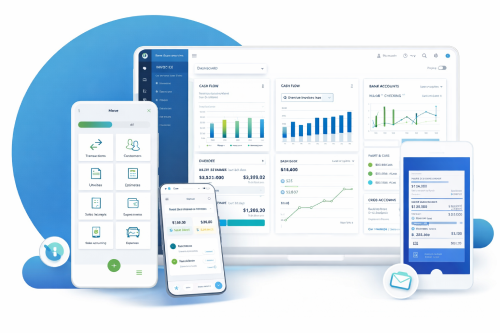
Useful features of QuickBooks Software
Running a small business means making dozens of financial decisions every week. Invoicing clients, tracking expenses, paying employees, and understanding whether the business is profitable often happen at the same time. This is where accounting software stops being optional and starts becoming essential.

QuickBooks Accounting Software is one of the most widely used tools for small business accounting. It promises to simplify bookkeeping, reduce manual work, and give business owners clarity over their finances. But what does QuickBooks do, and which functions matter the most in real-world business operations?

This article breaks down the five most useful QuickBooks functions, explains how they help small businesses, and shows where professional support can unlock even more value.

Contact GFPO today for free QuickBooks Setup Consultation

This guide walks through the five most useful functions of QuickBooks. Each one supports clean numbers, smooth bookkeeping, and better financial control.

What is QuickBooks Accounting Software?

QuickBooks is an accounting and bookkeeping platform developed to help businesses manage their day-to-day financial activities. It is available as cloud-based software, allowing business owners, accountants, and finance teams to access data securely from anywhere.

At its core, QuickBooks centralizes financial data. Instead of using spreadsheets, separate payroll tools, and disconnected banking apps, businesses can manage everything in one place. This reduces errors, saves time, and makes financial reporting far more reliable.

Key QuickBooks Functions at a Glance:

QuickBooks Function What It Helps With Business Benefit
Transaction Tracking Automatically records income and expenses Accurate, real-time bookkeeping
Invoicing & Billing Creates and sends professional invoices Faster payments and improved cash flow
Payroll Management Calculates wages, taxes, and deductions Reduced payroll errors and compliance risk
Financial Reporting Generates P&L, balance sheet, cash flow reports Clear business performance insights
Inventory Management Tracks stock levels and reorder points Avoids shortages and overstocking

Not sure which QuickBooks feature you actually need?

Global FPO – Accounting Advisory Services

Understanding 5 Useful Functions of QuickBooks

1. How Does QuickBooks Track Income and Expenses?

One of the most valuable functions of QuickBooks is automated transaction tracking. The software connects directly to business bank accounts and credit cards, importing transactions daily.

Each transaction can be categorized, reviewed, and reconciled. This ensures that income and expenses are recorded accurately and consistently throughout the month.

For small businesses, this function eliminates the need for manual data entry and reduces the risk of missed or duplicated transactions. Clean transaction tracking also forms the foundation for accurate reporting and tax preparation

Example: A business records a sale. The system updates income tables. If the same business logs an expense, QuickBooks bookkeeping displays the change instantly. This simple workflow helps owners understand spending and revenue trends.

2. How QuickBooks Simplifies Invoicing and Billing?

QuickBooks allows businesses to create professional invoices within minutes. Users can customize invoice templates, add payment terms, and automate recurring invoices for regular clients.

Payment reminders help reduce late payments, while integrated payment options allow customers to pay online. This shortens the payment cycle and improves cash flow without additional follow-up work.

For service-based businesses, this invoicing function alone can save several hours every month.

Type of Invoice

Purpose

Useful For

Standard Invoice

Regular billing

Service businesses

Recurring Invoice

Repeats automatically

Subscription models

Progress Invoice

Tracks parts of a
project

Contractors and
agencies

Note: QuickBooks also helps and provides support to users who wish to take guidance with invoice customization or delivery tracking.

Global FPO – Accounting Receivable and Billing Support

3. How Does QuickBooks Handle Payroll and Taxes?

Payroll is one of the most sensitive areas of small business accounting. QuickBooks payroll features help calculate wages, deductions, and applicable taxes based on employee data.

The system keeps payroll data linked to employee profiles. It also helps with tax forms, pay slips, and compliance tasks. For firms without a dedicated accounts team, this tool saves significant time.

Benefits for the Business:

  • Automated calculations
  • Direct bank deposits
  • Clear payroll reporting
  • Tax form assistance
  • Simple link to accounting software for small business
Companies also use this tool for attendance tracking and shift calculations. Payroll updates flow into your books instantly. This means your general ledger accounting stays accurate.

Payroll Setup and Compliance Support.

4. How QuickBooks Generates Financial Reports?

Reports show the health of your business. QuickBooks can produce many types of reports. These include balance sheets, profit and loss accounts, cash flow statements, and ageing reports for accounts receivable.

The software automatically generates key financial reports such as profit and loss statements, balance sheets, and cash flow reports. These reports update in real time as transactions are recorded. Business owners no longer need to wait until the end of the month to understand financial performance.

Common Reports you can generate

  • Sales summary
  • Vendor expense summary
  • Cash flow overview
  • Inventory status
  • Project cost reports
Key Reports and their use:
Report Purpose
Balance Sheet Shows assets and liabilities
Profit and Loss Shows revenue and expenses
Cash Flow Tracks inflow and outflow
Inventory Summary Shows stock movement

These reports help owners plan budgets and prepare for tax season. They also support external audits. Data from Intuit QuickBooks can be exported for advisors or for Global FPO analysts.

5. Inventory Management in QuickBooks

For product-based businesses, inventory management is one of the most useful QuickBooks functions. The software tracks stock levels, cost of goods sold, and inventory valuation.

This helps businesses avoid stock shortages, manage cash tied up in inventory, and maintain accurate margins. While not as advanced as enterprise systems, QuickBooks inventory tools are sufficient for many small and mid-sized businesses.

Inventory tools include:

  • Automatic stock updates
  • Product categorisation
  • Purchase order management
  • Vendor tracking
  • Sales channel syncing
Note: The software also displays the best-selling items. This guides your restock planning. It also supports demand forecasting. These features help owners link accounting, sales, and warehouse operations in one place.

Additional QuickBooks Features Worth Knowing

Bank Reconciliation

This feature keeps books accurate and reduces errors.

Tax Preparation

The software organizes numbers for filing and prepares tax summaries.

Integrations

QuickBooks ProAdvisor – level tools support many integrations. These include project systems, CRM tools, ecommerce platforms, and payment gateways.

Why Use QuickBooks for Businesses?

QuickBooks brings your entire business onto one platform. It supports tasks like accounting, bookkeeping, payroll, invoicing, and tax prep, all from one dashboard. The system scales as you grow, from QuickBooks Self Employed to QuickBooks Enterprise.

You also get access to trained QuickBooks ProAdvisor professionals who guide setup, cleanup, and optimization.

The result is simple: fewer errors, faster reporting, and a clearer view of your business numbers.

Choose QuickBooks to Strengthen Your Financial Systems:

QuickBooks supports daily work for busy business owners. It manages income, expenses, payroll, inventory, and reporting. Tools like QuickBooks Online, QuickBooks Payroll, and QuickBooks Payments help create a complete financial system.

Global FPO helps firms set up the right plan, understand QuickBooks pricing, and use the tools correctly. With expert support, businesses can save time, reduce errors, and maintain clean books throughout the year.

Free QuickBooks Assessment with Global FPO

FAQs

Ques 1: What are the main functions of QuickBooks?

Ans: QuickBooks helps businesses track income and expenses, create invoices, manage payroll, generate financial reports, and monitor inventory in one platform.

Ques 2: Is QuickBooks good for small businesses?

Ans: Yes. QuickBooks is designed for small and growing businesses that need organized bookkeeping, reliable reporting, and scalable accounting tools.

Ques 3: Can QuickBooks replace a bookkeeper?

Ans: No. QuickBooks is a tool. A bookkeeper ensures data accuracy, reconciles accounts, and prepares reliable financial reports using the software.

Ques 4: Does QuickBooks handle taxes?

Ans: QuickBooks supports tax preparation by organizing financial data and generating reports, but businesses still need professional tax filing support.

Ques 5: How much does QuickBooks cost?

Ans: QuickBooks pricing varies by plan and features. Costs increase when adding payroll, advanced reporting, or multiple users.

Ques 6: Is QuickBooks cloud-based?

Ans: Yes. QuickBooks Online allows secure access from any location with an internet connection.

Ques 7: Can QuickBooks manage inventory?

Ans: Yes. QuickBooks includes inventory tracking for product-based businesses, though it may not suit complex inventory needs.

Ques 8: Who should use QuickBooks with professional support?

Ans: Businesses with growing transaction volume, payroll, or compliance requirements benefit most from pairing QuickBooks with expert accounting support.

Final Thoughts: Making QuickBooks Work for Your Business

Ans: QuickBooks Accounting Software is more than a bookkeeping tool. When used correctly, it becomes the financial backbone of a business.

The five functions covered here – transaction tracking, invoicing, payroll, reporting, and inventory – address the most common financial challenges small businesses face.

With the right setup and expert support, QuickBooks helps businesses save time, reduce errors, and make confident financial decisions.

Get a Free QuickBooks Consultation with Global FPO
Get A Free Consultation with a QuickBooks Expert Today

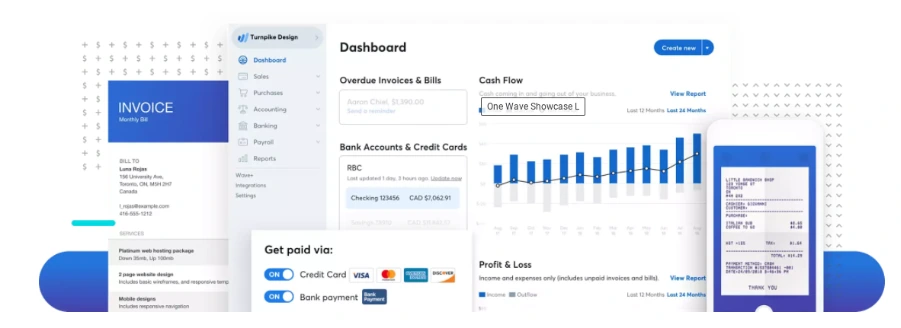
What are the Features and Benefits of Wave Accounting Software?

Features and Benefits of Wave Accounting Software

Managing finances is one of the least glamorous parts of running a small business, yet it is the backbone of everything else. From tracking income to staying compliant at tax time, the right accounting system can either simplify your operations or quietly create chaos.

Wave Accounting Software has become a popular choice among freelancers and small business owners looking for a low – cost way to manage their books. Its promise is simple: essential accounting tools with no monthly subscription fee.

But “Is Wave Accounting actually good for small businesses in 2026?” And where does it fit compared to paid platforms and professional bookkeeping support?

This guide breaks down the features, benefits, limitations, and ideal use cases of Wave Accounting Software, helping you decide whether it fits your business today – and tomorrow.

Article Summary:

  • Wave Accounting Software is a free, cloud-based accounting platform designed for freelancers and small businesses.
  • It offers invoicing, expense tracking, bank connections, and financial reporting without monthly subscription fees.
  • Wave is best suited for service – based businesses with simple financial needs and low transaction volume.
  • Optional paid services include payroll and online payment processing.
  • Wave lacks advanced features such as inventory management and deep third-party integrations.
  • Many businesses use Wave as a starter solution before transitioning to more robust accounting systems.
  • Global FPO supports businesses using Wave by providing professional bookkeeping, reporting, and accounting oversight.

What is Wave Accounting Software?

Wave Accounting Software is an online bookkeeping and accounting platform created primarily for freelancers, solopreneurs, and small businesses. Unlike most accounting tools, Wave offers its core features completely free.

The software focuses on essential accounting tasks rather than advanced financial management. Users can track income and expenses, send invoices, connect bank accounts, and generate basic financial reports from a single dashboard.

Wave operates entirely in the cloud, allowing business owners to access their financial data from anywhere without installing software.

Wave Accounting Software Features and Benefits

What Are the Key Features of Wave Accounting Software?

Wave is intentionally simple. Its feature set covers the fundamentals that small businesses need to stay organized and compliant.

Feature What It Does Best For
Invoicing Create, customize, and send professional invoices with payment links Freelancers and service-based businesses
Expense Tracking Automatically import and categorize expenses from connected accounts Small teams with recurring expenses
Bank Reconciliation Match bank transactions with recorded entries to ensure accuracy Businesses needing clean monthly books
Financial Reports Generate profit & loss, balance sheet, and cash flow reports Owners reviewing financial health
Receipt Capture Upload and attach receipts to expense transactions Businesses needing audit-ready records
Payroll (Paid Add-on) Process payroll and tax filings in supported regions Small businesses with employees

Invoicing and Payments:

Wave allows users to create and send professional invoices quickly. You can customize invoices with your branding, automate recurring invoices, and accept online payments through integrated payment processing.

This is especially useful for freelancers and service-based businesses that invoice clients regularly.

Global FPO often helps clients transition from spreadsheets into Wave in a single day. For small teams, this instant start is a huge advantage.

Expense Tracking

Users can manually record expenses or connect bank and credit card accounts to import transactions automatically. Expenses can be categorized, helping maintain clean and organized financial records.

Accurate expense tracking ensures reliable reporting and easier tax preparation.

Bank Reconciliation

Wave supports bank reconciliation by matching imported transactions with recorded entries. This helps identify missing or duplicate transactions and keeps books accurate.

Financial Reporting

Tracking expenses becomes a lot easier when everything sits in one place. You can upload receipts using your phone, match them against imported transactions, and tag them for tax purposes.

This helps with:

  • Audit – proof documentation
  • Faster tax season preparation
  • Better understanding of spending habits
  • Easier identification of unnecessary costs
For small teams or solo business owners, this feature keeps financial clutter under control.

Insights with Comprehensive Reporting Tools

Wave’s reports offer a complete picture of your business without needing an accountant to interpret basic numbers. You can monitor profitability, check what you owe, and review long-term trends.

This matters when:

  • Applying for loans
  • Planning Budgets
  • Pitching to Investors
  • Checking whether the business is profitable
  • Setting quarterly or annual goals
Many people researching What is Wave Pro discover that advanced reporting and payroll functions which are included in premium tiers, but the free reports are strong enough for most of the users.

Integration with Wave Apps for Enhanced Functionality

Wave integrates smoothly with its internal apps, and each add-on serves a clear purpose. Receipt scanning keeps documentation organized. Wave Payroll (available in select regions) helps automate compliance. Payment tools simplify collections.

For searches like wave project management, users typically want a tool that connects tasks with finances. Wave does not do that directly. However, its integrations with internal apps create a simple, unified financial workflow that avoids unnecessary complexity.

Tax Preparation Made Easy

Tax season becomes far less stressful when all your financial data is stored cleanly. Wave exports comprehensive reports in seconds. You can share them with your accountant or let Global FPO manage them on your behalf.

This helps with:

  • Expense deduction accuracy
  • Quarterly tax estimates
  • Income verification
  • GST or VAT preparation where applicable

For many small teams, Wave serves as the foundation on which proper tax compliance is built.


Global FPO makes taxation easy!!


Pricing Options for Different Business Needs

One of the biggest reasons people search is wave accounting free is the popularity of Wave’s free tier. It covers:

  • Invoicing
  • Payments
  • Expense tracking
  • Basic reporting
  • Bank imports

Businesses can purchase add-ons such as payroll or online payment processing if they want additional convenience. This flexible pricing structure makes the wave finance ecosystem accessible to businesses of all sizes.

Trusted Security Standards

Financial data needs to be protected, and Wave takes this seriously. It uses encryption, secure logins, and cloud-based storage with backups. You can also manage staff access by assigning permissions based on roles. For small organizations without IT teams, this provides peace of mind.

Ideal Users for Wave Software

Wave fits businesses that want essential accounting without complex tools. This includes:

  • Freelancers
  • Solo consultants
  • Micro businesses
  • Online service providers
  • Creative professionals
  • Independent contractors
  • Home-based entrepreneurs
Businesses with heavy inventory or multi-branch operations might need more advanced systems. Everyone else will find Wave more than enough.

Some Limitations to Note

Wave has purposefully kept its toolset simple. That means:

  •  No deep inventory tracking
  • Limited third-party integrations
  • Payroll restricted by geography
  • No full wave project management capabilities
  • No advanced asset tracking

Despite these limits, Wave solves the core bookkeeping needs for the vast majority of freelancers and small firms.

Focus on Growth with Wave Accounting Software

The less time you spend tracking receipts and reconciling expenses, the more time you have to grow your business. Accurate numbers help you make smarter decisions, pitch confidently, and stay organized.

With the wave accounting package in place, owners can focus on improving products, building relationships, and exploring new markets. Our team helps with:

If you want the confidence that your wave bookkeeping system is correct, we are here to guide you.


Book a free consultation with our Experts today.


FAQs

Question 1: What is included in the Wave Accounting package?

The wave accounting package includes invoicing, payments, expense tracking, receipts, reporting tools, and bank connections. It is structured for freelancers and small teams that want simple bookkeeping without complexity.

Question 2:How do I create a Wave account?

You can open a wave account in minutes. Sign up, verify your email, add your business details, and start tracking income or expenses. The setup flow is designed to be beginner-friendly.

Question 3:Does Wave offer payroll?

Yes, but payroll is available only in select regions. Users often upgrade when they search for what Wave Pro is because premium features include payroll and advanced support.

Want help in Payroll services? Contact GFPO today!

Question 4:Does Wave provide audit trails?

It offers transaction history but not a complete audit trail. If you need deep user-activity logs, you may require additional tools. But we at Global FPO do provide Audit trails for our clients, as we have a team of audit professionals. For a free consultation, you can contact us, and we will be happy to help you.

Question 5: Does Wave offer payroll?

Yes, but payroll is available only in select regions. Users often upgrade when they search for what Wave Pro is because premium features include payroll and advanced support, which is where we come in. We at Global FPO have experience in handling payroll issues and have helped more than 350+ clients in payroll handling.

10 Accounting Practices For The Growth Of Your Business!

Running a successful business is not just about generating revenue. It is about managing money wisely, tracking financial performance, and making decisions backed by accurate financial data. This is where strong accounting practices play a critical role.

Many growing businesses struggle because they overlook the importance of organized financial management. Poor record keeping, unclear cash flow visibility, and lack of financial planning often lead to missed opportunities or financial stress.

Adopting the right accounting practice can help businesses improve financial control, reduce risks, and create a solid foundation for long term growth. In this guide, we will explore the most effective accounting practices that can help your business scale sustainably.

Why Accounting Practices Matter for Business Growth

Strong accounting practices are more than just compliance requirements. They provide valuable insights into the financial health of your business.

When your financial data is accurate and organized, you can:

  • Track profitability with clarity

  • Manage operational costs effectively

  • Improve cash flow planning

  • Make informed business decisions

  • Stay compliant with tax regulations

Without structured accounting systems, businesses often operate blindly, making decisions based on assumptions rather than financial insights.

Now let’s explore the key accounting practices that can help your business grow.

10 Accounting Practices for the Growth of Your Business

1. Maintain Accurate Financial Records

Accurate record keeping is the foundation of every successful accounting practice.

Every transaction, whether income or expense, should be properly recorded and categorized. Organized records help businesses track financial performance and simplify audits or tax filings.

Key benefits include:

  • Better financial visibility

  • Easier tax preparation

  • Improved decision making

  • Reduced financial errors

Businesses that maintain accurate financial records can quickly identify opportunities for growth and areas that need improvement.

2. Separate Business and Personal Finances

One of the most common mistakes business owners make is mixing personal and business finances.

Separating accounts is an essential accounting practice that improves financial clarity and ensures accurate bookkeeping.

This means:

  • Maintaining a dedicated business bank account

  • Using separate credit cards for business expenses

  • Avoiding personal withdrawals from business accounts without documentation

This practice simplifies financial tracking and ensures that your financial reports accurately reflect business performance.

3. Implement a Reliable Accounting System

A strong accounting system helps businesses manage financial transactions efficiently.

Modern accounting software automates several financial processes such as invoicing, expense tracking, and financial reporting. This reduces manual errors and improves financial accuracy.

An effective accounting system helps businesses:

  • Track revenue and expenses

  • Monitor financial performance

  • Generate accurate financial reports

  • Manage payroll and taxes

Investing in the right accounting tools is a crucial step toward building a scalable financial infrastructure.

4. Monitor Cash Flow Regularly

Cash flow is the lifeline of any business.

Even profitable businesses can face financial challenges if they fail to manage cash flow properly. Monitoring cash inflows and outflows regularly ensures that your business always has enough liquidity to cover operational expenses.

Best practices include:

  • Tracking receivables and payables

  • Setting clear payment terms with clients

  • Maintaining a cash reserve for emergencies

  • Reviewing cash flow reports regularly

Strong cash flow management helps businesses stay financially stable and prepared for growth opportunities.

5. Reconcile Accounts Monthly

Account reconciliation is a critical accounting practice that ensures financial accuracy.

This process involves comparing internal financial records with bank statements to identify discrepancies.

Monthly reconciliation helps businesses:

  • Detect accounting errors early

  • Prevent fraud or unauthorized transactions

  • Maintain accurate financial statements

  • Improve financial transparency

Consistent reconciliation ensures that your financial data remains reliable and trustworthy.

6. Track Key Financial Metrics

Successful businesses monitor financial metrics that reflect performance and profitability.

Tracking key financial indicators allows businesses to evaluate growth and identify trends that influence strategic decisions.

Important financial metrics include:

  • Gross profit margin

  • Net profit margin

  • Operating expenses

  • Cash flow ratio

  • Accounts receivable turnover

Regularly reviewing these metrics helps business owners understand where their business stands financially.

7. Create a Budget and Financial Forecast

Financial planning is an essential accounting practice for business growth.

A well-structured budget helps businesses allocate resources efficiently, while forecasting helps anticipate future financial needs.

Benefits include:

  • Improved financial control

  • Better investment decisions

  • Reduced financial risks

  • Strategic growth planning

Forecasting allows businesses to prepare for expansion, seasonal fluctuations, and unexpected financial challenges.

8. Maintain Proper Tax Planning

Tax planning is often overlooked but plays a significant role in business profitability.

Proper tax planning ensures that businesses remain compliant while minimizing unnecessary tax liabilities.

Effective tax practices include:

  • Tracking deductible expenses

  • Maintaining proper documentation

  • Understanding tax obligations

  • Filing taxes accurately and on time

Working with experienced tax professionals helps businesses take advantage of available tax benefits while avoiding costly penalties.

9. Strengthen Internal Financial Controls

Internal financial controls help protect businesses from fraud, errors, and financial mismanagement.

This accounting practice involves establishing processes that ensure financial accountability and transparency.

Examples include:

  • Limiting access to financial records

  • Implementing approval systems for payments

  • Conducting regular financial audits

  • Separating financial responsibilities among team members

Strong financial controls reduce risks and ensure the integrity of your financial data.

10. Work With Professional Accounting Experts

As businesses grow, financial management becomes more complex.

Partnering with professional accountants ensures that your financial operations remain accurate, compliant, and optimized for growth.

Professional accounting services can help with:

Outsourcing accounting functions allows business owners to focus on strategic growth while experts manage financial processes.

How Outsourced Accounting Helps Businesses Scale Faster

Many growing companies are now choosing outsourced accounting services to improve efficiency and reduce operational costs.

Outsourced accounting provides businesses with access to experienced professionals, advanced tools, and scalable financial support without the overhead of hiring an in house team.

Key advantages include:

  • Cost effective financial management

  • Access to skilled accounting professionals

  • Improved financial reporting accuracy

  • Scalable support as your business grows

  • More time to focus on core operations

This approach allows businesses to build strong financial systems while maintaining operational flexibility.

Why Businesses Choose Global FPO for Accounting Services

Managing accounting operations internally can become overwhelming as businesses expand. This is where outsourcing to a trusted partner makes a difference.

Global FPO provides reliable accounting and bookkeeping outsourcing services designed to help businesses streamline financial operations and improve decision making.

Our services include:

  • Bookkeeping and financial reporting

  • Accounts payable and accounts receivable management

  • Tax preparation and compliance

  • Financial analysis and advisory

  • Cloud accounting solutions

With a team of experienced accounting professionals and advanced technology solutions, Global FPO helps businesses maintain accurate financial records while improving operational efficiency.

If you are looking to strengthen your accounting practice and support long term business growth, Global FPO can provide the expertise and support your business needs.

Frequently Asked Questions (FAQs)

1. What are accounting practices in business?

Accounting practices refer to the processes and methods used by businesses to record, track, and manage financial transactions. These practices ensure accurate financial reporting, compliance with regulations, and better financial decision making.

2. Why are accounting practices important for business growth?

Strong accounting practices help businesses maintain financial transparency, manage cash flow effectively, and make informed strategic decisions. They also reduce financial risks and ensure compliance with tax regulations.

3. What are the best accounting practices for small businesses?

Some of the most effective accounting practices include maintaining accurate records, separating business finances, monitoring cash flow, performing regular account reconciliation, and implementing strong financial controls.

4. How often should businesses review financial statements?

Businesses should review financial statements at least monthly. Regular reviews help identify trends, detect potential financial issues, and ensure accurate financial reporting.

5. What accounting software is best for small businesses?

Popular accounting software solutions include QuickBooks, Xero, and FreshBooks. These platforms help automate bookkeeping, invoicing, expense tracking, and financial reporting.

6. What is the difference between bookkeeping and accounting?

Bookkeeping focuses on recording daily financial transactions, while accounting involves analyzing financial data, preparing reports, and providing strategic financial insights.

7. Can outsourced accounting services help small businesses?

Yes. Outsourced accounting services help small businesses access professional expertise, improve financial accuracy, reduce operational costs, and focus more on core business activities.

8. How can Global FPO help improve business accounting?

Global FPO offers comprehensive accounting outsourcing services, including bookkeeping, tax consulting, financial reporting, and advisory support. Our team ensures accurate financial management while helping businesses improve efficiency and scalability.

Basic Accounting Terms Every Business Owners Should Know

Are you the one who hired a professional firm or an online accounting service to do your taxes? Are you also the one who always thought about dedicating a little time to understanding how your accountant is handling your business finances? Then you must have faced the problem of going through complicated terms while checking your tax return filed by your accountant and wondered what it is all about. But then again, to save time and avoid those research hassles, you left the same overlooked. After all, this is one of the main reasons you hire a professional to do it for you.

Or maybe some another scenario. Have you ever felt left out, when people around you start talking about how they do their taxes and how they save money and get refund benefits from the IRS? Most probably because you are on a payroll and you only know the total amount deducted from your salary in the name of taxes but not the science behind the terms mentioned with them. Well, not anymore!

We have compiled the 42 basic terms that every business owner should know for a smooth accounting process and financial consultation.

Also Read: What is the Role of Accounting Software for Companies

We are starting with the basic terms used while preparing or concerning a balance sheet;

1. Accounts Payable (AP)

Accounts Payable combines all of the expenses that a business has incurred but has not yet paid. This account is recorded as a liability on the Balance Sheet as it is a debt owed by the company.

2. Accounts Receivable (AR)

Accounts Receivable include all of the revenue (sales) that a company has provided but has not yet collected payment on. This account is on the Balance Sheet, recorded as an asset that will likely convert to cash in the short term.

3. Accrued Expense

An expense that has been incurred but hasn’t been paid is described by the term Accrued Expense.

4. Asset (A)

Anything the company owns that has monetary value. These are listed in order of liquidity, from cash (the most liquid) to land (the least liquid).

5. Balance Sheet (BS)

A financial statement that reports on all of a company’s assets, liabilities, and equity. As suggested by its name, a balance sheet abides by the equation.

6. Book Value (BV)

As an asset is depreciated, it loses value. The Book Value shows the original value of an asset, less any accumulated Depreciation.

7. Equity (E)

Equity denotes the value left over after liabilities have been removed. Recall the equation Assets = Liabilities + Equity. If you take your Assets and subtract your Liabilities, you are left with Equity, which is the portion of the company that is owned by the investors and owners.

8. Inventory

Inventory is the term used to classify the assets that a company has purchased to sell to its customers that remain unsold. As these items are sold to customers, the inventory account will be lower.

9. Liability (L)

All debts that a company has yet to pay are referred to as Liabilities. Common liabilities include Accounts Payable, Payroll, and Loans.

Income Statement Terms

The Income Statement or Profit and Loss Statement is one of the most common financial statements after a balance sheet. These are the most common basic accounting terms used in this reporting tool.

10. Cost of Goods Sold (COGS)

The cost of Goods Sold is the expenses that directly relate to the creation of a product or service. Not included in this category are those costs that are needed to run the business. An example of COGS would be the cost of Materials, or the Direct Labor to provide a service.

11. Depreciation (Dep)

Depreciation is the term that accounts for the loss of value in an asset over time. Generally, an asset has to have substantial value to warrant depreciating it. Common assets to be depreciated are automobiles and equipment. Depreciation appears on the Income Statement as an expense and is often categorized as a “Non-Cash Expense” since it doesn’t have a direct impact on a company’s cash position.

Also Read: Accounting Firms and CPAs Outsource Bookkeeping Services

12. Expense (Cost)

An Expense is any cost incurred by the business.

13. Gross Margin (GM)

Gross Margin is a percentage calculated by taking Gross Profit and dividing by Revenue for the same period. It represents the profitability of a company after deducting the Cost of Goods Sold.

14. Gross Profit (GP)

Gross Profit indicates the profitability of a company in dollars, without taking overhead expenses into account. It is calculated by subtracting the Cost of Goods Sold from Revenue for the same period.

15. Income Statement (Profit and Loss) (IS or P&L)

The Income Statement is the financial statement that shows the revenues, expenses, and profits over a given period. Revenue earned is shown at the top of the report and various costs (expenses) are subtracted from it until all costs are accounted for; the result being Net Income.

16. Net Income (NI)

Net Income is the dollar amount that is earned in profits. It is calculated by taking Revenue and subtracting all of the Expenses in a given period, including COGS, Overhead, Depreciation, and Taxes.

17. Net Margin

Net Margin is the percentage amount that illustrates the profit of a company concerning its Revenue. It is calculated by taking Net Income and dividing it by Revenue for a given period.

18. Revenue (Sales) (Rev)

Revenue is any money earned by the business.

General Terms

These are basic accounting terms that don’t pertain to a particular financial statement. That is why here’s the category as ‘General’ because you know it’s all GK.

19. Accounting Period

An Accounting Period is designated in all Financial Statements (Income Statement, Balance Sheet, and Statement of Cash Flows). The period communicates the time that is reported in the statements.

20. Allocation

The term Allocation describes the procedure of assigning funds to various accounts or periods.

21. Business (or Legal) Entity

This is the legal structure, or type, of a business. Common company formations include Sole Proprietor, Partnership, Limited Liability Corp (LLC), S-Corp and C-Corp. Each entity has a unique set of requirements, laws, and tax implications.

22. Cash Flow (CF)

Cash Flow is the term that describes the inflow and outflow of cash in a business. The Net Cash Flow for a period is found by taking the Beginning Cash Balance and subtracting the Ending Cash Balance. A positive number indicates that more cash flowed into the business than out, whereas a negative number indicates the opposite.

23. Certified Public Accountant (CPA)

CPA is a professional designation that an accountant can earn by passing the CPA exam and fulfilling the requirements for both education and work experience, which vary by state.

24. Credit

A credit is an increase in a liability or equity account or a decrease in an asset or expense account.

25. Debit

A debit is an increase in an asset or expense account or a decrease in a liability or equity account.

26. Diversification

Diversification is a method of reducing risk. The goal is to allocate capital across a multitude of assets so that the performance of any one asset doesn’t dictate the performance of the total.

27. Enrolled Agent (EA)

An Enrolled Agent is a professional accounting designation assigned to professionals who have successfully passed tests showcasing expertise in business and personal taxes. Enrolled Agents are generally sought out to complete business tax filings to ensure compliance with the IRS.

28. Fixed Cost (FC)

A Fixed Cost is something that does not change with the volume of sales. For example, rent and salaries won’t change if a company sells more. The opposite of a Fixed Cost is a Variable Cost.

29. General Ledger (GL)

A General Ledger is the complete record of a company’s financial transactions. The GL is used to prepare all of the Financial Statements.

30. Generally Accepted Accounting Principles (GAAP)

These are the rules that all accountants abide by when performing the act of accounting services. These general rules were established so that it is easier to compare ‘apples to apples when looking at a business’s financial reports.

31. Interest

Interest is the amount paid on a loan or line of credit that exceeds the repayment of the principal balance.

32. Journal Entry (JE)

Journal Entries are how updates and changes are made to a company’s books. Every Journal Entry must consist of a unique identifier (to record the entry), a date, a debit/credit, an amount, and an account code (that determines which account is altered).

33. Liquidity

A term referencing how quickly something can be converted into cash. For example, stocks are more liquid than a house since you can sell stocks (turning them into cash) more quickly than real estate.

34. Material

Material is the term that refers to whether information influences decisions. For example, if a company has revenue in the millions of dollars, an amount of $0.50 is hardly material. GAAP requires that all Material considerations must be disclosed.

35. On Credit/On Account

A purchase that happens On Credit or Account is a purchase that will be paid at a future time, but the buyer gets to enjoy the benefit of that purchase immediately. “Bartender put it on my tab…”

36. Overhead

Overhead are those Expenses that relate to running the business. They do not include Expenses that make the product or deliver the service. For example, Overhead often includes Rent and Executive Salaries.

37. Payroll

Payroll is the account that shows payments to employee salaries, wages, bonuses, and deductions. Often this will appear on the Balance Sheet as a Liability that the company owes if there is accrued vacation pay or any unpaid wages.

38. Present Value (PV)

Present Value is a term that refers to the value of an Asset today, as opposed to a different point in time. It is based on the theory that cash today is more valuable than cash tomorrow, due to the concept of inflation.

39. Receipts

A Receipt is a document that proves payment was made. A business produces receipts when it provides its product or service and it receives receipts when it pays for goods and services from other businesses. Received Receipts should be saved and cataloged so that a company can prove that its incurred expenses are accurate.

40. Return on Investment (ROI)

Originally, this term referred to the profit that a company was making (Return), divided by the Investment required. Today, the term is used more loosely to include returns on various projects and objectives. For example, if a company spent $1,000 on marketing, which produced $2,000 in profit, the company could state that its ROI on marketing spend is 50%.

41. Trial Balance (TB)

Trial Balance is a listing of all accounts in General Ledger with their balance amount (either debit or credit). The total debits must equal the total credits, hence the balance.

42. Variable Cost (VC)

These are costs that change with the volume of sales and are the opposite of Fixed Costs. Variable costs increase with more sales because they are an expense that is incurred to deliver the sale. For example, if a company produces a product and sells more of that product, it will require more raw materials to meet the increase in demand.

Also Read This:- Top 3 Golden Rules of Accounting

About Global FPO:

Global FPO(www.globalfpo.com) is an Outsourcing Accounting firm consistently recognized for its exceptional outcomes and strong work culture, with 500+ happy and satisfied clients across. They provide everything from straightforward tax return work, or basic bookkeeping, to advanced & complex Financial Statements to CPAs & Accounting Firms implementing best industry practices & values. Their Accounting solutions are comprehensive, customized to a unique business operating model, and use “best-of-breed” technology under a strong two-tier reviewing mechanism ensuring the minimum risk of error.

Global FPO is a professional outsourcing and consulting organization offering services across the globe including the USA, Canada, UK, Europe, Australia, New Zealand, Japan, Dubai, and the Far East. GFPO experts provide services at competitive prices to our clients in the areas of:

  1. Bookkeeping & Controller level services
  2. Tax Filing,
  3. Payroll processing
  4. Accounting Advisory and GAAP Reporting
  5. Audit and Transformation consulting

To explore more on global FPO and its online Accounting/ Bookkeeping services,Tax Return Preparation, Financial Statements, Accounting Advisory, Payroll Processing, and related Business Services contact us at:

Phone (USA): +1 (832) 426-2521, +1 (347) 781 5928

Email:contact@globalfpo.com